
Advancement Waypoints
Add waypoints into the advancements screen and navigate to them.
Screenshots
About this Mod
=====RU=====
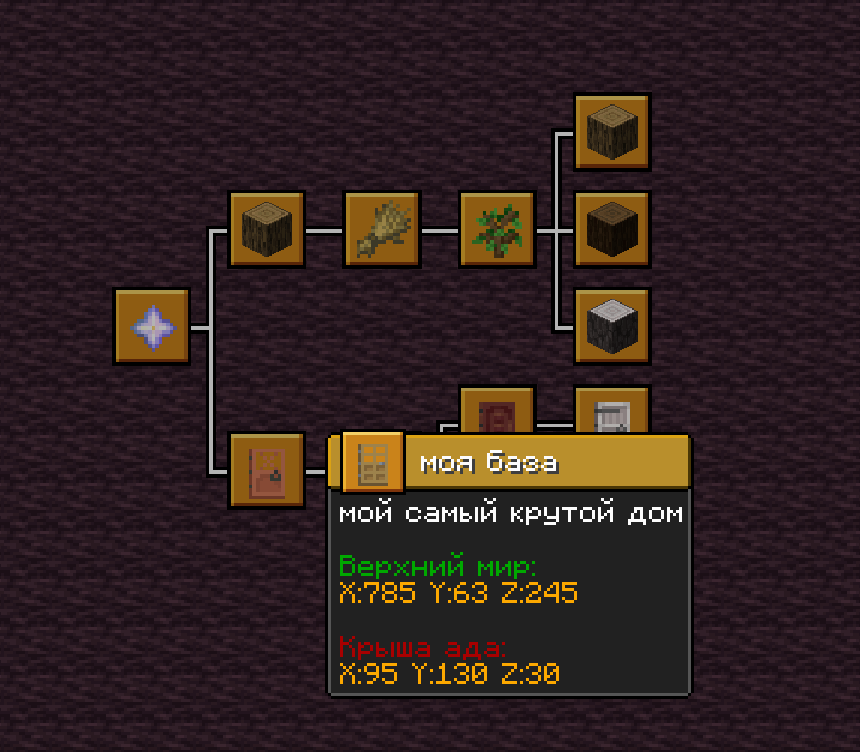
Advancement Waypoints — мод, встраивающий систему вэйпоинтов в стандартный экран достижений. Метки отображаются как обычные узлы в меню достижений, сохраняя ванильную эстетику.
Основные возможности
Управление вэйпоинтами
- Создание вэйпоинтов через GUI с настройкой названия, описания и иконки из любого предмета
- Поддержка нескольких координат/измерений в одной метке одновременно
- Редактирование и удаление ранее созданных точек
- Привязка меток к любым родительским узлам, включая ванильные и серверные вкладки достижений(пока нестабильно)
Навигация
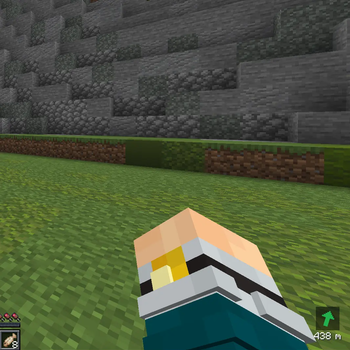
- Компас на HUD, показывающий направление к цели
- Активация навигации кликом ЛКМ по вэйпоинту в экране достижений
- Телепортация к точке по клику ПКМ по вэйпоинту
- Автоматический выбор ближайшей координаты из нескольких записанных в метку
- Команда /navigate для быстрой навигации без создания постоянного вэйпоинта
Совместимость
- Совместим с Better Advancements. Другие моды на изменение экрана достижений используйте на свой риск. При обнаружении ошибок можете написать мне.
- Поддерживается навигация по вэйпоинтам, добавленным сервером Pepeland
Контакты
По всем вопросам, найденным ошибкам и предложениям можете писать мне в discord/telegram.
=====EN=====
Advancement Waypoints is a mod that integrates a waypoint system into the standard advancements screen. Waypoints appear as regular nodes in the advancements menu, maintaining vanilla aesthetics.
Key Features
Waypoint Management
- Create waypoints via GUI with customizable title, description, and icon from any item
- Support for multiple coordinates/dimensions in a single waypoint
- Edit and delete previously created waypoints
- Attach waypoints to any parent node, including vanilla and server advancement tabs(unstable)
Navigation
- HUD compass showing direction to the target
- Activate navigation by left-clicking a waypoint in the advancements screen
- Teleport to a waypoint by right-clicking it
- Automatic selection of the nearest coordinate from multiple saved in the waypoint
- /navigate command for quick navigation without creating a permanent waypoint
Compatibility
- Compatible with Better Advancements. Use other advancements screen modification mods at your own risk. Feel free to report any issues you find.
Contacts
For any questions, bug reports, or suggestions, feel free to contact me on discord/telegram.
Available Versions
How to Install Advancement Waypoints on Your Server
Order Server
Order a Minecraft Java server with at least 3 GB RAM (4 GB recommended).
Set fabric Loader
In the panel under "Egg", select the fabric loader and matching Minecraft version (1.21.8).
Install Mod
Open the mod browser in the dashboard and search for "Advancement Waypoints". Click "Install" – done! Alternatively, upload the .jar via SFTP to the /mods folder.
Compatibility
Mod Loaders
Minecraft Versions
1.21.8
Server-side
✗ UnsupportedRecommended RAM
4 GB(min. 3 GB)Frequently Asked Questions
Advancement Waypoints server crashes on startup – what to do?
Most common cause: wrong fabric version or insufficient RAM. Check the server log (latest.log) for "OutOfMemoryError" or "Mixin" errors. With Mado Hosting: ensure at least 3 GB RAM is allocated and the loader matches the mod version (1.21.8). You can switch loaders with one click in the panel.
Is Advancement Waypoints compatible with fabric?
Advancement Waypoints officially supports fabric for Minecraft 1.21.8. The Mado dashboard automatically detects incompatible loader combinations.
Server lagging with Advancement Waypoints – how to optimize performance?
Recommended RAM: 4 GB (per 8 players). Use /spark profiler to check if Advancement Waypoints consumes the most tick time. Common fixes: reduce server view-distance to 8-10, install "performant" or "starlight" as supplementary mods on Forge. With Mado Hosting, your server runs on NVMe SSDs with dedicated CPU cores for minimal latency.
Similar Mods




![[ETF] Entity Texture Features](https://cdn.modrinth.com/data/BVzZfTc1/af683d206d50b05258d865b0d6e4aa2f2cee12f2_96.webp)
![[EMF] Entity Model Features](https://cdn.modrinth.com/data/4I1XuqiY/6e5bbd0d06b1741bfdab6c0cfab6de8fdaf0064c_96.webp)
Rent Modded Server
Install Advancement Waypoints with just one click on your server.