
Advancements Tracker
Advancements Tracker is a Minecraft Forge Client Mod that simplifies the process of tracking and achieving advancements through an intuitive overlay with sorting and filtering options.
Screenshots
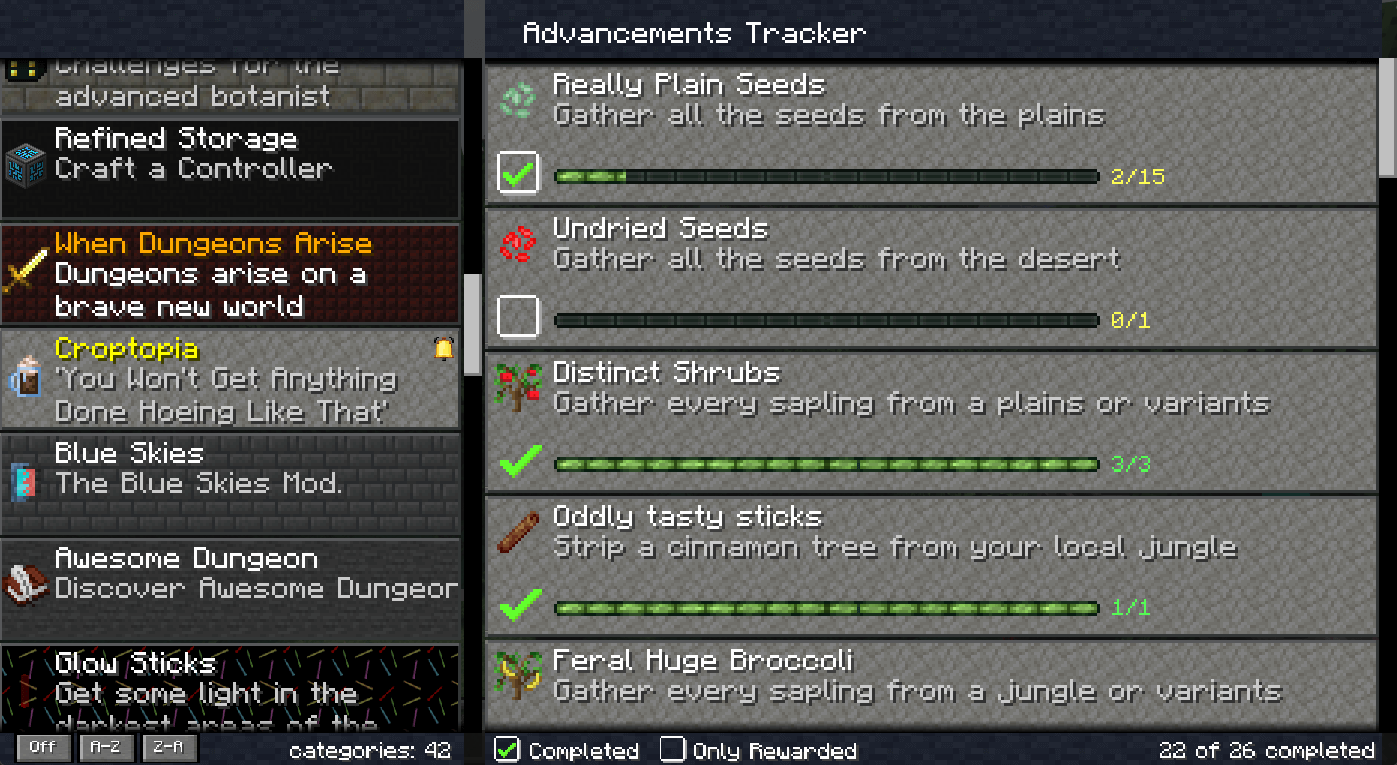
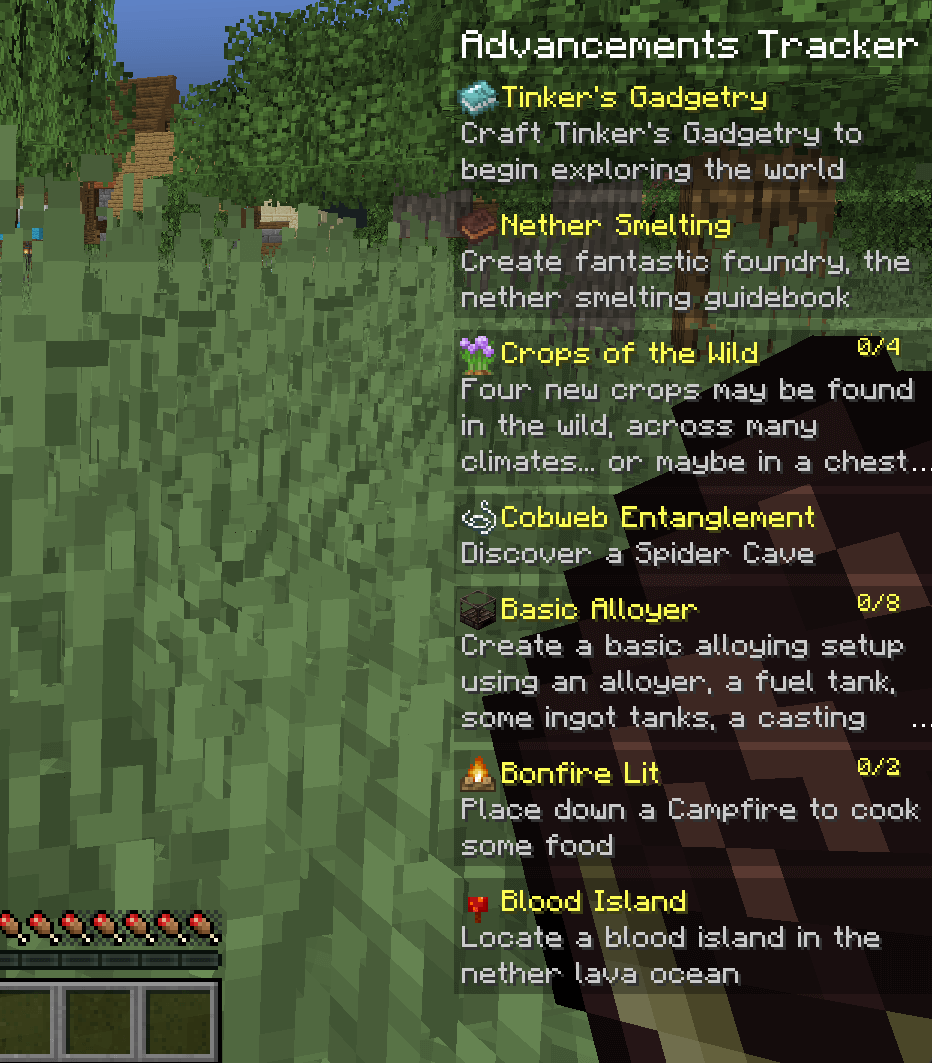
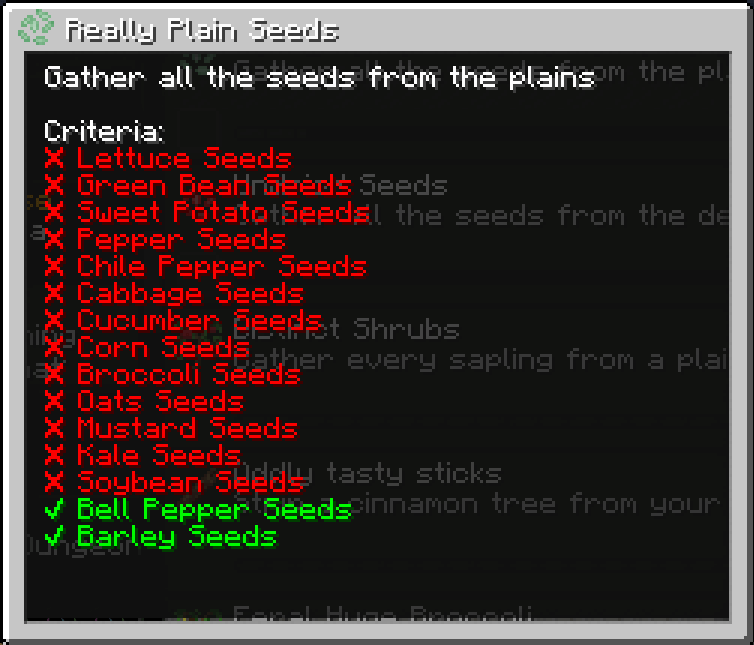
About this Mod
Advancements Tracker and Overview


Advancements Tracker is a powerful Minecraft Forge Client Mod that enhances your gaming experience by providing you with an intuitive overlay. This overlay enables you to easily track your progress towards completing your selected advancements, making the process smoother and more enjoyable.
With Advancements Tracker, you can also access advanced sorting and filtering options, allowing you to gain a better overview of your advancements. This feature helps you identify which advancements to prioritize and which ones require more effort, making the overall gameplay experience more rewarding and meaningful.
Say goodbye to the frustration of trying to keep track of your advancements on your own. With Advancements Tracker, you'll have all the information you need at your fingertips, making achieving your Minecraft goals a breeze.
Note: For Fabric please take a look at Advancement Info which offers similar functionality.

Example Video by PwrDown
🚀Features
- Client side only, but works with multiplayer servers.
- List Overview of advancements with sorting and filter.
- Displaying of completed and missing criteria to make it easier to complete an advancement.
- Easy way to track specific advancements and their process.
- Most criteria will be translated to more meaningful names.
📜Advancements Overview
The overview could be open with CTRL + L and displays all current advancements and allow the tracking of single advancements.
🔎 Advancement Details
By clicking on the advancements inside the overview you will see the details about the completed and missing criteria and a list of rewards, if any.
🎯Advancements Widget
The widget could be show/hide with ALT + L and displays the currently tracked advancements and their progress.
💾Storing tracked advancements
The tracked advancements are stored directly in the client settings file and could be easily adjusted.
They are stored per server, so you can have different tracked advancements for each single server.
Local games (single-player) however sharing the same tracked advancements.
🌐 Criteria Translation Support
This mods adds support for criteria translation instead of having cryptic requirements like 1, 2, 3.
The translated text is added over language files and you will see a corresponding message in the client log for untranslated advancements like:Unable to translate summoned (advancement.minecraft.nether.summon_wither.summoned) to a more meaningful name.
Example en_us.json entry for the former line:"advancement.minecraft.nether.summon_wither.summoned": "Summon a Wither",
You can add the translation directly into your mods, mod packs or in this mod over a PR.
🗄️Setting file
The setting file allows you to disable / enable the overview or widget screen.
You could also adjust the position and size of the widget overlay.
🧳Mod pack Support
You could define tracked advancements over the settings file which should be displayed by default in a specific order.
This is helpful for mod packs so that the user gets first an tutorial advancement / tasks and later other pre-defined tasks.
If you are defining a pre-defined order you could disable the overview screen to make sure that the user is not un-tracking them by mistake.
🙋FAQ
Is this a server side / client side mod❓
Its a pure client side mode, but will not harm if it is installed on the server.
Does it work with data packs❓
If the data pack is not using a custom advancement system it should work out of the box.
I recommending the Expanded Advancement and Recipe Pack data pack which adds a plenty of advancements and recipes.
Available Versions
How to Install Advancements Tracker on Your Server
Order Server
Order a Minecraft Java server with at least 3 GB RAM (4 GB recommended).
Set forge Loader
In the panel under "Egg", select the forge loader and matching Minecraft version (1.20.1).
Install Mod
Open the mod browser in the dashboard and search for "Advancements Tracker". Click "Install" – done! Alternatively, upload the .jar via SFTP to the /mods folder.
Compatibility
Mod Loaders
Minecraft Versions
1.20.1, 1.20, 1.19.4 (+6 more)
Server-side
✗ UnsupportedRecommended RAM
4 GB(min. 3 GB)Frequently Asked Questions
Advancements Tracker server crashes on startup – what to do?
Most common cause: wrong forge version or insufficient RAM. Check the server log (latest.log) for "OutOfMemoryError" or "Mixin" errors. With Mado Hosting: ensure at least 3 GB RAM is allocated and the loader matches the mod version (1.20.1). You can switch loaders with one click in the panel.
Is Advancements Tracker compatible with forge and neoforge?
Advancements Tracker officially supports forge, neoforge for Minecraft 1.20.1, 1.20, 1.19.4. The Mado dashboard automatically detects incompatible loader combinations.
Server lagging with Advancements Tracker – how to optimize performance?
Recommended RAM: 4 GB (per 8 players). Use /spark profiler to check if Advancements Tracker consumes the most tick time. Common fixes: reduce server view-distance to 8-10, install "performant" or "starlight" as supplementary mods on Forge. With Mado Hosting, your server runs on NVMe SSDs with dedicated CPU cores for minimal latency.
Similar Mods




![[ETF] Entity Texture Features](https://cdn.modrinth.com/data/BVzZfTc1/af683d206d50b05258d865b0d6e4aa2f2cee12f2_96.webp)
![[EMF] Entity Model Features](https://cdn.modrinth.com/data/4I1XuqiY/6e5bbd0d06b1741bfdab6c0cfab6de8fdaf0064c_96.webp)
Rent Modded Server
Install Advancements Tracker with just one click on your server.