
Aero-Reformation
Added a SubLevel-adapted chunk loader for Aeronautics, several useful changes, and new blocks, such as a chair that outputs redstone signals based on the player's view angle.
Screenshots
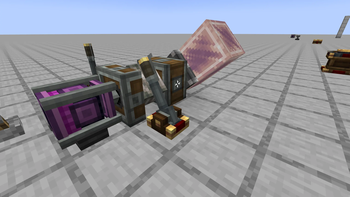
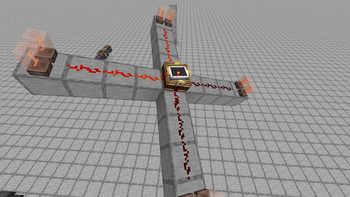
About this Mod
This mod adds new features and blocks for Aeronautics.
Right-click a Navigation Table or Gimbal Sensor with a Redstone Torch to invert their output for more precise control.
Right-click a Mechanical Bearing to set it to bidirectional mode, allowing both input directions to provide rotation.
Right-click a Mechanical Bearing with an Iron Ingot to increase its stiffness and prevent block offset.
Levitite can be harvested with a Silk Touch Golden Pickaxe.
SubLevel-adapted chunk loader that also marks your SubLevel on Xaero's map.
The Ender Compass syncs its position to other Ender Compasses on the same frequency.
The Direction Synchronizer outputs different redstone signals based on its facing direction.
The Sensor Agency integrates all four sensor types, making flight control more compact.
A HUD overlay is included — while wearing Goggles, right-click any sensor with an empty hand to display its data on screen.
Available Versions
How to Install Aero-Reformation on Your Server
Order Server
Order a Minecraft Java server with at least 3 GB RAM (4 GB recommended).
Set neoforge Loader
In the panel under "Egg", select the neoforge loader and matching Minecraft version (1.21.1).
Install Mod
Open the mod browser in the dashboard and search for "Aero-Reformation". Click "Install" – done! Alternatively, upload the .jar via SFTP to the /mods folder.
Compatibility
Mod Loaders
Minecraft Versions
1.21.1
Server-side
✓ RequiredRecommended RAM
4 GB(min. 3 GB)Frequently Asked Questions
Aero-Reformation server crashes on startup – what to do?
Most common cause: wrong neoforge version or insufficient RAM. Check the server log (latest.log) for "OutOfMemoryError" or "Mixin" errors. With Mado Hosting: ensure at least 3 GB RAM is allocated and the loader matches the mod version (1.21.1). You can switch loaders with one click in the panel.
Is Aero-Reformation compatible with neoforge?
Aero-Reformation officially supports neoforge for Minecraft 1.21.1. The Mado dashboard automatically detects incompatible loader combinations.
Server lagging with Aero-Reformation – how to optimize performance?
Recommended RAM: 4 GB (per 8 players). Use /spark profiler to check if Aero-Reformation consumes the most tick time. Common fixes: reduce server view-distance to 8-10, install "performant" or "starlight" as supplementary mods on Forge. With Mado Hosting, your server runs on NVMe SSDs with dedicated CPU cores for minimal latency.
Similar Mods




Rent Modded Server
Install Aero-Reformation with just one click on your server.
Details
- License
- Creative Commons Attribution Non Commercial 4.0 International
- Server-side
- Required