
Aetheria's Skyblock Mod
A feature-rich Quality of Life mod for Fakepixel Skyblock, made from scratch and formerly known as Just Enough Fakepixel (JEF).
Screenshots
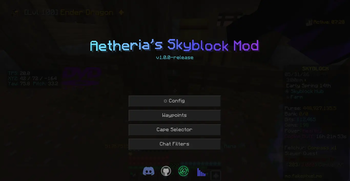
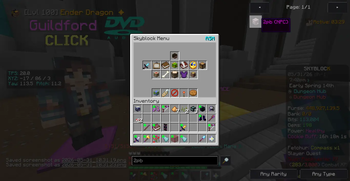
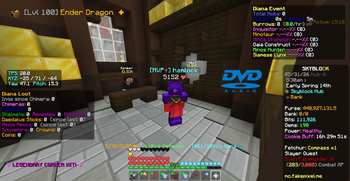

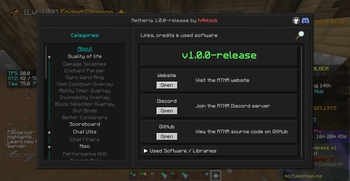
About this Mod
Aetheria's Skyblock Mod
A feature-rich Quality of Life mod for Fakepixel Skyblock, made from scratch and formerly known as Just Enough Fakepixel (JEF).





Download Aetheria's Skyblock Mod from your preferred platform:


Features
Aetheria is a feature-rich Quality-of-Life mod for Fakepixel Skyblock, which includes but is not limited to:
- Storage Overlay -- manage your inventories with a custom overlay, with multiple themes and jump-to-active support
- Item List & Recipe Viewer -- browse every SkyBlock item and view crafting recipes in-game
- Custom Scoreboard -- fully configurable sidebar with custom lines, colors, ordering, and drag-to-reorder
- Diana Tracking -- tracks burrows, playtime, mob rates, and loot with live HUD overlays
- Dungeon Tools -- run timers, end-of-run stats, boss highlights, blood mob highlight, and a CS:GO-style chest opening animation
- Chat Tools -- filters, compacting, timestamps, chat heads, copy, and animated messages
- Mining Overlays -- powder tracker, pristine tracker, Fetchur overlay, commission highlights, and Pickobulus preview
- Fishing -- trophy fish tracker and fishing timer
- Farming -- mouse lock and BPS overlay
- Waypoints -- ordered waypoints with auto-advance and a GUI manager
- Profile Viewer --
/pv [username]to view SkyBlock stats in-game via SkyAtlas - Capes -- equip and display custom capes visible to other Aetheria users
- And much more -- enchant parser, slot binds, item cooldowns, party commands, sign calculator, and dozens of other QoL improvements
A full list of features can be found here.
Contributing to the project
A full comprehensive guide for contribution and compiling the mod yourself can be found here.
IMPORTANT
Aetheria shows a privacy notice on first launch before making any external connections. Analytics are fully optional and can be disabled anytime.
Privacy & License
The mod is source-available under the Aetheria Mod License v1.0 (AML-1.0).
For full details on data collection, third-party infrastructure, and what the license means for you, see ABOUT.md.
✨ Credits
This project would not be where it is today without the help of these amazing people.
Contributors and Maintainers
Discord Maintainer
You can find credits and project information for Aetheria here: aetheria-org.github.io
Available Versions
How to Install Aetheria's Skyblock Mod on Your Server
Order Server
Order a Minecraft Java server with at least 3 GB RAM (4 GB recommended).
Set forge Loader
In the panel under "Egg", select the forge loader and matching Minecraft version (1.8.9).
Install Mod
Open the mod browser in the dashboard and search for "Aetheria's Skyblock Mod". Click "Install" – done! Alternatively, upload the .jar via SFTP to the /mods folder.
Compatibility
Mod Loaders
Minecraft Versions
1.8.9
Server-side
✗ UnsupportedRecommended RAM
4 GB(min. 3 GB)Frequently Asked Questions
Aetheria's Skyblock Mod server crashes on startup – what to do?
Most common cause: wrong forge version or insufficient RAM. Check the server log (latest.log) for "OutOfMemoryError" or "Mixin" errors. With Mado Hosting: ensure at least 3 GB RAM is allocated and the loader matches the mod version (1.8.9). You can switch loaders with one click in the panel.
Is Aetheria's Skyblock Mod compatible with forge?
Aetheria's Skyblock Mod officially supports forge for Minecraft 1.8.9. The Mado dashboard automatically detects incompatible loader combinations.
Server lagging with Aetheria's Skyblock Mod – how to optimize performance?
Recommended RAM: 4 GB (per 8 players). Use /spark profiler to check if Aetheria's Skyblock Mod consumes the most tick time. Common fixes: reduce server view-distance to 8-10, install "performant" or "starlight" as supplementary mods on Forge. With Mado Hosting, your server runs on NVMe SSDs with dedicated CPU cores for minimal latency.
Similar Mods




![[ETF] Entity Texture Features](https://cdn.modrinth.com/data/BVzZfTc1/af683d206d50b05258d865b0d6e4aa2f2cee12f2_96.webp)
![[EMF] Entity Model Features](https://cdn.modrinth.com/data/4I1XuqiY/6e5bbd0d06b1741bfdab6c0cfab6de8fdaf0064c_96.webp)
Rent Modded Server
Install Aetheria's Skyblock Mod with just one click on your server.