Aethersteel
Better than netherite
Screenshots

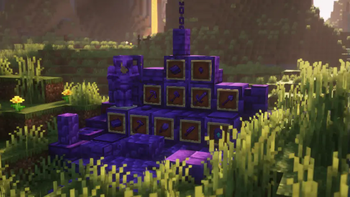
About this Mod
Welcome To Aethersteel!
- This mod adds new ingot called Aethersteel which is two times stronger than Netherite.
- To create an Aethersteel Ingot, find Aethersteel Debris within y-44 to y-64 (it can be found on the patches of Aetherslate), then smelt Aethersteel Debris, and craft it using 4 Aethersteel Scrap and 4 Netherite Ingot.
- Aethersteel Upgrade Template can be obtained by mining Suspicious Aetherslate, there will be a chance that it will drop.
- To upgrade to Aethersteel, put an Aethersteel Upgrade Template, a Netherite tool and Aethersteel Ingot on the Smithing Table.
- Armor trims can be used on the Aethersteel armor.
Items
- Aethersteel Ingot
- Aethersteel Nugget
- Aethersteel Scrap
- Aethersteel Upgrade Template
Tools
- Aethersteel Armor
- Aethersteel Axe
- Aethersteel Hoe
- Aethersteel Knife (Needs Farmer's Delight to craft)
- Aethersteel Pickaxe
- Aethersteel Shears
- Aethersteel Shovel
- Aethersteel Sword
Blocks
- Aetherslate
- Aetherslate Bricks (With slab, stair, and wall variant and cracked)
- Aetherslate Tiles (With slab, stair, and wall variant and cracked)
- Aethersteel Block (With slab and stair variant)
- Aethersteel Bookshelf (Needs Iron Bookshelves to craft)
- Aethersteel Chain
- Aethersteel Debris
- Aethersteel Door and trapdoor
- Cobbled Aetherslate (Comes with a slab, stair, and wall variant)
- Polished Aetherslate (Comes with a slab, stair, and wall variant)
- Suspicious Aetherslate (Drops several items when mined)
To see the recipes use JEI or REI
Compatible Mods
Farmer's Delight and Iron Bookshelves
FAQs
Can I make a modpack with this mod?
Yes, you are allowed to use this mod on your modpacks.
Can make an addon for this mod?
Yes, you are allowed to make an addon for this mod.
Can I upload this mod to other websites?
No, you are not allowed to upload this mod on other websites, you are only allowed to put the link of this mod (from Modrinth or CurseForge) to other websites.
Supported Minecraft versions and mod loaders
| Minecraft | Forge | NeoForge | Maintained? |
|---|---|---|---|
| 1.21.4 | ❌ | ✅ | Yes |
| 1.21.1 | ❌ | ✅ | Yes |
| 1.20.1 | ✅ | ❌ | No |
| 1.19.4 | ✅ | ❌ | No |
| 1.19.2 | ✅ | ❌ | No |
Available Versions
How to Install Aethersteel on Your Server
Order Server
Order a Minecraft Java server with at least 4 GB RAM (6 GB recommended).
Set forge Loader
In the panel under "Egg", select the forge loader and matching Minecraft version (1.21.4).
Install Mod
Open the mod browser in the dashboard and search for "Aethersteel". Click "Install" – done! Alternatively, upload the .jar via SFTP to the /mods folder.
Compatibility
Mod Loaders
Minecraft Versions
1.21.4, 1.21.3, 1.21.2 (+4 more)
Server-side
✓ RequiredRecommended RAM
6 GB(min. 4 GB)Frequently Asked Questions
Aethersteel server crashes on startup – what to do?
Most common cause: wrong forge version or insufficient RAM. Check the server log (latest.log) for "OutOfMemoryError" or "Mixin" errors. With Mado Hosting: ensure at least 4 GB RAM is allocated and the loader matches the mod version (1.21.4). You can switch loaders with one click in the panel.
Is Aethersteel compatible with forge and neoforge?
Aethersteel officially supports forge, neoforge for Minecraft 1.21.4, 1.21.3, 1.21.2. The Mado dashboard automatically detects incompatible loader combinations.
Server lagging with Aethersteel – how to optimize performance?
Recommended RAM: 6 GB (per 5 players). Use /spark profiler to check if Aethersteel consumes the most tick time. Common fixes: reduce server view-distance to 8-10, install "performant" or "starlight" as supplementary mods on Forge. With Mado Hosting, your server runs on NVMe SSDs with dedicated CPU cores for minimal latency.
Similar Mods

![[ETF] Entity Texture Features](https://cdn.modrinth.com/data/BVzZfTc1/af683d206d50b05258d865b0d6e4aa2f2cee12f2_96.webp)
![[EMF] Entity Model Features](https://cdn.modrinth.com/data/4I1XuqiY/6e5bbd0d06b1741bfdab6c0cfab6de8fdaf0064c_96.webp)



Rent Modded Server
Install Aethersteel with just one click on your server.