
AFK Announcer
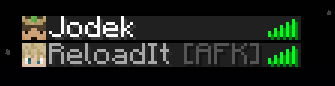
Shows AFK players, /trigger afk, auto AFK kick & more
About this Mod






Features
1. Players are marked as AFK --> displayed next to the name
2. Setting to get an announcement when a player is AFK
3. Adjustable time until you are AFK
4. /trigger afk to instatly be AFK
5. Setting to choose if players get kicked when AFK or not
Config
/trigger afk_announcer.config
Config Pre 1.21.6
/trigger afkannouncer.config
/trigger afkannouncer.color.config
To uninstall run: /function afkannouncer:uninstall
Pre 1.21 Config
Config
To adjust the duration before being marked as AFK:
/trigger afk_timer set value
value = seconds until you are AFK
default = 5 minutes = 300 seconds
To disable the AFK Announcer for yourself, you can set the value to 0
To change if you get a notification when you or someone else is AFK:
/trigger afk_notification set value
value = 1 = notificcation --> default
value = 2 = no notification
To change if you should be invulnerable when AFK:
/scoreboard players set &afk_invulnerable afk_announcer.config value
value = 0 = not invulnerable when AFK --> default
value = 1 = invulnerable when AFK
For the following to work you need to set function-permission-level to 3
To enable that players will always get kicked when AFK:
/scoreboard players set &afk_kick afk_announcer.config value
value = 0 = player do not get kicked when afk -> default
value = 1 = all players get kicked when afk
To enable so players can choose if they want to be kicked or not:
/scoreboard players set &afk_kick_player_control afk_announcer.config value
value = 0 = players can't choose if the want to be kicked or not --> default
value = 1 = players can choose
Individual player setting to choose if you want to be kicked or not:
/trigger individual_afk_kick set value
value = 0 = the player will not get kicked --> default
value = 1 = the player will get kicked
Change any color (config)
Color table
1 - aqua
2 - black
3 - blue
4 - dark_aqua
5 - dark_blue
6 - dark_gray
7 - dark_green
8 - dark_purple
9 - dark_red
10 - gold
11 - gray
12 - green
13 - light_purple
14 - red
15 - white
16 - yellow
Change name color
Color of the normal name
default = white
/scoreboard players set &name_color name_color.jodek value
value = color --> look at color table
Change afk name color
Color of the name when AFK
default = gray
/scoreboard players set &name_color_afk name_color.jodek value
value = color --> look at color table
[AFK] Suffix color
Color of the [AFK suffix]
default = dark_gray
/scoreboard players set &suffix_color_afk name_color.jodek value
value = color --> look at color table
Settings if you have Show Dimension In Name installed
Name color
Change afk name color (overworld)
Color of the name when AFK in the overworld
default = gray
/scoreboard players set &name_color_afk_overworld name_color.jodek value
value = color --> look at color table
Change afk name color (nether)
Color of the name when AFK in the nether
default = gray
/scoreboard players set &name_color_afk_nether name_color.jodek value
value = color --> look at color table
Change afk name color (end)
Color of the name when AFK in the end
default = gray
/scoreboard players set &name_color_afk_end name_color.jodek value
value = color --> look at color table
Prefix color --> [Overworld] - [Nether] - [End]
Change prefix color (overworld)
Color of the prefix when AFK in the overworld
default = green
/scoreboard players set &prefix_color_afk_overworld name_color.jodek value
value = color --> look at color table
Change prefix color (nether)
Color of the prefix when AFK in the nether
default = red
/scoreboard players set &prefix_color_afk_nether name_color.jodek value
value = color --> look at color table
Change prefix color (end)
Color of the prefix when AFK in the end
default = dark_purple
/scoreboard players set &prefix_color_afk_end name_color.jodek value
value = color --> look at color table
Suffix color --> [AFK]
Change suffix color (overworld)
Color of the suffix when AFK in the overworld
default = dark_gray
/scoreboard players set &suffix_color_afk_overworld name_color.jodek value
value = color --> look at color table
Change suffix color (nether)
Color of the suffix when AFK in the nether
default = dark_gray
/scoreboard players set &suffix_color_afk_nether name_color.jodek value
value = color --> look at color table
Change suffix color (end)
Color of the suffix when AFK in the end
default = dark_gray
/scoreboard players set &suffix_color_afk_end name_color.jodek value
value = color --> look at color table
To uninstall:
/function afkannouncer:uninstall
Showcase

![Jodek [AFK] is no longer AFK!](https://cdn.modrinth.com/data/cached_images/ec65120d4d5997cbe8608015afdd00b9ae4ea669.png)
Compatible with my Show Dimension In Name datapack/mod


Compatible with my Invisible Player Name datapack/mod
Available Versions
How to Install AFK Announcer on Your Server
Order Server
Order a Minecraft Java server with at least 3 GB RAM (4 GB recommended).
Set datapack Loader
In the panel under "Egg", select the datapack loader and matching Minecraft version (26.1.2).
Install Mod
Open the mod browser in the dashboard and search for "AFK Announcer". Click "Install" – done! Alternatively, upload the .jar via SFTP to the /mods folder.
Compatibility
Mod Loaders
Minecraft Versions
26.1.2, 26.1.1, 26.1 (+16 more)
Server-side
✓ RequiredRecommended RAM
4 GB(min. 3 GB)Frequently Asked Questions
AFK Announcer server crashes on startup – what to do?
Most common cause: wrong datapack version or insufficient RAM. Check the server log (latest.log) for "OutOfMemoryError" or "Mixin" errors. With Mado Hosting: ensure at least 3 GB RAM is allocated and the loader matches the mod version (26.1.2). You can switch loaders with one click in the panel.
Is AFK Announcer compatible with datapack and fabric and forge and neoforge and quilt?
AFK Announcer officially supports datapack, fabric, forge, neoforge, quilt for Minecraft 26.1.2, 26.1.1, 26.1. Note: Forge and Fabric mods are NOT cross-compatible – pick one loader and stick with it. The Mado dashboard automatically detects incompatible loader combinations.
Server lagging with AFK Announcer – how to optimize performance?
Recommended RAM: 4 GB (per 8 players). Use /spark profiler to check if AFK Announcer consumes the most tick time. Common fixes: reduce server view-distance to 8-10, install "performant" or "starlight" as supplementary mods on Forge. With Mado Hosting, your server runs on NVMe SSDs with dedicated CPU cores for minimal latency.
Similar Mods




Rent Modded Server
Install AFK Announcer with just one click on your server.