
AFK to Ghost
A Fabric mod that protects AFK players by making them invisible and invulnerable on dedicated and client-hosted servers.
Screenshots
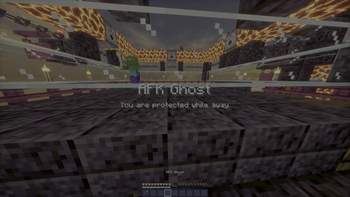
About this Mod
AFK to Ghost
AFK to Ghost protects inactive players by placing them into a safe, ghost-like state while they are AFK.
When a player is inactive for the configured amount of time, the mod can:
- Make them invisible
- Prevent incoming damage
- Show an action bar message
- Return them to normal as soon as activity is detected
The mod is designed to keep AFK players safe without removing them from the world.
Supported environments
AFK to Ghost works on both dedicated servers and client-hosted integrated servers.
Dedicated servers
Install the mod on the server only.
Players joining the server do not need to install AFK to Ghost.
Singleplayer, LAN, and e4mc hosting
Install the mod on the hosting player's client.
This allows AFK protection to work in:
- Singleplayer worlds
- LAN-hosted worlds
- Worlds shared through e4mc
Joining players do not need to install the mod.
Configuration
The mod stores its configuration in:
config/afk-to-ghost.json
Available options include:
- AFK timeout
- Invisibility
- Invulnerability
- Action bar messages
- Debug logging
Mod Menu and Cloth Config are supported as optional client-side dependencies.
When both are installed, the hosting player can edit AFK to Ghost settings directly from Mod Menu.
Dedicated server administrators can continue editing the configuration file manually.
Requirements
- Minecraft 26.1.2
- Fabric Loader 0.18.6 or later
- Fabric API 0.151.0+26.1.2 or later
- Fabric Language Kotlin 1.13.12+kotlin.2.4.0 or later
Optional dependencies
- Mod Menu
- Cloth Config
These are only required for the in-game configuration screen.
Notes
- AFK to Ghost does not require installation on joining clients.
- e4mc support does not require any direct integration or dependency.
- Changes made while a world or server is already running may require reopening the world or restarting the server.
Available Versions
How to Install AFK to Ghost on Your Server
Order Server
Order a Minecraft Java server with at least 3 GB RAM (4 GB recommended).
Set fabric Loader
In the panel under "Egg", select the fabric loader and matching Minecraft version (26.1.2).
Install Mod
Open the mod browser in the dashboard and search for "AFK to Ghost". Click "Install" – done! Alternatively, upload the .jar via SFTP to the /mods folder.
Compatibility
Mod Loaders
Minecraft Versions
26.1.2
Server-side
✓ RequiredRecommended RAM
4 GB(min. 3 GB)Frequently Asked Questions
AFK to Ghost server crashes on startup – what to do?
Most common cause: wrong fabric version or insufficient RAM. Check the server log (latest.log) for "OutOfMemoryError" or "Mixin" errors. With Mado Hosting: ensure at least 3 GB RAM is allocated and the loader matches the mod version (26.1.2). You can switch loaders with one click in the panel.
Is AFK to Ghost compatible with fabric?
AFK to Ghost officially supports fabric for Minecraft 26.1.2. The Mado dashboard automatically detects incompatible loader combinations.
Server lagging with AFK to Ghost – how to optimize performance?
Recommended RAM: 4 GB (per 8 players). Use /spark profiler to check if AFK to Ghost consumes the most tick time. Common fixes: reduce server view-distance to 8-10, install "performant" or "starlight" as supplementary mods on Forge. With Mado Hosting, your server runs on NVMe SSDs with dedicated CPU cores for minimal latency.
Similar Mods




Rent Modded Server
Install AFK to Ghost with just one click on your server.