
AIChat
A mod wich allows you to communicate with ChatGPT while playing Minecraft!
Screenshots
About this Mod
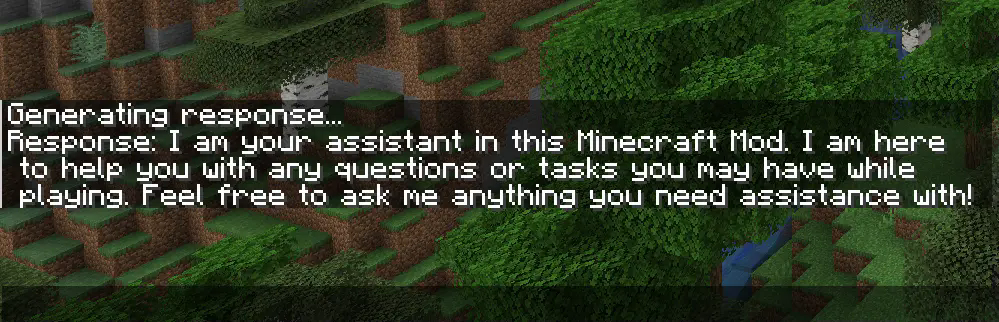
This fully client side mod adds a command that allows you to communicate with ChatGPT while playing Minecraft. It also works while you are playing on a Server. With the added /ask command, you can ask any question you want and receive an answer in the Minecraft chat:

With the newest Version, you can now also upload pictures to ChatGPT. When you take a screenshot, you can see a button called "Send to OpenAI". Now you type in your question an hit enter. Make sure you use a model wich can process pictures like gpt-4o-mini if you have used the mod before the latest version, you have to change your model from gpt-3.5-turbo to gpt-4o-mini.


Setup Guide
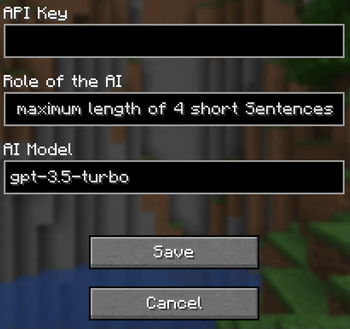
To use the mod, you first need to type /config without any arguments to open the config screen. There you have to paste your OpenAI API Key and hit save. You can also use /config OPENAI_API_KEY <Your API key> to connect your client to the OpenAI API. Your API key is obtainable here.

Make sure you have some funds in your OpenAI account. The default model (gpt-4o-mini) doesn’t really require any money, but you still need a minimum balance of $0.01 to use the API. You can add funds to your account here
Configuration
If you want to use a model other than gpt-4o-mini (e.g., gpt-4o), you can configure it by changing the name of the model in the config screen or you type /config AI_MODEL <AI model you want to use>. Keep in mind that better models are also more expensive. You can view all available models here.

To change the role of ChatGPT, you have to change the sentance in the role field at the config screen or you type /config ROLE_OF_THE_AI <Role the AI should play>
. The default role is:
"You are an assistant implemented in a Minecraft mod to help players. You provide short answers with a maximum length of 4 short sentences."

Available Versions
How to Install AIChat on Your Server
Order Server
Order a Minecraft Java server with at least 3 GB RAM (4 GB recommended).
Set fabric Loader
In the panel under "Egg", select the fabric loader and matching Minecraft version (1.21.5).
Install Mod
Open the mod browser in the dashboard and search for "AIChat". Click "Install" – done! Alternatively, upload the .jar via SFTP to the /mods folder.
Compatibility
Mod Loaders
Minecraft Versions
1.21.5, 1.21.4, 1.21.3 (+10 more)
Server-side
✗ UnsupportedRecommended RAM
4 GB(min. 3 GB)Frequently Asked Questions
AIChat server crashes on startup – what to do?
Most common cause: wrong fabric version or insufficient RAM. Check the server log (latest.log) for "OutOfMemoryError" or "Mixin" errors. With Mado Hosting: ensure at least 3 GB RAM is allocated and the loader matches the mod version (1.21.5). You can switch loaders with one click in the panel.
Is AIChat compatible with fabric?
AIChat officially supports fabric for Minecraft 1.21.5, 1.21.4, 1.21.3. The Mado dashboard automatically detects incompatible loader combinations.
Server lagging with AIChat – how to optimize performance?
Recommended RAM: 4 GB (per 8 players). Use /spark profiler to check if AIChat consumes the most tick time. Common fixes: reduce server view-distance to 8-10, install "performant" or "starlight" as supplementary mods on Forge. With Mado Hosting, your server runs on NVMe SSDs with dedicated CPU cores for minimal latency.
Similar Mods




![[ETF] Entity Texture Features](https://cdn.modrinth.com/data/BVzZfTc1/af683d206d50b05258d865b0d6e4aa2f2cee12f2_96.webp)
![[EMF] Entity Model Features](https://cdn.modrinth.com/data/4I1XuqiY/6e5bbd0d06b1741bfdab6c0cfab6de8fdaf0064c_96.webp)
Rent Modded Server
Install AIChat with just one click on your server.