
aicheye's Combat Tagging
Lightweight fabric server plugin to make PvP fairer and prevent combat-logging.
Screenshots
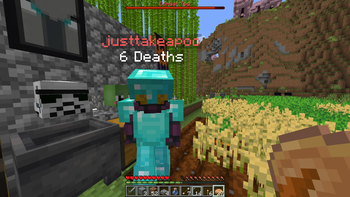
About this Mod
A lightweight fabric server mod to make PvP fairer and prevent combat-logging.
Ethically sourced and GMO-free! Consider downloading on Modrinth to support this project.
Features:
- Compatible with PvP and PvE
- Combat disconnect punishing
- Reduced health to half a heart (can be configured to instantly kill)
- Reduced absorption
- Poison
- While combat tagged
- TP cooldown (ender pearls and chorus fruit)
- By default, the cooldown starts as soon as the player enters combat
- Enchanted golden apple cooldown
- By default, the cooldown only starts after eating the first enchanted golden apple
- Elytras disabled while combat tagged
- Command blacklist (e.g., /home, /spawn, /tpa)
- Red username
- Bar to indicate how long until the player's combat tag expires
- TP cooldown (ender pearls and chorus fruit)
- Fully configurable
Note:
An unexpected server shutdown will count as a disconnect (stopping the server gracefully will not).
By default, /teammsg and /team are disabled
- All players in combat are put on a "combat" team for the sake of username colouring
- Disabling username colouring also re-enables these commands
Configuration Options
Found in ./config/CombatTag.json
| Key | Type | Default | Description |
|---|---|---|---|
| CombatDurationSec | Float | 20.0 | How long the combat tag should last for |
| CombatTpCooldownSec | Float | 10.0 | How long the cooldown for enderpearls and chorus fruits should be during combat |
| CombatNotchAppleCooldownSec | Float | 10.0 | How long the cooldown for enchanted golden apples should be during combat |
| HealthRemainingPunish | Float | 1.0 | How much health the player should have upon reconneccting while combat tagged |
| AbsorptionRemainingPunish | Float | 0.0 | How much absorption the player should have upon reconnecting while combat tagged |
| PoisonDurationSec | Float | 20.0 | How long the player should be poisoned for upon reconnecting while combat tagged |
| PoisonLevel | Integer | 5 | The amplification level of the poison effect upon reconnecting while combat tagged |
| OnlyTagWeapons | Boolean | false | Whether combat tags should only apply when taking weapon/TNT/crystal damage (full list of weapons here) |
| EnableTagOnAttack | Boolean | true | Whether the attacker should be tagged in PvP |
| EnablePveTagOnDamage | Boolean | false | Whether the damaged player should be tagged in PvE |
| EnablePveTagOnAttack | Boolean | false | Whether the attacking player should be tagged in PvE |
| EnableHealthPunish | Boolean | true | Whether the player should lose health upon reconnecting while combat tagged |
| EnableAbsorptionPunish | Boolean | true | Whether the player should lose absorption upon reconnecting while combat tagged |
| EnablePoisonPunish | Boolean | true | Whether the player should be poisoned upon reconnecting while combat tagged |
| EnableTpPunish | Boolean | true | Whether the teleport cooldown should be active during combat |
| EnableInstantTpPunish | Boolean | true | Whether the teleport cooldown should be activated immediately upon entering combat |
| EnableNotchApplePunish | Boolean | true | Whether the enchanted golden apple cooldown should be active during combat |
| EnableInstantNotchApplePunish | Boolean | false | Whether the enchanted golden apple cooldown should be activated immediately upon entering combat |
| EnableElytraPunish | Boolean | true | Whether elytra should be disabled during combat |
| EnableCombatColour | Boolean | true | Whether players in combat should appear red (spectral arrows, scoreboard, username in chat, etc.) |
| DisableTeamMsgCommand* | Boolean | true | Whether players should be allowed to use /teammsg |
| DisableTeamCommand* | Boolean | true | Whether players should be allowed to use /team |
| CommandBlacklist | String[] | ["tpa", "tpaccept", "home", "spawn", "back", "warp"] | Commands that are blocked while in combat |
| CommandBlacklistMessage | String | "You cannot use this command while in combat!" | Message shown when a blacklisted command is blocked |
*Warning: disabling these options may allow players in combat to message each other or leave the combat team and lose their colour
Requirements
- Fabric loader 16.10 or later (1.21.4/5)
- Fabric loader 16.14 or later (1.21.6/7)
- Minecraft 1.21.4 or later
- May work with older versions (build yourself to test: see here for more)
- Java 21 or later
Available Versions
How to Install aicheye's Combat Tagging on Your Server
Order Server
Order a Minecraft Java server with at least 3 GB RAM (4 GB recommended).
Set fabric Loader
In the panel under "Egg", select the fabric loader and matching Minecraft version (1.21.11).
Install Mod
Open the mod browser in the dashboard and search for "aicheye's Combat Tagging". Click "Install" – done! Alternatively, upload the .jar via SFTP to the /mods folder.
Compatibility
Mod Loaders
Minecraft Versions
1.21.11, 1.21.10, 1.21.9 (+5 more)
Server-side
✓ RequiredRecommended RAM
4 GB(min. 3 GB)Frequently Asked Questions
aicheye's Combat Tagging server crashes on startup – what to do?
Most common cause: wrong fabric version or insufficient RAM. Check the server log (latest.log) for "OutOfMemoryError" or "Mixin" errors. With Mado Hosting: ensure at least 3 GB RAM is allocated and the loader matches the mod version (1.21.11). You can switch loaders with one click in the panel.
Is aicheye's Combat Tagging compatible with fabric?
aicheye's Combat Tagging officially supports fabric for Minecraft 1.21.11, 1.21.10, 1.21.9. The Mado dashboard automatically detects incompatible loader combinations.
Server lagging with aicheye's Combat Tagging – how to optimize performance?
Recommended RAM: 4 GB (per 8 players). Use /spark profiler to check if aicheye's Combat Tagging consumes the most tick time. Common fixes: reduce server view-distance to 8-10, install "performant" or "starlight" as supplementary mods on Forge. With Mado Hosting, your server runs on NVMe SSDs with dedicated CPU cores for minimal latency.
Similar Mods




Rent Modded Server
Install aicheye's Combat Tagging with just one click on your server.