
Air Strike Warfare
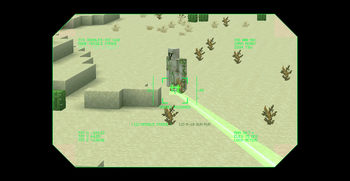
Air Strike Warfare adds a laser designator for calling in air strikes. Aim through a tactical HUD with zoom to mark a target, choose a missile strike or an A-10 gun run, then the strike hits it with explosions, shockwaves, and camera shake.
Screenshots
About this Mod


Air Strike Warfare
Air Strike Warfare brings laser-guided air support to Minecraft. Equip the
Laser Designator, mark a target through a tactical targeting overlay, and call
in a strike on the spot you painted — complete with a visible laser beam,
inbound ordnance, and cinematic impact effects.
Features
- Laser Designator — a dedicated targeting tool. Hold use to raise the
optic and paint a target in the world. - Tactical HUD — a scope-style overlay with live telemetry: target
coordinates, range, lock status, selected mode, and an animated reticle. - Adjustable zoom — scroll to change magnification (1x–16x) with a matching
field-of-view zoom while aiming. - Two strike modes — switch between a Missile Strike and an
A-10 Gun Run on the fly with the number keys. - Visible laser beam — a real beam is drawn from the designator to the
target, turning green on a valid lock and red when there is no target. - Cinematic impacts — custom explosion bursts with an expanding ground
shockwave, plus camera shake to sell the hit. - Custom entities & audio — strike aircraft, the A-10, and missiles, backed
by positional engine and impact sound. - Localization — English and Arabic language support.
How to Use
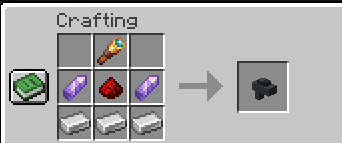
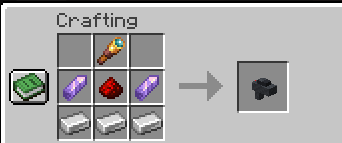
- Obtain the Laser Designator from the creative tab (or your usual means).
- Hold use to bring up the targeting HUD and aim at a location.
- Press 1 or 2 to choose Missile Strike or A-10 Gun Run.
- Scroll to adjust zoom, line up your lock, and the strike is delivered to
the marked spot.
Available Versions
How to Install Air Strike Warfare on Your Server
Order Server
Order a Minecraft Java server with at least 3 GB RAM (4 GB recommended).
Set fabric Loader
In the panel under "Egg", select the fabric loader and matching Minecraft version (26.2).
Install Mod
Open the mod browser in the dashboard and search for "Air Strike Warfare". Click "Install" – done! Alternatively, upload the .jar via SFTP to the /mods folder.
Compatibility
Mod Loaders
Minecraft Versions
26.2, 26.1.2, 26.1.1 (+1 more)
Server-side
✓ RequiredRecommended RAM
4 GB(min. 3 GB)Frequently Asked Questions
Air Strike Warfare server crashes on startup – what to do?
Most common cause: wrong fabric version or insufficient RAM. Check the server log (latest.log) for "OutOfMemoryError" or "Mixin" errors. With Mado Hosting: ensure at least 3 GB RAM is allocated and the loader matches the mod version (26.2). You can switch loaders with one click in the panel.
Is Air Strike Warfare compatible with fabric?
Air Strike Warfare officially supports fabric for Minecraft 26.2, 26.1.2, 26.1.1. The Mado dashboard automatically detects incompatible loader combinations.
Server lagging with Air Strike Warfare – how to optimize performance?
Recommended RAM: 4 GB (per 8 players). Use /spark profiler to check if Air Strike Warfare consumes the most tick time. Common fixes: reduce server view-distance to 8-10, install "performant" or "starlight" as supplementary mods on Forge. With Mado Hosting, your server runs on NVMe SSDs with dedicated CPU cores for minimal latency.
Similar Mods




Rent Modded Server
Install Air Strike Warfare with just one click on your server.