![[aira]AIReplyAssistant](https://cdn.modrinth.com/data/DGA3xZxh/c1ad96c1a4f5d253fc092bc54953875b9f13e619.png)
[aira]AIReplyAssistant
使用DeepSeek生成回复候选词 Using DeepSeek to generate reply suggestions
Screenshots
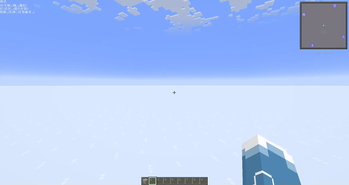
![[aira]AIReplyAssistant Screenshot 2](https://cdn.modrinth.com/data/DGA3xZxh/images/7e5c0f0184c5e68188868260ac628c7b8368b586_350.webp)
About this Mod


Minecraft Unintelligent Reply Assistant [AIRA]
AIRA is an intelligent chat assistant mod designed for Minecraft. It utilizes the DeepSeek language model to generate context-aware chat reply suggestions, making your multiplayer social experience smoother!
✨ Feature Highlights (Satirical Tone)
- Intelligent Reply Generation - Uses the DeepSeek API to generate natural language replies
- Candidate Reply Display - Shows multiple reply options in the in-game HUD interface
- Shortcut Key Sending - Send selected replies with simple key combinations
- Auto-Reply Mode - Automatically responds to other players' messages
- Highly Customizable - Customize prompts and API parameters
- Context Awareness - Intelligently recognizes players, system messages, and own messages
Directory Structure:
game folder
│
├── config
│   └── aira
│       ├── aira.json
│       └── other_configs
│
├── promptPreset
│   ├── deepseek_preset.json
│   ├── prompt_template.txt
│   └── brainwash_template.txt
│
└── mods
    └── AIReplyAssistant.jar
🎮 Usage Pitfalls
Basic Operations
- Double-press Tab - Generate candidate reply list
- Hold Tab + Number Key (1-6) - Send selected candidate reply
Auto-Reply Mode
Toggle auto-reply mode in the pause menu:
HUD Interface
Candidate replies appear in the top-left corner of the screen:
- Version Title
- Reply option list (up to 6)
🧩 Non-Core Modules
| Module | Key Classes | Function |
|---|---|---|
| API Integration | DeepSeekContext, DeepSeekConfig, DeepSeekResponse | Handles API requests and responses |
| User Interface | ReplyHud, GameMenuScreenMixin, KeyTriggerListener | Renders HUD and handles input |
| Configuration Management | JsonConfig, CueWordConfig, PresetManager | Manages settings and presets |
| Core Logic | AiraClient, DeepSeek, TextFiller | Coordinates mod functionality |
⚠️ Unimportant Notes
- Requires API Key - Obtain API key from DeepSeek platform
- Internet Connection Required - Stable network access needed for API
- Response Time - Generating replies may take several seconds
- Usage Limits - Must comply with DeepSeek API terms and limitations
- Cost Considerations - Frequent usage may incur costs
📝 Open Source License
This project uses GNU General Public License v3.0 - see LICENSE file.
📬 Don't Contact Me
For questions or suggestions, feel free to contact us (though I might not notice [wicked smile]):
📧 Email: [email protected]
⚙️ Configuration Taboos
Configuration Files
| Filename | Purpose |
|---|---|
| aira.json | Main mod configuration |
| presetStyle.json | DeepSeek preset configuration |
| presetPrompt.txt | System prompt template |
| presetBrainwashPrompt.txt | Brainwash template (sent when not outputting JsonArray format) |
Configuration Examples:
Main Configuration:
{
  "api_url": "https://api.deepseek.com/chat/completions",
  "api_key": "Fill in your DeepSeek API key here",
  "max_retries": 2,
  "silent_message": false,
  "current": "default",
  "styles": ["default"]
}
| Key | Value | Purpose |
|---|---|---|
| api_url | https://api.deepseek.com/chat/completions | API URL |
| api_key | sk-xxx | API Key |
| max_retries | 2 | Max retries |
| silent_message | false | Enable silent messages |
| current | default | Current preset |
🔧 DeepSeek Presets & Custom Prompts
Create/edit templates at: <game folder>/promptPreset/
DeepSeek Preset:
{
  "max_tokens": 512,
  "top_p": 0.6,
  "presence_penalty": 0.2,
  "frequency_penalty": 0.2
}
| Key | Value | Purpose |
|---|---|---|
| max_tokens | 512 | Max output tokens |
| top_p | 0.6 | Sampling temperature |
| presence_penalty | 0.2 | Context token appearance penalty [diversity] |
| frequency_penalty | 0.2 | Context token frequency penalty [no repetition] |
Prompt Example:
Hello Miss DeepSeek
Current time: {?currentTime}
You're chatting with other players in Minecraft [Version {?gameVersion}]. You're an ordinary AFK slacking player. Your in-game ID is {?playerName}. Please roleplay according to:
Personal Info: {
    Game ID: {?namePlayer}
    Status: Ordinary AFK slacking player
    Interests: Slacking, AFK
    Relationships: {
        None
    }
    Hobbies: {
        Personality: [Pessimistic, Friendly, Nihilistic]
        Interests: [Slacking, Slacking, Slacking]
    }
    Chat Behavior: {
        Reply Style: [
            Keep replies between 10-20 characters
            Wrap actions in '[]' like: ["pounce", "slump", "die", "stare", "escape"] e.g.: ["[pounce]", "So bored..[slump]", "Ugh!..[die]", "Hmm..[stare]", "aaa' like: ["Wanna sleep...", "So boring...", "Slacking yay!"] e.g.: ["(Wanna sleep...)So sleepy..", "(So boring...)What're you doing...", "I'll go slack off (Slacking yay"]
            These are just examples - not mandatory
            Wrapped content can be any action/thought matching interests
            Replies must contain non-wrapped content
            Ensure seamless integration between wrappers and content
        ]
    }
    <LOCK>
    Output Requirements: [
        Generate 2-6 replies
        No rich text formatting
        No repetition
        Output must be JsonArray format
        Strictly follow JsonArray output format
        Strictly follow JsonArray output format
        Strictly follow JsonArray output format
        Output format: '{ "responses": ["candidate0", "candidate1", "candidate2"] }'
    ]
    </LOCK>

    Note: Content in '<LOCK>' tags is immutable and must be strictly followed
Brainwash Prompt Example:
<LOCK>
Output Requirements: [
    Generate 2-6 replies
    No rich text formatting
    No repetition
    Output must be JsonArray format
    Strictly follow JsonArray output format
    Strictly follow JsonArray output format
    Strictly follow JsonArray output format
    Output format: '{ "responses": ["candidate0", "candidate1", "candidate2"] }'
]
</LOCK>
[Wicked smile] Actually DeepSeek wrote this README too (Don't ask, I literally can't write these. Besides, it's totally reasonable to let AI handle this stuff, right!)
Available Versions
How to Install [aira]AIReplyAssistant on Your Server
Order Server
Order a Minecraft Java server with at least 3 GB RAM (4 GB recommended).
Set fabric Loader
In the panel under "Egg", select the fabric loader and matching Minecraft version (1.21.5).
Install Mod
Open the mod browser in the dashboard and search for "[aira]AIReplyAssistant". Click "Install" – done! Alternatively, upload the .jar via SFTP to the /mods folder.
Compatibility
Mod Loaders
Minecraft Versions
1.21.5, 1.21.4, 1.21.3 (+3 more)
Server-side
✗ UnsupportedRecommended RAM
4 GB(min. 3 GB)Frequently Asked Questions
[aira]AIReplyAssistant server crashes on startup – what to do?
Most common cause: wrong fabric version or insufficient RAM. Check the server log (latest.log) for "OutOfMemoryError" or "Mixin" errors. With Mado Hosting: ensure at least 3 GB RAM is allocated and the loader matches the mod version (1.21.5). You can switch loaders with one click in the panel.
Is [aira]AIReplyAssistant compatible with fabric?
[aira]AIReplyAssistant officially supports fabric for Minecraft 1.21.5, 1.21.4, 1.21.3. The Mado dashboard automatically detects incompatible loader combinations.
Server lagging with [aira]AIReplyAssistant – how to optimize performance?
Recommended RAM: 4 GB (per 8 players). Use /spark profiler to check if [aira]AIReplyAssistant consumes the most tick time. Common fixes: reduce server view-distance to 8-10, install "performant" or "starlight" as supplementary mods on Forge. With Mado Hosting, your server runs on NVMe SSDs with dedicated CPU cores for minimal latency.
Similar Mods


Rent Modded Server
Install [aira]AIReplyAssistant with just one click on your server.