
Cloud Storage
Simple mass storage without the hassle of tech mods - plus a bunch of other sky-related additions.
Screenshots
About this Mod

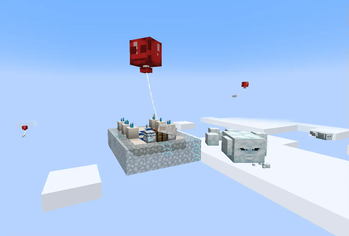
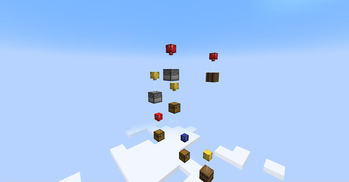
Many people have heard of Cloud Storage, but many believe that it involves computers and servers and other smart people stuff. In reality, and in this mod, Cloud Storage involves tying a chest, barrel or other inventory to a balloon and sending it up to the cloud. Why? So you can access its inventory from your home, without the need of a complicated network of meteorite-sourced crystals, something you traded with elves through a portal, or even a gigantic chest.
What is this mod exactly?
This mod is an easy to use solution to the storage problem. Rather than gating our nearly-endless storage systems behind tech mod stuff or endgame content, most of it can be easily crafted from new items dropped by new mobs that shouldn't be much of a challenge to defeat by most players. Although storage is the main reason you'd play with this mod, there is additional content added such as new foods, pets, blocks, mechanics, music disc etc. that are all thoroughly polished and fit the theme and aesthetic of both the mod and Minecraft itself.
Getting Started
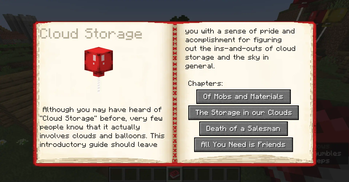
If you get confused by such a simple mod or don't want this website constantly open in the other tab, I'd recommend you craft the in-game guide book:

This book is written by yours truly and should be a better guide than this mod description. But if you insist...
The first major addition of cloud storage are two mobs that drop the main materials required to create balloons, cloud chests, etc. Meet the Badloon and the Bloviator.
Badloons are angry, yet fragile balloon monsters that attempt to punch you with their single glove, in hopes of knocking you off to your doom. However, they can be easily popped with any projectile and are deathly afraid of cactus. Badloons drop 0-2 balloon pieces when killed.
Bloviators are hostile cloud spirits that will attempt to spew gusts of wind at you to push you away - although this does no damage in itself, it is quite a nuisance. But if the weather turns from clear skies to rain, the bloviator will enter its charged, thundercloud form, zapping you with lightning instead. When killed, big bloviators split into smaller ones, just like slimes. The smallest ones have a chance of dropping a Cloud Block, and the thunder-y ones can drop a Static Cloud Block.
Both of these monsters only spawn at y-level 196 and above (spawning is highly configurable), so you will have to climb high into the sky to find them. Once you have enough of their respective drops, you're going to need to craft at least two balloons and one cloud chest, like so:
Then, simply dye the balloons any color of your choosing(or don't, I'm a mod author, not a cop) and tie one to a normal chest under the sky to send it to the cloud. Once the chest has reached world height and been uploaded to the cloud, you should be able to access all of its 27 slots by placing the balloon of the same color inside the cloud chest. Note that this only works if the cloud chest has skylight access! When you need more space, simply tie another balloon of the same color to a chest and send it upwards. By default, cloud chests can hold up to 4096 slots (configurable of course) - which is a lot of items.

Cloud chests can be scrolled through, sorted, and searched in order to find any item you need.
Cloud chests themselves are private storage - like an ender chest, they are exclusive to you and cannot be opened by other players, or accessed by hoppers. Luckily, if you need something like that, there is the static cloud chest, made in the same way as the cloud chest but with static cloud blocks. These can be accessed by hoppers, pipes, other players, etc. as they are static and the same for everyone. To upload to the static inventory, you will need a statically-charged balloon, which you can get by rubbing a balloon against a static cloud.
Since static cloud chests can be accessed from anywhere by hoppers, they can be used as instantaneous item transport beyond two far points, such as two separate bases, or a sky mob farm.
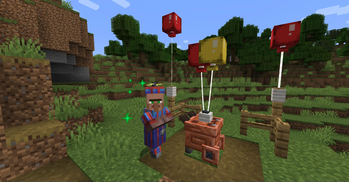
Balloons have other uses too, such as slowing your fall speed and reducing fall damage, and can be tied to fences and stands for decoration. Cloud blocks also can be used to reduce fall height.
Additional Fun Content
An additional new mob is added, the Balloon Buddy, who can be crafted and will be your best friend forever and ever. They have 8 possible personalities which dictate how they behave, fight, etc.
In villages, you can find the Balloon Salesman, who can trade you a variety of cloud storage - related items, along with his own propeller hat. Sometimes, they can offer a map to a temple in the sky or a big balloon, which has a unique loot chest and mob spawner (1.18.2 only)
Cotton candy is a new food source that can be crafted from sugar and cloud blocks. It's fun to eat but I'm not a fan of the taste.
You can use some of the bottled clouds to create a new tool called the Cloud Blower. But I don't understand how you could possibly have fun with one of those oversized hairdryers...
If a badloon is popped by a skeleton, it can drop a unique new music disc.
Credits
- Yosh: Art assets
- FallenReaper: Art assets
- Carro1001: Art assets
- Crydigo: Art assets
- Shroomy: Music disc
- PlummetStudios: testing
- Alex's Mods Discord <3
Future/Possible Additions
Cloud structuresAdded in 1.1.0Cloud Crafting
Cloud Golems to facilitate cloud crafting
Enough balloons being able to lift multi-blocks a la Up
More Balloon Buddy personalities
Creative mode only cloud chests/amenities for server admins
Follow the development of this project and my other mods on:
And report any sort of bugs or issues here.
Available Versions
How to Install Cloud Storage on Your Server
Order Server
Order a Minecraft Java server with at least 3 GB RAM (4 GB recommended).
Set forge Loader
In the panel under "Egg", select the forge loader and matching Minecraft version (1.20.1).
Install Mod
Open the mod browser in the dashboard and search for "Cloud Storage". Click "Install" – done! Alternatively, upload the .jar via SFTP to the /mods folder.
Compatibility
Mod Loaders
Minecraft Versions
1.20.1, 1.20, 1.19.4 (+2 more)
Server-side
✓ RequiredRecommended RAM
4 GB(min. 3 GB)Frequently Asked Questions
Cloud Storage server crashes on startup – what to do?
Most common cause: wrong forge version or insufficient RAM. Check the server log (latest.log) for "OutOfMemoryError" or "Mixin" errors. With Mado Hosting: ensure at least 3 GB RAM is allocated and the loader matches the mod version (1.20.1). You can switch loaders with one click in the panel.
Is Cloud Storage compatible with forge and neoforge?
Cloud Storage officially supports forge, neoforge for Minecraft 1.20.1, 1.20, 1.19.4. The Mado dashboard automatically detects incompatible loader combinations.
Server lagging with Cloud Storage – how to optimize performance?
Recommended RAM: 4 GB (per 8 players). Use /spark profiler to check if Cloud Storage consumes the most tick time. Common fixes: reduce server view-distance to 8-10, install "performant" or "starlight" as supplementary mods on Forge. With Mado Hosting, your server runs on NVMe SSDs with dedicated CPU cores for minimal latency.
Similar Mods
![[EMF] Entity Model Features](https://cdn.modrinth.com/data/4I1XuqiY/6e5bbd0d06b1741bfdab6c0cfab6de8fdaf0064c_96.webp)


Rent Modded Server
Install Cloud Storage with just one click on your server.