
Allied: Teams
A mod re-imagining teams, an all in one mod with essential team features for fabric
Screenshots


About this Mod




Allied
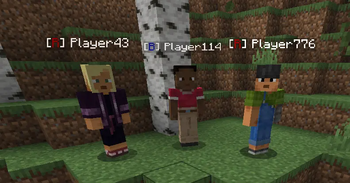
This mod allows players to create and make teams, featuring friendly fire, Seeing teamates while there invisible and echests (soon) all togglable in settings, these features are easily accessed with /allied

Commands
/allied create <teamName> <teamTag>Create a new team and become its owner/allied disbandDisbands the team (Team Owner Command)/allied leaveLeave the current team you are in/allied join <teamName>Send a join request to the team owner/allied accept <playerName>Accept the players join request (Team Owner Command)/allied deny <playerName>Deny the players join request (Team Owner Command)/allied invite <playerName>Send a team invitation to a player for them to join (Team Owner Command)/allied invAccept <teamName>Accept the owner invite/allied invDeny <teamName>Deny the owners invite/allied infoShow info about the team, Team Name, Team Tag, Owner, Members/allied settingsShows the teams settings available and buttons to change them (Team Owner Command)/allied set <teamName|teamTag|teamColor> <value>Chose a value to change and set a name, tag or color (Team Owner Command)/allied kick <playerName>Kick a player from the team (Team Owner Command)/allied tmToggles team chat
Admin Commands
/alliedAdmin memberCap <value>Set a new max members in a team/alliedAdmin info <teamName>Get the info of any valid team/alliedAdmin listList all teams in the server/alliedAdmin reset [<Code>]A command to wipe all mod data and reset it to default, after entering the command, a code thats valid for 60s will be given to confirm the reset
This description is currently up to date with v1.1.0 of the mod
If you like the mod, please consider donating to support my development
Any issues, bugs or suggestions are to be put on the github issue page
The mods inspiration came from there not being any team mods for fabric that is up to date
Thank you for using my mod <3
Available Versions
How to Install Allied: Teams on Your Server
Order Server
Order a Minecraft Java server with at least 3 GB RAM (4 GB recommended).
Set fabric Loader
In the panel under "Egg", select the fabric loader and matching Minecraft version (26.1.2).
Install Mod
Open the mod browser in the dashboard and search for "Allied: Teams". Click "Install" – done! Alternatively, upload the .jar via SFTP to the /mods folder.
Compatibility
Mod Loaders
Minecraft Versions
26.1.2, 1.21.11
Server-side
✓ RequiredRecommended RAM
4 GB(min. 3 GB)Frequently Asked Questions
Allied: Teams server crashes on startup – what to do?
Most common cause: wrong fabric version or insufficient RAM. Check the server log (latest.log) for "OutOfMemoryError" or "Mixin" errors. With Mado Hosting: ensure at least 3 GB RAM is allocated and the loader matches the mod version (26.1.2). You can switch loaders with one click in the panel.
Is Allied: Teams compatible with fabric?
Allied: Teams officially supports fabric for Minecraft 26.1.2, 1.21.11. The Mado dashboard automatically detects incompatible loader combinations.
Server lagging with Allied: Teams – how to optimize performance?
Recommended RAM: 4 GB (per 8 players). Use /spark profiler to check if Allied: Teams consumes the most tick time. Common fixes: reduce server view-distance to 8-10, install "performant" or "starlight" as supplementary mods on Forge. With Mado Hosting, your server runs on NVMe SSDs with dedicated CPU cores for minimal latency.
Similar Mods




Rent Modded Server
Install Allied: Teams with just one click on your server.