
Ambient Leaves
A lightweight Vanilla+ Fabric mod that adds immersive falling leaves and atmospheric ambience to Minecraft survival.
Screenshots
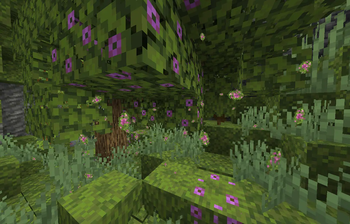
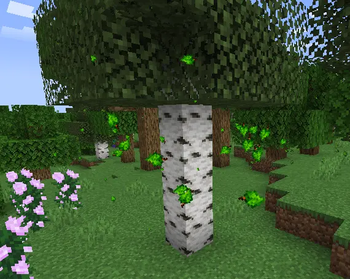
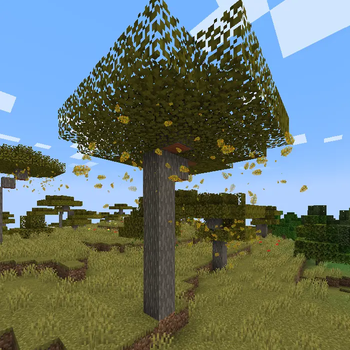
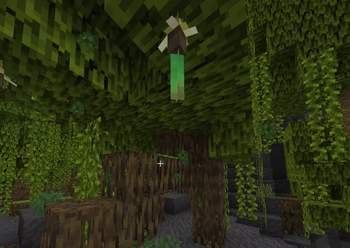
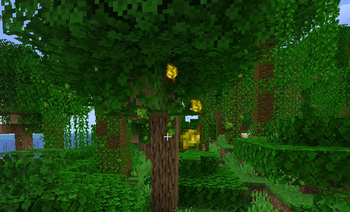
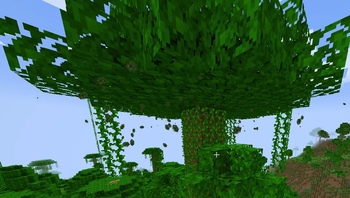
About this Mod
Ambient Leaves
Ambient Leaves is a lightweight Vanilla+ Fabric mod that adds immersive falling leaves, atmospheric particles, and biome-based ambience to Minecraft survival.
Designed to preserve the classic Minecraft aesthetic while making forests, jungles, swamps, and natural environments feel more alive and immersive.
Features
Falling Leaf Particles
Biome-specific falling leaves for:
- Oak forests
- Birch forests
- Spruce forests
- Jungles
- Dark oak forests
- Savannas
- Mangrove swamps
- Cherry groves
- Azalea environments
Atmospheric Particles
Additional ambience effects:
- Forest fog
- Pollen particles
- Cave dust
- Ash particles
Full Customization Menu
Ambient Leaves includes a complete in-game customization system with:
- Particle density controls
- Particle size controls
- Wind movement settings
- Atmosphere toggles
- Performance presets
- Rare particle settings
- Reset settings button
Vanilla+ Experience
- Lightweight and optimized
- Client-side only
- Multiplayer-friendly
- Vanilla-style visuals
- Smooth immersive ambience
Requirements
Required:
- Fabric API
- Cloth Config API
Optional:
- Mod Menu
Minecraft Version:
- 1.21.1+
Included Biome Effects
- Falling oak leaves
- Birch forest ambience
- Spruce forest particles
- Jungle atmosphere
- Cherry blossom petals
- Mangrove swamp ambience
- Azalea ambience
- Dynamic atmospheric particles
Performance
Ambient Leaves is designed to remain lightweight while improving Minecraft's environmental atmosphere.
Performance presets are included for:
- Low-end PCs
- Vanilla gameplay
- Shader users
- Cinematic ambience setups
Support & Community
GitHub Issues:
https://github.com/iamrippon/ambient-leaves-support/issues
Discord:
https://discord.gg/GFGCn2mMrE
Email:
[email protected]
Developed by RG Studios.
Available Versions
How to Install Ambient Leaves on Your Server
Order Server
Order a Minecraft Java server with at least 3 GB RAM (4 GB recommended).
Set fabric Loader
In the panel under "Egg", select the fabric loader and matching Minecraft version (1.21.8).
Install Mod
Open the mod browser in the dashboard and search for "Ambient Leaves". Click "Install" – done! Alternatively, upload the .jar via SFTP to the /mods folder.
Compatibility
Mod Loaders
Minecraft Versions
1.21.8, 1.21.7, 1.21.6 (+5 more)
Server-side
✗ UnsupportedRecommended RAM
4 GB(min. 3 GB)Frequently Asked Questions
Ambient Leaves server crashes on startup – what to do?
Most common cause: wrong fabric version or insufficient RAM. Check the server log (latest.log) for "OutOfMemoryError" or "Mixin" errors. With Mado Hosting: ensure at least 3 GB RAM is allocated and the loader matches the mod version (1.21.8). You can switch loaders with one click in the panel.
Is Ambient Leaves compatible with fabric?
Ambient Leaves officially supports fabric for Minecraft 1.21.8, 1.21.7, 1.21.6. The Mado dashboard automatically detects incompatible loader combinations.
Server lagging with Ambient Leaves – how to optimize performance?
Recommended RAM: 4 GB (per 8 players). Use /spark profiler to check if Ambient Leaves consumes the most tick time. Common fixes: reduce server view-distance to 8-10, install "performant" or "starlight" as supplementary mods on Forge. With Mado Hosting, your server runs on NVMe SSDs with dedicated CPU cores for minimal latency.
Similar Mods

![[ETF] Entity Texture Features](https://cdn.modrinth.com/data/BVzZfTc1/af683d206d50b05258d865b0d6e4aa2f2cee12f2_96.webp)
![[EMF] Entity Model Features](https://cdn.modrinth.com/data/4I1XuqiY/6e5bbd0d06b1741bfdab6c0cfab6de8fdaf0064c_96.webp)



Rent Modded Server
Install Ambient Leaves with just one click on your server.