
An Explosive Filter
A highly configurable chat filter mod where you can make certain words/phrases explode the players saying them in chat.
Screenshots
About this Mod
Summary
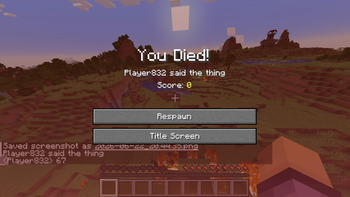
This is supposed to just be a silly little mod where, using a command or config you can make it so saying certain words in chat causes the player saying them to explode and die.
This is highly customisable and is simple, since all config can be adjusted via a command.
How To Use
The mod uses a list of words/phrases and checks if chat messages sent contain any of these, if they are the explosion occurs but the message is still sent.
You can edit all of these areas in the server/world config file or via the /explosivefilter command in game. The command is much easier to use. The command tree is as follows:
/explosivefilter add "phrase" - Adds a phrase that causes an explosion to the config.
/explosionfilter list - Shows all words that can an explosion and their associated power
/explosionfilter remove 'phrase' - Removes a certain phrase from the config (if its there)
/explosionfilter reload - Reloads the json entries - for bug fixing
/explosionfilter damage - Toggles if the explosions actually deal damage
/explosionfilter damageothers - Toggles if the explosions deal damage to other entities that aren't the player
/explosionfilter defaultpower - Sets the default explosion power for the phrases
/explosionfilter dropitems - Toggles if the explosions drop all broken blocks
/explosionfilter fire - Toggles if explosions leave fire
/explosionfilter instakill - Toggles if the player who said the phrase will die regardless of gamemode, armour etc.
/explosionfilter worlddamage - Toggles if the explosions will also damage nearby blocks
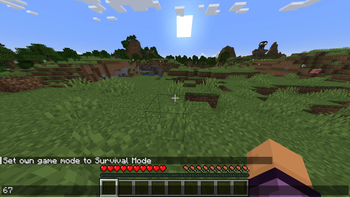
By default the words 67 and 'six seven' will cause explosions if spoken in chat.
This mod only supports English, but contains translatable text.
Available Versions
How to Install An Explosive Filter on Your Server
Order Server
Order a Minecraft Java server with at least 3 GB RAM (4 GB recommended).
Set fabric Loader
In the panel under "Egg", select the fabric loader and matching Minecraft version (1.21.1).
Install Mod
Open the mod browser in the dashboard and search for "An Explosive Filter". Click "Install" – done! Alternatively, upload the .jar via SFTP to the /mods folder.
Compatibility
Mod Loaders
Minecraft Versions
1.21.1
Server-side
✓ RequiredRecommended RAM
4 GB(min. 3 GB)Frequently Asked Questions
An Explosive Filter server crashes on startup – what to do?
Most common cause: wrong fabric version or insufficient RAM. Check the server log (latest.log) for "OutOfMemoryError" or "Mixin" errors. With Mado Hosting: ensure at least 3 GB RAM is allocated and the loader matches the mod version (1.21.1). You can switch loaders with one click in the panel.
Is An Explosive Filter compatible with fabric?
An Explosive Filter officially supports fabric for Minecraft 1.21.1. The Mado dashboard automatically detects incompatible loader combinations.
Server lagging with An Explosive Filter – how to optimize performance?
Recommended RAM: 4 GB (per 8 players). Use /spark profiler to check if An Explosive Filter consumes the most tick time. Common fixes: reduce server view-distance to 8-10, install "performant" or "starlight" as supplementary mods on Forge. With Mado Hosting, your server runs on NVMe SSDs with dedicated CPU cores for minimal latency.
Similar Mods






Rent Modded Server
Install An Explosive Filter with just one click on your server.