
AngleSnap
Save and snap to precise angles and camera positions, useful for redstone contraptions using Magic Mirror technology.
Screenshots
About this Mod
Summary
This mod adds a UI to save precise viewing angles and camera positions to help with the use of redstone contraptions like the Mirror Pylon by Squibble and the Orbital Railcannon by cubicmetre.
Usage
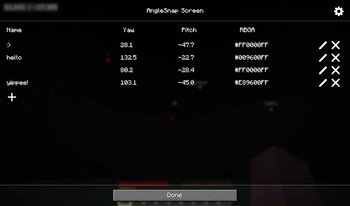
Pressing F6 while in a world will open the AngleSnap menu, where precise angles can be added, edited or removed. Clicking on an angle without pressing the edit button first will close the screen and snap the players crosshair to that angle.
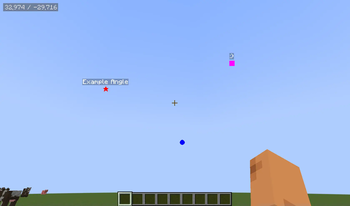
Pressing F7 will toggle the AngleSnap overlay, which will render icons at the saved angles, allowing easy visualization.
Pressing F8 will open the CameraSnap menu, where camera positions can be added, edited or removed. Clicking on a camera position will move the camera to that position, while movement and viewing angle are still synced with the actual player.
Configuration
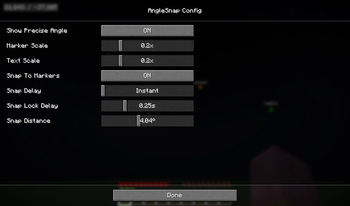
The config can be opened through modmenu or by pressing the gear icon in either the AngleSnap or CameraSnap menus.
It allows configuring the overlay to your liking and can be used to enable "Snap To Markers", which will snap your crosshair to precise angles when hovering near them with the overlay enabled.
Available Versions
How to Install AngleSnap on Your Server
Order Server
Order a Minecraft Java server with at least 3 GB RAM (4 GB recommended).
Set fabric Loader
In the panel under "Egg", select the fabric loader and matching Minecraft version (1.21.8).
Install Mod
Open the mod browser in the dashboard and search for "AngleSnap". Click "Install" – done! Alternatively, upload the .jar via SFTP to the /mods folder.
Compatibility
Mod Loaders
Minecraft Versions
1.21.8, 1.21.7, 1.21.6 (+2 more)
Server-side
✗ UnsupportedRecommended RAM
4 GB(min. 3 GB)Frequently Asked Questions
AngleSnap server crashes on startup – what to do?
Most common cause: wrong fabric version or insufficient RAM. Check the server log (latest.log) for "OutOfMemoryError" or "Mixin" errors. With Mado Hosting: ensure at least 3 GB RAM is allocated and the loader matches the mod version (1.21.8). You can switch loaders with one click in the panel.
Is AngleSnap compatible with fabric?
AngleSnap officially supports fabric for Minecraft 1.21.8, 1.21.7, 1.21.6. The Mado dashboard automatically detects incompatible loader combinations.
Server lagging with AngleSnap – how to optimize performance?
Recommended RAM: 4 GB (per 8 players). Use /spark profiler to check if AngleSnap consumes the most tick time. Common fixes: reduce server view-distance to 8-10, install "performant" or "starlight" as supplementary mods on Forge. With Mado Hosting, your server runs on NVMe SSDs with dedicated CPU cores for minimal latency.
Similar Mods




![[ETF] Entity Texture Features](https://cdn.modrinth.com/data/BVzZfTc1/af683d206d50b05258d865b0d6e4aa2f2cee12f2_96.webp)
![[EMF] Entity Model Features](https://cdn.modrinth.com/data/4I1XuqiY/6e5bbd0d06b1741bfdab6c0cfab6de8fdaf0064c_96.webp)
Rent Modded Server
Install AngleSnap with just one click on your server.