
Animal Brush
A vanilla-friendly tool to reroll animal skin variants with a simple right-click. Preserve NBT data while cycling through all available variants for 13+ animal types!
Screenshots

About this Mod
Tired of breeding dozens of animals to get the perfect color? Animal Brush is here to help! This lightweight, vanilla-friendly mod adds a simple tool that lets you reroll animal skin variants with a single right-click.
✨ Features
- 🎨 Reroll Variants: Right-click any supported animal to cycle through all available skin variants
- 💾 NBT Preservation: Keeps custom names, equipment, and all entity data intact
- 🎭 13+ Animals Supported: Works with Cats, Horses, Llamas, Foxes, Rabbits, Axolotls, Frogs, Wolves, Pandas, Chickens, Cows, Pigs, and more!
- 💫 Visual Feedback: Particles appear on successful variant changes
- ⚖️ Balanced Gameplay: Limited durability (20 uses) keeps it fair
- 🌐 Multiplayer Ready: Full server compatibility with proper synchronization
🐾 Supported Animals
Minecraft 1.19.4 - 1.20.1
- Cat - 11 variants
- Horse - 7 colors × 5 markings = 35 variants
- Llama - 4 variants
- Parrot - 5 variants
- Rabbit - 6 variants (+ Toast Easter egg)
- Fox - 2 variants (Red, Snow)
Minecraft 1.20.2+
All previous + Axolotl (5 variants), Frog (3 variants)
Minecraft 1.20.5+
All previous + Wolf (9 biome variants)
Minecraft 1.21.5+ (Spring to Life Update)
All previous + Panda (7 personality variants), Chicken (3 climate variants), Cow (3 climate variants), Pig (3 climate variants)
Total: 13 animal types with 100+ variant combinations!
🎨 Crafting Recipes
Modern Recipe (Minecraft 1.20+)
When the vanilla brush exists:
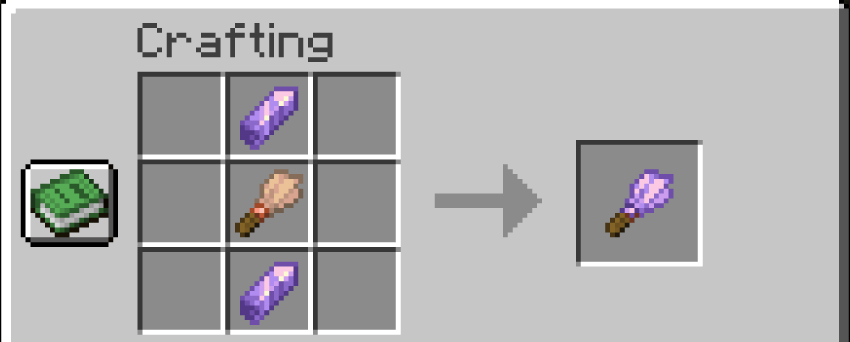
Ingredients:
- 2× Amethyst Shard
- 1× Brush (vanilla)
Legacy Recipe (Minecraft 1.19.4)
Before the vanilla brush was added:
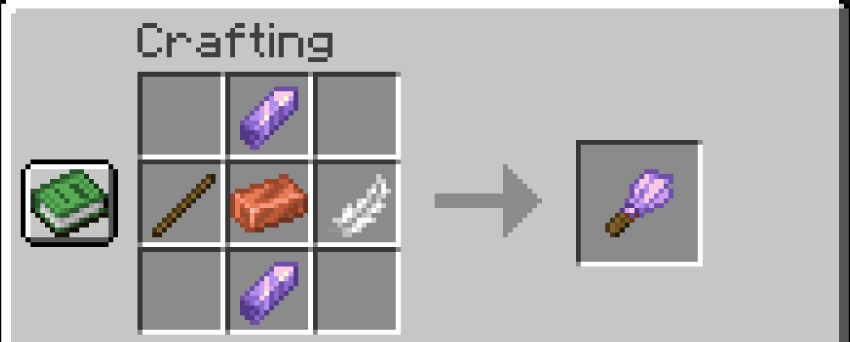
Ingredients:
- 2× Amethyst Shard
- 1× Stick
- 1× Copper Ingot
- 1× Feather
📖 How to Use
- Craft the Animal Brush (see recipes above)
- Right-click on any supported animal
- Watch the variant change with particles
- Repeat until you get the variant you want!
Note: The tool has 20 uses before breaking, just like the vanilla brush.
🔧 Technical Details
- Multi-Loader Support: Available for Fabric, Forge, and NeoForge
- Multi-Version: Supports Minecraft 1.19.4 through 1.21.11
Available Versions
How to Install Animal Brush on Your Server
Order Server
Order a Minecraft Java server with at least 3 GB RAM (4 GB recommended).
Set fabric Loader
In the panel under "Egg", select the fabric loader and matching Minecraft version (1.21.11).
Install Mod
Open the mod browser in the dashboard and search for "Animal Brush". Click "Install" – done! Alternatively, upload the .jar via SFTP to the /mods folder.
Compatibility
Mod Loaders
Minecraft Versions
1.21.11, 1.21.1, 1.20.6 (+6 more)
Server-side
✓ RequiredRecommended RAM
4 GB(min. 3 GB)Frequently Asked Questions
Animal Brush server crashes on startup – what to do?
Most common cause: wrong fabric version or insufficient RAM. Check the server log (latest.log) for "OutOfMemoryError" or "Mixin" errors. With Mado Hosting: ensure at least 3 GB RAM is allocated and the loader matches the mod version (1.21.11). You can switch loaders with one click in the panel.
Is Animal Brush compatible with fabric and forge and neoforge?
Animal Brush officially supports fabric, forge, neoforge for Minecraft 1.21.11, 1.21.1, 1.20.6. Note: Forge and Fabric mods are NOT cross-compatible – pick one loader and stick with it. The Mado dashboard automatically detects incompatible loader combinations.
Server lagging with Animal Brush – how to optimize performance?
Recommended RAM: 4 GB (per 8 players). Use /spark profiler to check if Animal Brush consumes the most tick time. Common fixes: reduce server view-distance to 8-10, install "performant" or "starlight" as supplementary mods on Forge. With Mado Hosting, your server runs on NVMe SSDs with dedicated CPU cores for minimal latency.
Similar Mods




![[ETF] Entity Texture Features](https://cdn.modrinth.com/data/BVzZfTc1/af683d206d50b05258d865b0d6e4aa2f2cee12f2_96.webp)
![[EMF] Entity Model Features](https://cdn.modrinth.com/data/4I1XuqiY/6e5bbd0d06b1741bfdab6c0cfab6de8fdaf0064c_96.webp)
Rent Modded Server
Install Animal Brush with just one click on your server.