
Animal Plus
A mod that lets players change animal age and breeding cooldowns, with support for other mods that use the Animal API
Screenshots

About this Mod
Keep in mind this is a Work In Progress mod
I will slowly will add new feature
I study at UNI so i will try my best to update this mod
Animal Plus
Overview
The Animal Plus mod enhances Minecraft gameplay by giving players control over the aging and breeding mechanics of passive mobs.
With this mod, you can skip the long wait for animals to grow up or breed, adjust cooldowns per mob, check values, and reset them to defaults — making farming much faster and more efficient.
Features
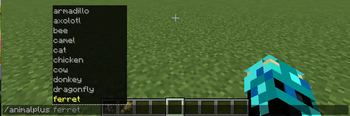
- Adjust Passive Mob Aging & Breeding: Change the cooldowns of passive mobs, such as cows, chickens, and pigs.
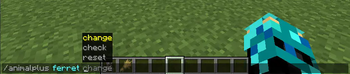
- Check and Reset Cooldowns: Instantly check current values or restore defaults.
- Per-Mob Settings: Each mob has its own individual configuration.
- Cross-Mod Support: Fully compatible with other mods that use the standard Animal API, so custom mobs from supported mods can also benefit from Animal Plus features.
Mobs
Soon adding more animal with Animations
Brown Cow (Reskin of normal cow + Some Animations)
spawnable in the world soon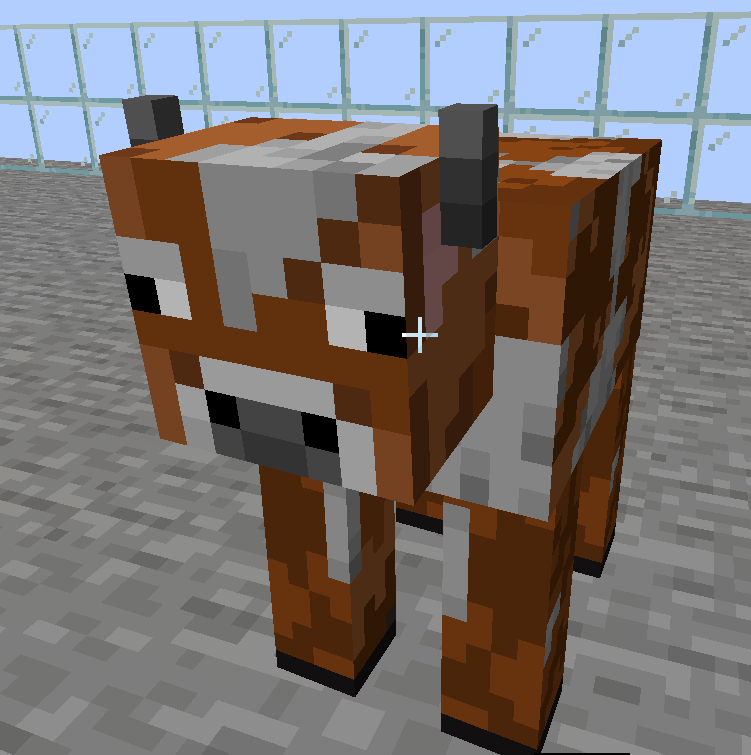
New Items
Age Wand
Show how long until adult
Grow Wand
Immediately change baby animal to adult
Supported Mods
Animal Plus works alongside other mods that implement the Animal API, like:
| Icon | Mod Name |
|---|---|
 |
Critters and Companions |
(More mods can be added here as compatibility grows.)
Commands
/animalplus <animal> check
/animalplus <animal> change breed <seconds>
/animalplus <animal> change age <seconds>
/animalplus <animal> reset age
/animalplus <animal> reset breed
Goals
Adding new items, adding new animals
Available Versions
How to Install Animal Plus on Your Server
Order Server
Order a Minecraft Java server with at least 3 GB RAM (4 GB recommended).
Set neoforge Loader
In the panel under "Egg", select the neoforge loader and matching Minecraft version (1.21.8).
Install Mod
Open the mod browser in the dashboard and search for "Animal Plus". Click "Install" – done! Alternatively, upload the .jar via SFTP to the /mods folder.
Compatibility
Mod Loaders
Minecraft Versions
1.21.8, 1.21.7, 1.21.6 (+5 more)
Server-side
~ OptionalRecommended RAM
4 GB(min. 3 GB)Frequently Asked Questions
Animal Plus server crashes on startup – what to do?
Most common cause: wrong neoforge version or insufficient RAM. Check the server log (latest.log) for "OutOfMemoryError" or "Mixin" errors. With Mado Hosting: ensure at least 3 GB RAM is allocated and the loader matches the mod version (1.21.8). You can switch loaders with one click in the panel.
Is Animal Plus compatible with neoforge?
Animal Plus officially supports neoforge for Minecraft 1.21.8, 1.21.7, 1.21.6. The Mado dashboard automatically detects incompatible loader combinations.
Server lagging with Animal Plus – how to optimize performance?
Recommended RAM: 4 GB (per 8 players). Use /spark profiler to check if Animal Plus consumes the most tick time. Common fixes: reduce server view-distance to 8-10, install "performant" or "starlight" as supplementary mods on Forge. With Mado Hosting, your server runs on NVMe SSDs with dedicated CPU cores for minimal latency.
Similar Mods




Rent Modded Server
Install Animal Plus with just one click on your server.