
Anime angel
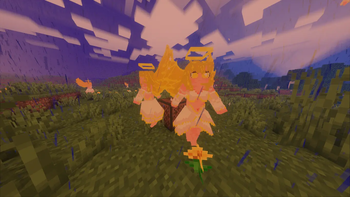
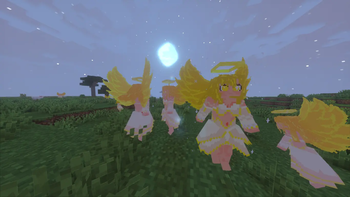
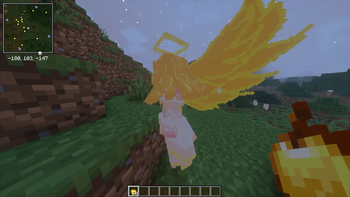
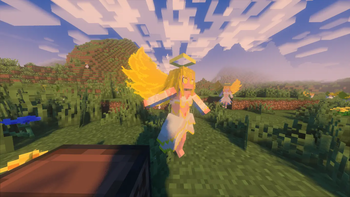
Adds a beautiful, spawnable Anime Angel to your world! Tame them with a Golden Apple as a loyal companion, or defeat them to obtain an Enchanted Golden Apple.
Screenshots
About this Mod
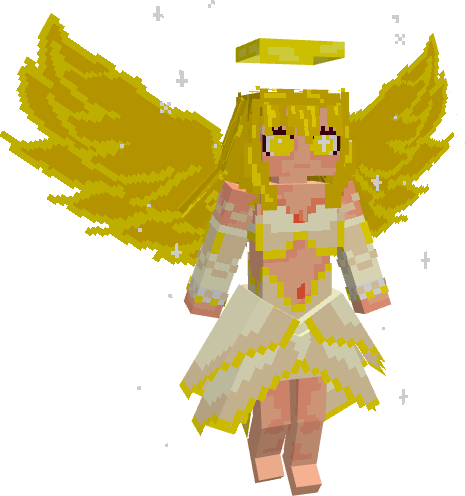
💫 Anime Angel by Anoosh 💫
Bring a touch of divine beauty and anime aesthetics to your Minecraft world! Anime Angel by Anoosh introduces a majestic, glowing celestial entity that naturally spawns throughout your world. Whether you seek a loyal companion or a high-risk, high-reward challenge, this angel will completely change your survival experience.
✨ Features ✨
🪽 Natural Spawning: Anime Angels appear naturally across the overworld in Plains, Forest, Flower Forest, and Meadow biomes. They spawn in two variants — the classic Anime Angel and the fiery Flame Variant — adding a magical, fantasy atmosphere to your gameplay.
🍎 Golden Bond: Defeating an Anime Angel rewards you with a Golden Apple. Use that same Golden Apple to tame her and turn her into your loyal celestial ally who fights by your side.
🎶 Rhythmic Dancing: Place a jukebox nearby and play a music disc — if the Anime Angel is close enough, she will start dancing for 820 Minecraft ticks, bringing life, motion, and style to your base.
⚔️ Dynamic Animations: Includes smooth walking, idle, attack, and dance animations powered by GeckoLib, delivering a fluid, anime-inspired experience.
🌈 Stylized Visuals: Beautifully crafted 3D pixel-art model with glowing details, angelic wings, and a distinct visual identity for both the normal and flame variants.
🛠️ Installation & Support 🛠️
1️⃣ Download and install the required library mod (see Requirements below).
2️⃣ Download the correct version of Anime Angel by Anoosh for your Mod Loader (Forge/Fabric/NeoForge).
3️⃣ Drop both .jar files into your Minecraft mods folder.
4️⃣ Launch the game and explore the overworld to encounter your first Anime Angel!
⛔ Requirements (🚨 VERY IMPORTANT 🚨) ⛔
To ensure the models and animations for Anime Angel work properly and do not cause crashes, you must install the following dependency:
Make sure you download the version of GeckoLib that exactly matches your Minecraft version and mod loader.
Available Versions
How to Install Anime angel on Your Server
Order Server
Order a Minecraft Java server with at least 3 GB RAM (4 GB recommended).
Set forge Loader
In the panel under "Egg", select the forge loader and matching Minecraft version (1.21.1).
Install Mod
Open the mod browser in the dashboard and search for "Anime angel". Click "Install" – done! Alternatively, upload the .jar via SFTP to the /mods folder.
Compatibility
Mod Loaders
Minecraft Versions
1.21.1, 1.20.1
Server-side
✓ RequiredRecommended RAM
4 GB(min. 3 GB)Frequently Asked Questions
Anime angel server crashes on startup – what to do?
Most common cause: wrong forge version or insufficient RAM. Check the server log (latest.log) for "OutOfMemoryError" or "Mixin" errors. With Mado Hosting: ensure at least 3 GB RAM is allocated and the loader matches the mod version (1.21.1). You can switch loaders with one click in the panel.
Is Anime angel compatible with forge and neoforge?
Anime angel officially supports forge, neoforge for Minecraft 1.21.1, 1.20.1. The Mado dashboard automatically detects incompatible loader combinations.
Server lagging with Anime angel – how to optimize performance?
Recommended RAM: 4 GB (per 8 players). Use /spark profiler to check if Anime angel consumes the most tick time. Common fixes: reduce server view-distance to 8-10, install "performant" or "starlight" as supplementary mods on Forge. With Mado Hosting, your server runs on NVMe SSDs with dedicated CPU cores for minimal latency.
Similar Mods
![[EMF] Entity Model Features](https://cdn.modrinth.com/data/4I1XuqiY/6e5bbd0d06b1741bfdab6c0cfab6de8fdaf0064c_96.webp)


Rent Modded Server
Install Anime angel with just one click on your server.