
Anime Hologram
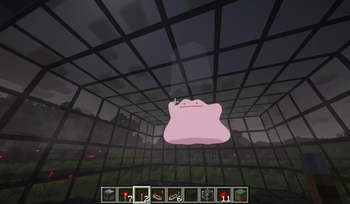
Render 3D “holograms” inside tinted-glass cuboids and drive them with redstone. Bring your own models/animations; powered by BlazeRod.
Screenshots
About this Mod
Overview
- Render 3D “holograms” inside tinted-glass cuboids and control them entirely with redstone.
- Bring your own models and animations (none are bundled).
- Powered by the BlazeRod rendering library.
- Server play is currently not tested.
Features
- BlazeRod-based rendering, with a stable CPU transform path by default.
- External VMD animation support for PMX/PMD models. Drop .vmd files next to the model.
- Universal Edge Bus (UEB) redstone control:
- Model code: 0–255
- Animation code: 0–255 (0 = rest pose)
- Ctrl code: 0–15 (reserved for future use)
- Param bus (scale/offsets), quantized 0–15
- Helpful commands to detect, map, watch, and manage cuboids.
- Clickable TP coordinates in the /holo map output.
Requirements
- Minecraft: 1.21.8
- Fabric Loader
- Fabric API
- Fabric Language Kotlin
How to use
- Build a filled tinted-glass cuboid anywhere in the world.
- Use /holo watch while looking at a tinted glass block (or let auto-watch pick it up).
- Place your model content in your Minecraft run directory (not inside the mod jar):
- Windows: %appdata%/.minecraft/hologram/models/
- Linux: ~/.minecraft/hologram/models/
- Select model/animation via redstone or commands.
Content folder structure
- One folder per model code (3-digit, zero-padded):
- hologram/models/003/
- model.pmx (.pmd/.glb/.gltf/.vrm also supported)
- Idle.vmd, Walk.vmd, etc. (optional; VMD for PMX/PMD)
- manifest.json (optional)
- hologram/models/003/
Optional manifest.json
- Place next to your model:
{
  "file": "model.pmx",
  "scale": 1.0,
  "offset": [0.0, 0.0, 0.0],
  "defaultAnimation": 0
}
- file: picks a model file (otherwise the first supported file is used)
- scale/offset: default transform applied to the hologram root
- defaultAnimation: ignored when anim=0 (since anim=0 is rest pose)
Supported formats
- Models: .pmx, .pmd, .vrm, .glb, .gltf
- Animations: .vmd (MMD; expects PMX/PMD rigs with matching bones)
Redstone: Universal Edge Bus (UEB)
- The mod reads redstone from the cuboid edges:
- Bottom edges → Model bits (8)
- Top edges → Anim bits (8)
- Vertical edges (middle Y centers) → Ctrl bits (4)
- If a bus can only fit a single port on a small cuboid, it falls back to an analog nibble (0..15) at that one position.
- Use /holo map to print clickable coordinates for all bus ports and the param bus.
Parameter bus (analog, middle face centers)
- scaleQ: north face center
- offXQ: east face center
- offYQ: south face center
- offZQ: west face center
- Quantization: 0..15 (0 = inactive; use manifest defaults)
- Client mapping:
- Scale: 0.25 + (scaleQ / 15) * 1.75 (if scaleQ > 0), else 1.0
- Offsets: (Q − 8) / 8.0 (if Q > 0), else 0.0
Animation behavior
- anim=0 → rest pose (no animation applied)
- anim=1..N → clip indices 0..N−1 (wraps if out of range)
- On clip change: the mod resets relative transforms and morphs for a clean start.
Commands
- /holo detect [x y z]
- Detect cuboid bounds/size for where you’re looking or a position.
- /holo map [x y z]
- Print the bus layout (Model/Anim/Ctrl ports + Param ports).
- Coordinates are clickable:
- OP (permission ≥ 2): click to teleport.
- Non‑OP: click to get a suggested /tp command in chat.
- /holo codes [x y z]
- Print current Model/Anim/Ctrl codes for that cuboid.
- /holo setcodes
[x y z] - Set codes and broadcast instantly to clients.
- Requires OP (permission level 2).
- /holo watch [x y z]
- Start watching a cuboid (bus is read and broadcast).
- /holo unwatch [x y z]
- Stop watching a cuboid.
Tips
- To play animation 10, set anim bus = 10:
- Command: /holo setcodes
10 (OP only) - Redstone: power anim bus ports that sum to 10, or feed strength 10 to the analog fallback.
- Command: /holo setcodes
- To select model folder 003, set model bus = 3.
Troubleshooting
- Nothing renders:
- Ensure you’re watching the cuboid (/holo watch).
- Ensure your model folder exists and contains a supported model file.
- VMD doesn’t play:
- Use PMX/PMD models; ensure VMD files are next to the model file.
- Check client log for “Loaded scene ... animations=K”; K=0 means no usable clips were found.
- Weird pose when switching animations:
- The mod resets pose on clip change. If issues persist, the rig or channel mapping may be unusual—please report the model format/rig.
Content policy
- No models are bundled with this mod. You must supply your own content.
- The included screenshots/videos are for demonstration only and are not part of the mod jar.
Credits
- Rendering library: BlazeRod by Fifth Light (aka fifth_light). Thank you for the renderer and format loaders.
- This project does not redistribute BlazeRod source; BlazeRod JARs are included jar‑in‑jar for convenience.
License
- This mod: GPLv3.
- BlazeRod: LGPL 3.0.
- Third‑party models/media remain the property of their authors and are subject to their own licenses.
Available Versions
How to Install Anime Hologram on Your Server
Order Server
Order a Minecraft Java server with at least 3 GB RAM (4 GB recommended).
Set fabric Loader
In the panel under "Egg", select the fabric loader and matching Minecraft version (1.21.8).
Install Mod
Open the mod browser in the dashboard and search for "Anime Hologram". Click "Install" – done! Alternatively, upload the .jar via SFTP to the /mods folder.
Compatibility
Mod Loaders
Minecraft Versions
1.21.8
Server-side
✓ RequiredRecommended RAM
4 GB(min. 3 GB)Frequently Asked Questions
Anime Hologram server crashes on startup – what to do?
Most common cause: wrong fabric version or insufficient RAM. Check the server log (latest.log) for "OutOfMemoryError" or "Mixin" errors. With Mado Hosting: ensure at least 3 GB RAM is allocated and the loader matches the mod version (1.21.8). You can switch loaders with one click in the panel.
Is Anime Hologram compatible with fabric?
Anime Hologram officially supports fabric for Minecraft 1.21.8. The Mado dashboard automatically detects incompatible loader combinations.
Server lagging with Anime Hologram – how to optimize performance?
Recommended RAM: 4 GB (per 8 players). Use /spark profiler to check if Anime Hologram consumes the most tick time. Common fixes: reduce server view-distance to 8-10, install "performant" or "starlight" as supplementary mods on Forge. With Mado Hosting, your server runs on NVMe SSDs with dedicated CPU cores for minimal latency.
Similar Mods

![[ETF] Entity Texture Features](https://cdn.modrinth.com/data/BVzZfTc1/af683d206d50b05258d865b0d6e4aa2f2cee12f2_96.webp)
![[EMF] Entity Model Features](https://cdn.modrinth.com/data/4I1XuqiY/6e5bbd0d06b1741bfdab6c0cfab6de8fdaf0064c_96.webp)



Rent Modded Server
Install Anime Hologram with just one click on your server.