
Anshar
Write yourself into the cosmos with the power of beacons!
Screenshots
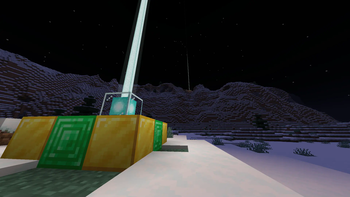
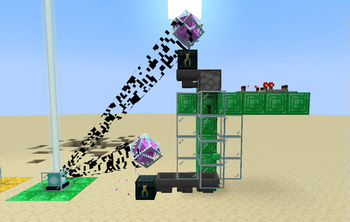

About this Mod
Beacons link this world to the firmament beyond. Go there, to the ends of eternity, and return changed.
Anshar explores the eternities to which the beacons point. By harnessing the infinite power of the nether star, we can store data - or even ourselves - in the fabric of the world itself.
An active beacon resonates with the cosmos on a frequency determined by the blocks making up its base. This expands its functionality in two ways:
- Beacons can read and write items into space, sharing with all others on the same frequency. Connecting an ender chest to the beacon by placing it on the pyramid (or nearby with an end crystal above it) modifies the chest to act as an interface to this storage.
- Standing on a beacon will embed the player into space, allowing them to navigate connected beacons to obtain reentry. Tarry not long within eternity, or the distant sounds may draw near.
Storing items
Every Frequency has an inventory attached to it that has the same size and behavior as an Ender Chest. To access this inventory, do one of the following:
- Place an Ender Chest on the pyramid of the Beacon.
- Place an Ender Chest somewhere nearby the Beacon, then place End Crystal on top while sneaking. The crystal will automatically connect to the nearest beacon. Alternatively, you can manually link it by clicking the Beacon with End Crystal item while sneaking.
Frequency storage is accessible to both players and machines through attached ender chests.
Jumping between beacons
Once you step onto the beacon, you will be written into the sky. From there, you'll be shown other possible destinations. You may hop to a desired beacon by looking at its gate and holding forward. You can descend back into the world anytime by sneaking.
Art Credits
- Audio Production: Nulb
- Voice Acting & Mod Icon: Hiroyuki K.T.
This mod was created as a ModFest 1.20 submission
Available Versions
How to Install Anshar on Your Server
Order Server
Order a Minecraft Java server with at least 3 GB RAM (4 GB recommended).
Set fabric Loader
In the panel under "Egg", select the fabric loader and matching Minecraft version (1.21.4).
Install Mod
Open the mod browser in the dashboard and search for "Anshar". Click "Install" – done! Alternatively, upload the .jar via SFTP to the /mods folder.
Compatibility
Mod Loaders
Minecraft Versions
1.21.4, 1.21.1, 1.21 (+1 more)
Server-side
✓ RequiredRecommended RAM
4 GB(min. 3 GB)Frequently Asked Questions
Anshar server crashes on startup – what to do?
Most common cause: wrong fabric version or insufficient RAM. Check the server log (latest.log) for "OutOfMemoryError" or "Mixin" errors. With Mado Hosting: ensure at least 3 GB RAM is allocated and the loader matches the mod version (1.21.4). You can switch loaders with one click in the panel.
Is Anshar compatible with fabric?
Anshar officially supports fabric for Minecraft 1.21.4, 1.21.1, 1.21. The Mado dashboard automatically detects incompatible loader combinations.
Server lagging with Anshar – how to optimize performance?
Recommended RAM: 4 GB (per 8 players). Use /spark profiler to check if Anshar consumes the most tick time. Common fixes: reduce server view-distance to 8-10, install "performant" or "starlight" as supplementary mods on Forge. With Mado Hosting, your server runs on NVMe SSDs with dedicated CPU cores for minimal latency.
Similar Mods




Rent Modded Server
Install Anshar with just one click on your server.