
AnvilFix
This mod aims to fix the long-standing Anvil balance issues Mojang refuses to fix.
Screenshots
About this Mod
(Requires the Fabric API)
Why I Made These Changes
I've been increasingly frustrated with the balance of Survival mode, especially when it comes to anvil enchanting/repairing/renaming. With the recent controversy around the villager rebalance, I thought I'd take the opportunity to try my hand at addressing the issues surrounding anvil mechanics.
Changes Implemented
General
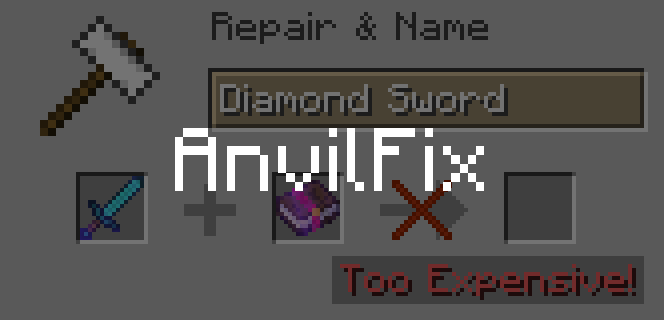
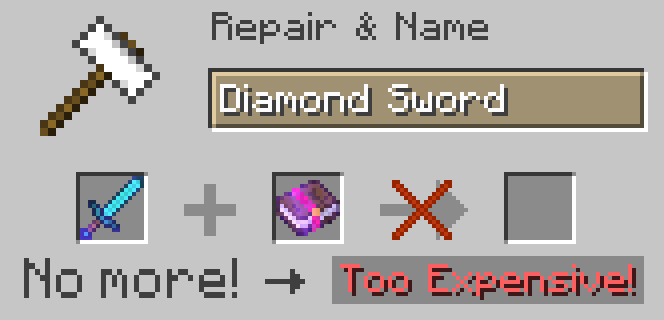
- Removed "Too Expensive!".
- Removed XP cost accumulation.
- Made enchanting, repairing, and renaming independent of each other in terms of XP usage.
Enchanting
- Rethought the enchanting cost system. Instead of relying on frustrating XP accumulation and other obscure factors, costs are now based solely on the enchantments you want to apply.
- Each enchantment has a base cost that is then multiplied by its level. For example, applying Sharpness I costs 2 XP, Sharpness II costs 4 XP, and Sharpness V costs 10 XP.
Repairing
- Introduced a straightforward linear cost of 2 XP * material amount.
- The removal of "Too Expensive!" means you can now repair your equipment as much as you want without it eventually becoming disposable.
Renaming
- Renaming now has a flat cost of 2 XP.
Optional: Mending Rebalance
- I know this change is probably gonna be controversial, so it's an optional feature (mendingWorksWithUnbreaking gamerule, off by default)
- I've always felt like Mending is Mojang's band-aid fix to the anvil repairing issue, while also being overpowered and obtainable too early in the game. With the anvil issues resolved, a rebalance seems appropriate.
- Mending and Unbreaking are now incompatible, providing players with two choices:
- Choose Unbreaking if you want extended equipment durability, but need to manually repair it through an anvil.
- Choose Mending for automatic equipment repair via XP, but with standard uses.
- Buffed Mending: Mending now works on unequipped items as well. The hierarchy of repair priority is as follows: Equipped items take priority over unequipped ones, and damaged items are prioritized over those with less damage. Damaged unequipped items are given priority over nearly fully repaired equipped items.Not implemented yet
Disclaimer
This is my first public mod, so it will probably have some bugs. XP costs are still being tweaked and I haven't tested this in multiplayer, but it should work. You can always report any bugs at the GitHub issue tracker. Also, I just realized there's another mod named AnvilFix already, but it hasn't been updated for more than a year. I'll rename this mod if the author asks me to.
Available Versions
How to Install AnvilFix on Your Server
Order Server
Order a Minecraft Java server with at least 3 GB RAM (4 GB recommended).
Set fabric Loader
In the panel under "Egg", select the fabric loader and matching Minecraft version (1.20.1).
Install Mod
Open the mod browser in the dashboard and search for "AnvilFix". Click "Install" – done! Alternatively, upload the .jar via SFTP to the /mods folder.
Compatibility
Mod Loaders
Minecraft Versions
1.20.1, 1.20, 1.19.4 (+4 more)
Server-side
✓ RequiredRecommended RAM
4 GB(min. 3 GB)Frequently Asked Questions
AnvilFix server crashes on startup – what to do?
Most common cause: wrong fabric version or insufficient RAM. Check the server log (latest.log) for "OutOfMemoryError" or "Mixin" errors. With Mado Hosting: ensure at least 3 GB RAM is allocated and the loader matches the mod version (1.20.1). You can switch loaders with one click in the panel.
Is AnvilFix compatible with fabric?
AnvilFix officially supports fabric for Minecraft 1.20.1, 1.20, 1.19.4. The Mado dashboard automatically detects incompatible loader combinations.
Server lagging with AnvilFix – how to optimize performance?
Recommended RAM: 4 GB (per 8 players). Use /spark profiler to check if AnvilFix consumes the most tick time. Common fixes: reduce server view-distance to 8-10, install "performant" or "starlight" as supplementary mods on Forge. With Mado Hosting, your server runs on NVMe SSDs with dedicated CPU cores for minimal latency.
Similar Mods




Rent Modded Server
Install AnvilFix with just one click on your server.