
AnvilRepair
Did the anvil break at the wrong time? So fix it using a block of iron! Diversify your gameplay by adding a new anvil repair system.
Screenshots
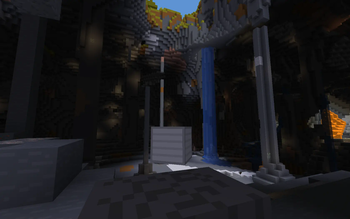
About this Mod
AnvilRepair
Description / Описание
[en] Did the anvil break at the wrong time? With this datapack you can easily repair your anvil by clicking an iron block on it! Never before has repairing an anvil been so simple and unusual. Diversify your game by adding new mechanics!
[ru] Не вовремя сломалась наковальня? С этим датапаком вы сможете легко починить свою наковальню кликнув железным блоком по ней! Никогда ещё починка наковальни не была такой простой и не обычной. Разнообразьте свою игру добавив новую механику!
Installation / Установка
[en] To install the datapack, place the datapack zip file in the datapacks folder of your world. If you are installing a mod, then place the jar file of the mod in the .minecraft/mods folder
[ru] Чтобы установить датапак, поместите zip-файл датапака в папку datapacks вашего мира.
Если вы устанавливаете мод, поместите jar-файл мода в папку .minecraft/mods

Available Versions
How to Install AnvilRepair on Your Server
Order Server
Order a Minecraft Java server with at least 3 GB RAM (4 GB recommended).
Set datapack Loader
In the panel under "Egg", select the datapack loader and matching Minecraft version (1.20.6).
Install Mod
Open the mod browser in the dashboard and search for "AnvilRepair". Click "Install" – done! Alternatively, upload the .jar via SFTP to the /mods folder.
Compatibility
Mod Loaders
Minecraft Versions
1.20.6, 1.20.5, 1.20.4 (+31 more)
Server-side
✓ RequiredRecommended RAM
4 GB(min. 3 GB)Frequently Asked Questions
AnvilRepair server crashes on startup – what to do?
Most common cause: wrong datapack version or insufficient RAM. Check the server log (latest.log) for "OutOfMemoryError" or "Mixin" errors. With Mado Hosting: ensure at least 3 GB RAM is allocated and the loader matches the mod version (1.20.6). You can switch loaders with one click in the panel.
Is AnvilRepair compatible with datapack and fabric and forge and quilt?
AnvilRepair officially supports datapack, fabric, forge, quilt for Minecraft 1.20.6, 1.20.5, 1.20.4. Note: Forge and Fabric mods are NOT cross-compatible – pick one loader and stick with it. The Mado dashboard automatically detects incompatible loader combinations.
Server lagging with AnvilRepair – how to optimize performance?
Recommended RAM: 4 GB (per 8 players). Use /spark profiler to check if AnvilRepair consumes the most tick time. Common fixes: reduce server view-distance to 8-10, install "performant" or "starlight" as supplementary mods on Forge. With Mado Hosting, your server runs on NVMe SSDs with dedicated CPU cores for minimal latency.
Similar Mods




Rent Modded Server
Install AnvilRepair with just one click on your server.