
anyskin
anyskin can instantly load skins from Mojang, TLauncher, URLs or direct png files!
Screenshots
About this Mod
anyskin
A powerful and easy-to-use skin mod for Minecraft
anyskin allows players and admins to change skins instantly while allowing skins from Mojang, TLauncher, URL or direct png file.
Features
- Multiple Sources: Fetch skins from official Mojang accounts, TLauncher's database, Imgur links, or direct image URLs.
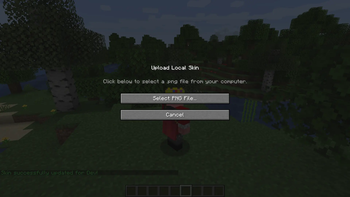
- Local File Uploads: Upload
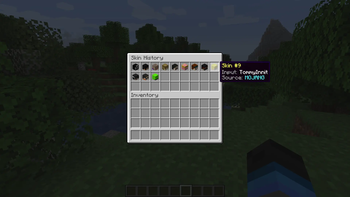
.pngfiles directly from your computer (requires the mod to be installed on the client-side). - Skin History GUI: Keep track of your previously used skins and easily switch back to them.
- Auto-Skin on Join: Perfect for offline servers; automatically applies a skin based on the player's username when they join.
- Server-Side Capable: The mod can run entirely on the server. (However, players must have it installed on their client if they want to use the
/uploadskincommand).
Basic Commands
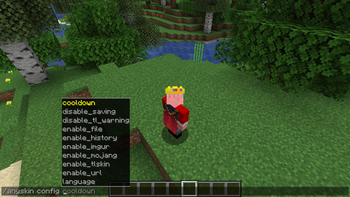
/skin <username / url / $code>- Change your skin instantly./clearskin- Reset your skin to the default./uploadskin- Opens a UI to select and upload a local.pngfile./skinhistory- Shows your previous skins./setskin <player> <input>- (Admin) Change another player's skin./anyskin help- (Admin) View admin commands and configure the mod in-game.
You can provide feedback or report bugs in my website, all messages are anonymous.
🇪🇸 Español (Spanish)
anyskin
Un mod de skins potente y fácil de usar para Minecraft
anyskin permite a jugadores y administradores cambiar skins al instante, permitiendo skins de Mojang, TLauncher, URLs o archivos png directos.
Características
- Múltiples Fuentes: Obtén skins de cuentas oficiales de Mojang, la base de datos de TLauncher, enlaces de Imgur o URLs directas de imágenes.
- Subida de Archivos Locales: Sube archivos
.pngdirectamente desde tu computadora (requiere que el mod esté instalado en el cliente). - Menú de Historial de Skins: Guarda un registro de las skins que has usado y vuelve a ellas fácilmente.
- Auto-Skin al Entrar: Perfecto para servidores piratas; aplica automáticamente una skin basada en el nombre del jugador al entrar.
- Funciona del Lado del Servidor: El mod puede ejecutarse completamente en el servidor. (Sin embargo, los jugadores deben instalarlo en su cliente si quieren usar el comando
/uploadskin).
Comandos Básicos
/skin <nombre / url / $codigo>- Cambia tu skin al instante./clearskin- Restablece tu skin a la predeterminada./uploadskin- Abre una interfaz para seleccionar y subir un archivo.pnglocal./skinhistory- Muestra tus skins anteriores./setskin <jugador> <entrada>- (Admin) Cambia la skin de otro jugador./anyskin help- (Admin) Ver comandos de administrador y configurar el mod en el juego.
🇷🇺 Русский (Russian)
anyskin
Мощный и простой в использовании мод на скины для Minecraft
anyskin позволяет игрокам и администраторам мгновенно менять скины, поддерживая скины из Mojang, TLauncher, по URL-адресу или из прямого png-файла.
Особенности
- Множество источников: Получайте скины из официальных аккаунтов Mojang, базы данных TLauncher, ссылок Imgur или прямых URL-адресов изображений.
- Загрузка локальных файлов: Загружайте файлы
.pngпрямо с вашего компьютера (требуется установка мода на клиент). - Меню истории скинов: Сохраняйте историю ранее использованных скинов и легко переключайтесь между ними.
- Авто-скин при входе: Идеально для пиратских серверов; автоматически применяет скин по нику игрока при его заходе на сервер.
- Работает на сервере: Мод может работать исключительно на стороне сервера. (Однако игрокам необходимо установить его на свой клиент, если они хотят использовать команду
/uploadskin).
Основные команды
/skin <ник / url / $код>- Мгновенно изменить свой скин./clearskin- Сбросить скин на стандартный./uploadskin- Открыть интерфейс для выбора и загрузки локального файла.png./skinhistory- Показывает ваши предыдущие скины./setskin <игрок> <ввод>- (Админ) Изменить скин другого игрока./anyskin help- (Админ) Просмотр команд администратора и настройка мода в игре.
🇧🇷/🇵🇹 Português (Portuguese)
anyskin
Um mod de skins poderoso e fácil de usar para Minecraft
anyskin permite que jogadores e administradores mudem de skin instantaneamente, permitindo skins da Mojang, TLauncher, URL ou arquivo png direto.
Funcionalidades
- Múltiplas Fontes: Busque skins de contas oficiais da Mojang, banco de dados do TLauncher, links do Imgur ou URLs diretas de imagens.
- Upload de Arquivos Locais: Faça upload de arquivos
.pngdiretamente do seu computador (requer que o mod esteja instalado no cliente). - Menu de Histórico de Skins: Mantenha um registro das skins usadas anteriormente e volte para elas facilmente.
- Auto-Skin ao Entrar: Perfeito para servidores piratas; aplica automaticamente uma skin baseada no nome do jogador quando ele entra.
- Funciona no Servidor: O mod pode rodar inteiramente no servidor. (No entanto, os jogadores precisam instalá-lo no cliente se quiserem usar o comando
/uploadskin).
Comandos Básicos
/skin <nome / url / $codigo>- Mude sua skin instantaneamente./clearskin- Redefina sua skin para o padrão./uploadskin- Abre uma interface para selecionar e fazer upload de um arquivo.pnglocal./skinhistory- Mostra suas skins anteriores./setskin <jogador> <entrada>- (Admin) Mude a skin de outro jogador./anyskin help- (Admin) Veja os comandos de administrador e configure o mod no jogo.
Available Versions
How to Install anyskin on Your Server
Order Server
Order a Minecraft Java server with at least 3 GB RAM (4 GB recommended).
Set fabric Loader
In the panel under "Egg", select the fabric loader and matching Minecraft version (26.1.2).
Install Mod
Open the mod browser in the dashboard and search for "anyskin". Click "Install" – done! Alternatively, upload the .jar via SFTP to the /mods folder.
Compatibility
Mod Loaders
Minecraft Versions
26.1.2, 26.1.1, 26.1 (+13 more)
Server-side
✓ RequiredRecommended RAM
4 GB(min. 3 GB)Frequently Asked Questions
anyskin server crashes on startup – what to do?
Most common cause: wrong fabric version or insufficient RAM. Check the server log (latest.log) for "OutOfMemoryError" or "Mixin" errors. With Mado Hosting: ensure at least 3 GB RAM is allocated and the loader matches the mod version (26.1.2). You can switch loaders with one click in the panel.
Is anyskin compatible with fabric and forge and neoforge and quilt?
anyskin officially supports fabric, forge, neoforge, quilt for Minecraft 26.1.2, 26.1.1, 26.1. Note: Forge and Fabric mods are NOT cross-compatible – pick one loader and stick with it. The Mado dashboard automatically detects incompatible loader combinations.
Server lagging with anyskin – how to optimize performance?
Recommended RAM: 4 GB (per 8 players). Use /spark profiler to check if anyskin consumes the most tick time. Common fixes: reduce server view-distance to 8-10, install "performant" or "starlight" as supplementary mods on Forge. With Mado Hosting, your server runs on NVMe SSDs with dedicated CPU cores for minimal latency.
Similar Mods




Rent Modded Server
Install anyskin with just one click on your server.