
aozaink
Aozai Ink MC is a NeoForge foundation mod that turns handwritten Chinese glyphs into semantic world states for Minecraft addons.
Screenshots
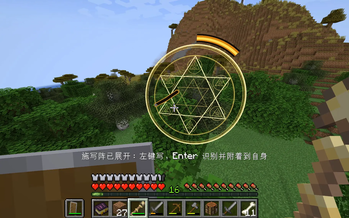
About this Mod
Aozai Ink MC is a foundation mod for handwritten Chinese glyph systems in Minecraft.
It provides the technical base for addon mods that want to use handwriting recognition as a gameplay input. By itself, Aozai Ink MC does not add spells, combat abilities, dungeons, or progression content. Content mods define what each recognized glyph actually does.
What it provides
- In-world handwriting input circles
- ONNX-based Chinese character recognition
- Self-cast and world-anchored writing modes
- Ink stave items with multiple material tiers
- Stave durability, repair, progression, and upgrade metadata
InkMarkstate records for addon mods- Official Java addon API under
com.aozainkmc.api - Event hooks for recognized glyphs, attached marks, and block target selection
- A two-step block selection flow for mechanics such as seals or remote targeting
Who this is for
This mod is mainly for:
- Players installing addon mods that require Aozai Ink MC
- Modpack makers who want glyph-based addon content
- Developers building mods around handwritten Chinese characters
If you install only Aozai Ink MC, you will get the handwriting system and ink staves, but not a full spell system. For actual gameplay content, install an addon mod that depends on it.
Current limitations
- Current gameplay flow is focused on singleplayer / integrated worlds.
- The addon API is in its first public alpha and may change during early versions.
- Recognition depends on the bundled ONNX model and supported character labels.
Controls
Hold an ink stave, then use:
G- open the self-cast writing circleV- open the world-anchored inscription circle- Left click - draw strokes
Enter- recognize the glyphR- clear strokesX- cancel the active circle
Developer notes
Addon integration documentation is included in the project repository:
docs/addon-integration.md
Available Versions
How to Install aozaink on Your Server
Order Server
Order a Minecraft Java server with at least 3 GB RAM (4 GB recommended).
Set neoforge Loader
In the panel under "Egg", select the neoforge loader and matching Minecraft version (1.21.1).
Install Mod
Open the mod browser in the dashboard and search for "aozaink". Click "Install" – done! Alternatively, upload the .jar via SFTP to the /mods folder.
Compatibility
Mod Loaders
Minecraft Versions
1.21.1
Server-side
✓ RequiredRecommended RAM
4 GB(min. 3 GB)Frequently Asked Questions
aozaink server crashes on startup – what to do?
Most common cause: wrong neoforge version or insufficient RAM. Check the server log (latest.log) for "OutOfMemoryError" or "Mixin" errors. With Mado Hosting: ensure at least 3 GB RAM is allocated and the loader matches the mod version (1.21.1). You can switch loaders with one click in the panel.
Is aozaink compatible with neoforge?
aozaink officially supports neoforge for Minecraft 1.21.1. The Mado dashboard automatically detects incompatible loader combinations.
Server lagging with aozaink – how to optimize performance?
Recommended RAM: 4 GB (per 8 players). Use /spark profiler to check if aozaink consumes the most tick time. Common fixes: reduce server view-distance to 8-10, install "performant" or "starlight" as supplementary mods on Forge. With Mado Hosting, your server runs on NVMe SSDs with dedicated CPU cores for minimal latency.
Similar Mods




Rent Modded Server
Install aozaink with just one click on your server.