
ApiumRadio
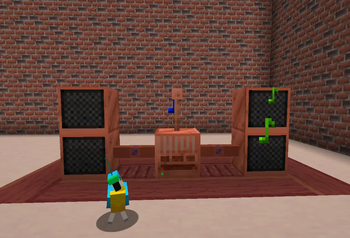
Immerse yourself in a world of high-fidelity streaming radio with realistic 3D spatial audio, multi-speaker surround sound systems, and interactive components. Build your dream station, connect speakers across your base.
Screenshots


About this Mod
📻 Apium Radio - Next-Gen Streaming Radio for Minecraft
Apium Radio brings real internet radio streaming into Minecraft with a level of immersion and technical sophistication never seen before. Forget about simple "jukeboxes" — this is a fully simulated audio system with 3D sound, multi-speaker networks, and realistic physics.
✨ Key Features
🎵 True Streaming Audio
- Real-time MP3 Streaming: Listen to any internet radio station or MP3 stream directly in-game.
- Built-in Decoder: No external libraries or codecs required on the client side. It just works.
- High-Fidelity Audio Engine: Custom-built audio engine with 64KB buffering and per-sample volume interpolation for crystal clear sound without crackling or lag.
🔊 Advanced 3D Audio System
- Spatial Audio: Sound is accurately positioned in 3D space. Walk around the radio, and you'll hear the sound pan from left to right.
- Realistic Falloff: Volume fades naturally with distance.
- Occlusion: Walls and obstacles muffle the sound, just like in real life.
- Multi-Source Mixing: Connect multiple speakers, and the mod will intelligently mix the audio sources to create a seamless surround sound experience. No "jumping" sound when moving between speakers!
📡 Network & Speakers
- Expand Your Range: Connect Speakers to your Radio to extend the broadcast area to other rooms or even outside.
- Daisy-Chaining: Speakers act as cables! Chain them together to cover huge areas.
- Individual Control: Rename speakers and adjust their volume individually via a dedicated GUI. Create zones with different volume levels!
- Cables: Use Audio Cables to connect components neatly.
⚡ Realistic Mechanics
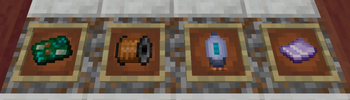
- Component System: The Radio isn't a magic block. You need to craft and install 3 essential components:
- Magnetic Coil
- Vacuum Tube
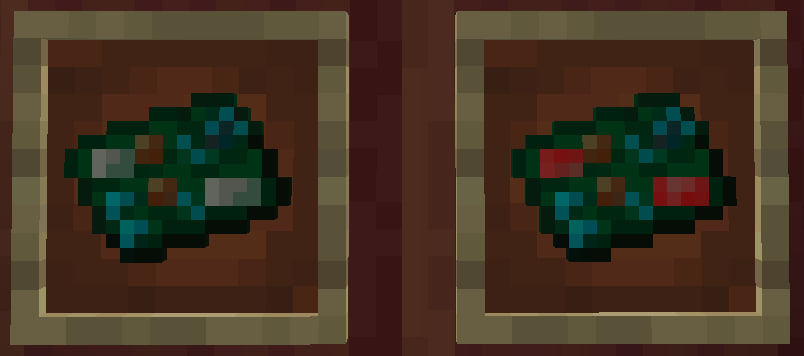
- Crystal Resonator
- Antenna Requirement: You must place a Lightning Rod (or configured block) on top of the radio to receive a signal.
- Lightning Hazard: If lightning strikes your antenna, your radio might fry! Components can burn out, and connected speakers might overload. Protect your equipment!
🖥️ Modern UI
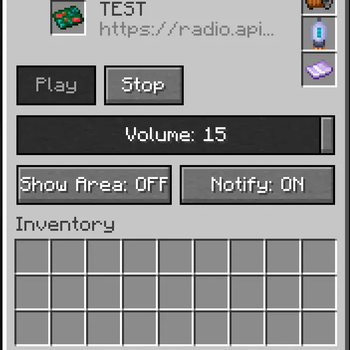
- Vanilla-Style GUI: Clean, intuitive interface that fits perfectly with the game's aesthetic.
- Tabs: Easily switch between Main controls and Speaker management.
- Status Indicators: Clear visual feedback on connection status, errors, and missing components.
🛠️ Installation
- Install Minecraft Forge for 1.20.1.
- Drop the
apiumradio-x.x.x.jarinto yourmodsfolder. - Launch the game and craft your first Radio!
🎮 Getting Started
- Craft a Radio and place it down.
- Place an Antenna (Lightning Rod) on top of it.
- Insert Components: Open the GUI and place the Coil, Lamp, and Resonator in their slots.
- Tune In: Enter a stream URL (e.g., a direct MP3 link) and hit Play.
- Expand: Craft Speakers and Cables to set up a sound system for your entire base.
🔧 Configuration
The mod is highly configurable via apiumradio-common.toml:
- Max Speakers: Limit the number of speakers per radio (Default: 32).
- Default URL: Set a default station for new radios.
- Antenna Block: Change which block acts as an antenna.
Apium Radio is the only up-to-date, feature-rich radio mod for modern Minecraft versions. Experience music like never before!
Available Versions
How to Install ApiumRadio on Your Server
Order Server
Order a Minecraft Java server with at least 3 GB RAM (4 GB recommended).
Set forge Loader
In the panel under "Egg", select the forge loader and matching Minecraft version (1.20.6).
Install Mod
Open the mod browser in the dashboard and search for "ApiumRadio". Click "Install" – done! Alternatively, upload the .jar via SFTP to the /mods folder.
Compatibility
Mod Loaders
Minecraft Versions
1.20.6, 1.20.5, 1.20.4 (+3 more)
Server-side
✓ RequiredRecommended RAM
4 GB(min. 3 GB)Frequently Asked Questions
ApiumRadio server crashes on startup – what to do?
Most common cause: wrong forge version or insufficient RAM. Check the server log (latest.log) for "OutOfMemoryError" or "Mixin" errors. With Mado Hosting: ensure at least 3 GB RAM is allocated and the loader matches the mod version (1.20.6). You can switch loaders with one click in the panel.
Is ApiumRadio compatible with forge?
ApiumRadio officially supports forge for Minecraft 1.20.6, 1.20.5, 1.20.4. The Mado dashboard automatically detects incompatible loader combinations.
Server lagging with ApiumRadio – how to optimize performance?
Recommended RAM: 4 GB (per 8 players). Use /spark profiler to check if ApiumRadio consumes the most tick time. Common fixes: reduce server view-distance to 8-10, install "performant" or "starlight" as supplementary mods on Forge. With Mado Hosting, your server runs on NVMe SSDs with dedicated CPU cores for minimal latency.
Similar Mods




Rent Modded Server
Install ApiumRadio with just one click on your server.