
APMCraft
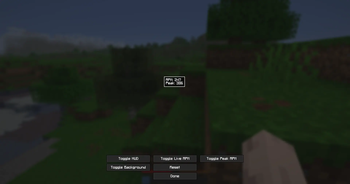
Track your APM! APMCraft adds a real-time APM (Actions Per Minute) counter to Minecraft, inspired by StarCraft II and Warcraft III. Track your live APM and peak APM as you play, whether you're fighting, building, or just spamming for fun.
Screenshots

About this Mod
A very simple mod that I made to track my APM while playing Acrobat on WynnCraft.
APMCraft adds a real-time APM (Actions Per Minute) counter to Minecraft, inspired by StarCraft II, Warcraft III, and Desktop APM.
Track your live APM and peak APM as you play, whether you're fighting, building, or just spamming for fun.
Customize the display using ModMenu. You can move it anywhere on your screen and toggle live or peak APM on/off.
All mouse clicks and key presses count toward your APM, even while in menus. This ensures speedrunners, including those who rely on the escape menu and fast inventory interactions, are fully tracked.
APM tracking is only paused when chat is open or when the game is unfocused.
This mod is designed for fun, not to track your effective APM (meaningful actions). So go ahead and mash your way to insane APM numbers.
Please note that like most APM trackers, your numbers will stabilize and appear more “normal” after about 60 seconds of gameplay.
Available Versions
How to Install APMCraft on Your Server
Order Server
Order a Minecraft Java server with at least 3 GB RAM (4 GB recommended).
Set fabric Loader
In the panel under "Egg", select the fabric loader and matching Minecraft version (1.21.11).
Install Mod
Open the mod browser in the dashboard and search for "APMCraft". Click "Install" – done! Alternatively, upload the .jar via SFTP to the /mods folder.
Compatibility
Mod Loaders
Minecraft Versions
1.21.11
Server-side
✗ UnsupportedRecommended RAM
4 GB(min. 3 GB)Frequently Asked Questions
APMCraft server crashes on startup – what to do?
Most common cause: wrong fabric version or insufficient RAM. Check the server log (latest.log) for "OutOfMemoryError" or "Mixin" errors. With Mado Hosting: ensure at least 3 GB RAM is allocated and the loader matches the mod version (1.21.11). You can switch loaders with one click in the panel.
Is APMCraft compatible with fabric?
APMCraft officially supports fabric for Minecraft 1.21.11. The Mado dashboard automatically detects incompatible loader combinations.
Server lagging with APMCraft – how to optimize performance?
Recommended RAM: 4 GB (per 8 players). Use /spark profiler to check if APMCraft consumes the most tick time. Common fixes: reduce server view-distance to 8-10, install "performant" or "starlight" as supplementary mods on Forge. With Mado Hosting, your server runs on NVMe SSDs with dedicated CPU cores for minimal latency.
Similar Mods




![[ETF] Entity Texture Features](https://cdn.modrinth.com/data/BVzZfTc1/af683d206d50b05258d865b0d6e4aa2f2cee12f2_96.webp)
![[EMF] Entity Model Features](https://cdn.modrinth.com/data/4I1XuqiY/6e5bbd0d06b1741bfdab6c0cfab6de8fdaf0064c_96.webp)
Rent Modded Server
Install APMCraft with just one click on your server.