
Apple Armor
[Fabric] Adds full Apple & Golden Apple Armor Set
Screenshots

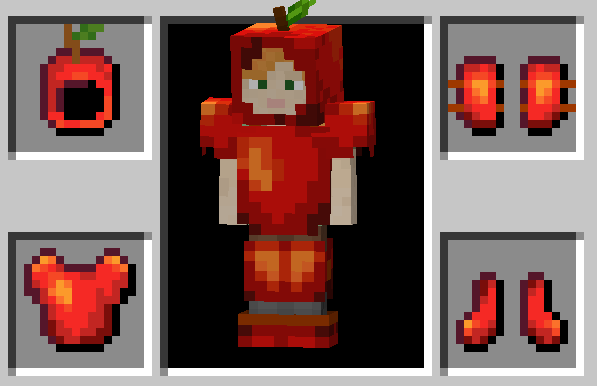
About this Mod
Vanilla+ mod for people who drink applesauce all by themselve
Features
Apple Armor
- Replenishes hunger upon being damaged.
- Wearing multiple pieces has slight diminishing returns. Meaning wearing 3 pieces (e.g. Helmet, Leggins & Chestplate) does not equal 3x the effect of wearing only 1 piece (e.g. only the helmet). This would be closer to 2.5x effectiveness.
- Wearing the full set of Apple Armor additionally increases the effect.
- Protection Enchantments increase the effect.
- When a armor piece breaks an apple gets dropped (2 for chestplate).
Golden Apple Armor
- Includes every Apple Armor feature.
- Bestows same status effects as golden apples upon being damaged.
- Try enchanting the armor! (doesnt matter which enchantment)
General
- Every variable is fully customizable. (Configuration can be accessed through the options screen and clicking the button with a round symbol in the top left or through using ModMenu.)
Installation
- Install Fabric
- Navigate to your .minecraft folder (in the MC launcher select the "installation" header and click the file icon next to your fabric installation)
- Download matching version of the mod and place the .jar file in .minecraft/mods
- Play :)
Supported Languages
- English
- German
Available Versions
How to Install Apple Armor on Your Server
Order Server
Order a Minecraft Java server with at least 3 GB RAM (4 GB recommended).
Set fabric Loader
In the panel under "Egg", select the fabric loader and matching Minecraft version (1.19.4).
Install Mod
Open the mod browser in the dashboard and search for "Apple Armor". Click "Install" – done! Alternatively, upload the .jar via SFTP to the /mods folder.
Compatibility
Mod Loaders
Minecraft Versions
1.19.4, 1.19.3, 1.19.2 (+3 more)
Server-side
✓ RequiredRecommended RAM
4 GB(min. 3 GB)Frequently Asked Questions
Apple Armor server crashes on startup – what to do?
Most common cause: wrong fabric version or insufficient RAM. Check the server log (latest.log) for "OutOfMemoryError" or "Mixin" errors. With Mado Hosting: ensure at least 3 GB RAM is allocated and the loader matches the mod version (1.19.4). You can switch loaders with one click in the panel.
Is Apple Armor compatible with fabric?
Apple Armor officially supports fabric for Minecraft 1.19.4, 1.19.3, 1.19.2. The Mado dashboard automatically detects incompatible loader combinations.
Server lagging with Apple Armor – how to optimize performance?
Recommended RAM: 4 GB (per 8 players). Use /spark profiler to check if Apple Armor consumes the most tick time. Common fixes: reduce server view-distance to 8-10, install "performant" or "starlight" as supplementary mods on Forge. With Mado Hosting, your server runs on NVMe SSDs with dedicated CPU cores for minimal latency.
Similar Mods

![[ETF] Entity Texture Features](https://cdn.modrinth.com/data/BVzZfTc1/af683d206d50b05258d865b0d6e4aa2f2cee12f2_96.webp)
![[EMF] Entity Model Features](https://cdn.modrinth.com/data/4I1XuqiY/6e5bbd0d06b1741bfdab6c0cfab6de8fdaf0064c_96.webp)



Rent Modded Server
Install Apple Armor with just one click on your server.