
APS Battles
APS Battles is a gameplay overhaul mod built for the APS Cobblemon Server extending Cobblemon's default battle challenge system with a fully custom UI, competitive rule presets, and a complete in-game tournament engine — including a live we
Screenshots
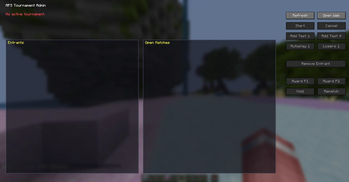
About this Mod
APS Battles
APS Battles is a gameplay overhaul mod built for the APS Cobblemon modpack. It replaces Cobblemon's default player challenge system with a fully custom battle UI, competitive rule presets, and a complete in-game tournament engine — including a live web bracket viewer and Discord integration.
⚔️ Custom Battle Challenge System
When challenging another player, a redesigned Battle Builder screen gives both players full control over how the match is played before it starts.
- Battle Modes — Singles or Doubles format
- Level Settings — Set a level cap or enforce level-lock rules for fair play
- Ban Lists — Ban specific Pokémon or entire ban categories
- Clause Options — Toggle competitive clauses including a custom Dry Pass Clause
- Doubles Roster — Configure team selection specifically for double battles
- Battle Presets — Load server-synced rule configurations in one click (e.g. OU, Ubers, server-standard)
🔢 Team Order Screen
Before every battle, players arrange their Pokémon's send-out order — a competitive staple not included in vanilla Cobblemon.
🏆 Tournament System
A fully featured tournament engine for running structured competitions on the server, with elimination brackets, match tracking, and placements.
🌐 Live Web Bracket Viewer
A built-in web service serves a live tournament page for spectators to follow in any browser, with real-time updates via SSE, match history, and Pokémon previews per player.
💬 Discord Integration
Automatic match announcements, results, and bracket updates can be broadcast to a Discord server via the built-in JDA bot.
🕹️ How to Use
In-Game (No Commands)
Right-click any player to open the interact menu:
- Select Challenge to open the Battle Builder and configure a custom match
- Select Tournament Battle if you are matched against them in an active tournament
After accepting a challenge, both players go through the Team Order screen to set their send-out order before the battle begins.
Player Commands
All commands use the /apstour root.
| Command | Description |
|---|---|
/apstour join |
Opens the tournament signup screen |
/apstour leave |
Leaves the current tournament signup |
/apstour forfeit |
Forfeits your current tournament game |
/apstour spectate |
Toggles spectator announcements for match results and bracket updates |
Admin Commands
| Command | Description |
|---|---|
/apstour create |
Opens the tournament creation screen to configure format, preset, elimination type, and best-of count |
/apstour start |
Starts the active tournament and begins bracket matchmaking |
/apstour cancel |
Cancels the active tournament |
/apstour admin |
Opens the admin dashboard to monitor participants and manage matches |
/apstour listpresets |
Lists all available battle presets configured on the server |
/apstour send <url> |
Opens the live bracket web viewer in a player's browser |
/apstour forceforfeit <player> |
Forces a forfeit for a specific player's current match |
/apstour testadd <count> |
Adds dummy participants for testing |
/apstour testautoplay |
Auto-resolves all pending matches for testing |
/apstour testautoplaylosers |
Auto-resolves losers bracket matches for testing |
Available Versions
How to Install APS Battles on Your Server
Order Server
Order a Minecraft Java server with at least 3 GB RAM (4 GB recommended).
Set fabric Loader
In the panel under "Egg", select the fabric loader and matching Minecraft version (1.21.1).
Install Mod
Open the mod browser in the dashboard and search for "APS Battles". Click "Install" – done! Alternatively, upload the .jar via SFTP to the /mods folder.
Compatibility
Mod Loaders
Minecraft Versions
1.21.1
Server-side
✓ RequiredRecommended RAM
4 GB(min. 3 GB)Frequently Asked Questions
APS Battles server crashes on startup – what to do?
Most common cause: wrong fabric version or insufficient RAM. Check the server log (latest.log) for "OutOfMemoryError" or "Mixin" errors. With Mado Hosting: ensure at least 3 GB RAM is allocated and the loader matches the mod version (1.21.1). You can switch loaders with one click in the panel.
Is APS Battles compatible with fabric?
APS Battles officially supports fabric for Minecraft 1.21.1. The Mado dashboard automatically detects incompatible loader combinations.
Server lagging with APS Battles – how to optimize performance?
Recommended RAM: 4 GB (per 8 players). Use /spark profiler to check if APS Battles consumes the most tick time. Common fixes: reduce server view-distance to 8-10, install "performant" or "starlight" as supplementary mods on Forge. With Mado Hosting, your server runs on NVMe SSDs with dedicated CPU cores for minimal latency.
Similar Mods




Rent Modded Server
Install APS Battles with just one click on your server.