
AquaGuard
Forge mod that implements data logging.
Screenshots
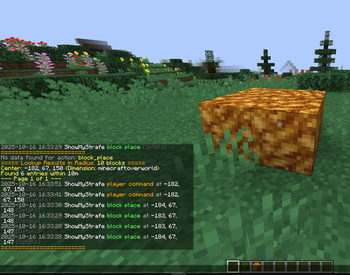
About this Mod
AquaGuard
AquaGuard is a powerful server administration mod for Minecraft Forge, designed to help server owners track and manage in-game activities with ease. It logs player actions, block changes, fluid placements, and more, while providing robust tools for inspection, rollback, and log pruning to maintain a fair and secure server environment.
Features
- Comprehensive Logging: Tracks block placements, breaks, fluid interactions, container access, player deaths, logins, logouts, chat, commands, and more.
- Inspect Tool: Use a special stick to inspect block history with detailed logs (left/right-click blocks).
- Rollback & Restore: Revert or restore changes by player or radius, supporting blocks and fluids, with customizable timeframes.
- Prune Logs: Clean up old logs to keep your database lean and efficient.
- Customizable: Enable or disable specific logging options via the config file.
Commands
/ag inspector/ag i: Toggle the inspect mode to view block history./ag lookup <user/radius/position> ...: Search logs by player, radius, or specific position./ag rollback <user/radius> ...: Revert changes made by a player or within a radius./ag restore <user/radius> ...: Restore changes to their original state./ag prune <time>: Remove logs older than the specified time (e.g.,7dfor 7 days).
Installation
- Ensure you have Minecraft Forge installed for your Minecraft version (e.g., 1.20.1).
- Download the latest AquaGuard release from Modrinth.
- Place the
.jarfile in your server'smodsfolder. - Start the server to generate the
aquaguardconfig folder inconfig/. - (Optional) Edit
config/aquaguard/aquaguard_logs.jsonto customize logging settings.
Requirements
- Minecraft: 1.20.1 (or compatible version)
- Forge: Latest for your Minecraft version
- Server-side: Works on servers, no client mod required
Support
Dm me on Telegram for help, or report issues on GitHub.
License
AquaGuard is licensed under the MIT License. See GitHub for details.
Available Versions
How to Install AquaGuard on Your Server
Order Server
Order a Minecraft Java server with at least 3 GB RAM (4 GB recommended).
Set forge Loader
In the panel under "Egg", select the forge loader and matching Minecraft version (1.20.6).
Install Mod
Open the mod browser in the dashboard and search for "AquaGuard". Click "Install" – done! Alternatively, upload the .jar via SFTP to the /mods folder.
Compatibility
Mod Loaders
Minecraft Versions
1.20.6, 1.20.5, 1.20.4 (+3 more)
Server-side
✓ RequiredRecommended RAM
4 GB(min. 3 GB)Frequently Asked Questions
AquaGuard server crashes on startup – what to do?
Most common cause: wrong forge version or insufficient RAM. Check the server log (latest.log) for "OutOfMemoryError" or "Mixin" errors. With Mado Hosting: ensure at least 3 GB RAM is allocated and the loader matches the mod version (1.20.6). You can switch loaders with one click in the panel.
Is AquaGuard compatible with forge?
AquaGuard officially supports forge for Minecraft 1.20.6, 1.20.5, 1.20.4. The Mado dashboard automatically detects incompatible loader combinations.
Server lagging with AquaGuard – how to optimize performance?
Recommended RAM: 4 GB (per 8 players). Use /spark profiler to check if AquaGuard consumes the most tick time. Common fixes: reduce server view-distance to 8-10, install "performant" or "starlight" as supplementary mods on Forge. With Mado Hosting, your server runs on NVMe SSDs with dedicated CPU cores for minimal latency.
Similar Mods




Rent Modded Server
Install AquaGuard with just one click on your server.