
Archeology Mod
Archeology System from Minecraft Live 2020
Screenshots
About this Mod
Archeology Mod



Archeology Mod is a Fabric mod for Minecraft, that adds Archeology System! My goal was to make it as Vanilla-like as I possibly could, to try to imagine how Mojang will implement it (and maybe even give them inspiration).
If you found a bug, or have a suggestion, advice, please create a GitHub Issue.

The mod requires Fabric API to work! Also, this is recommended to use Mod Menu to easily edit mod's config.
What is the Archeology System?
Archeology was firstly introduced at Minecraft Live 2020, but was later delayed from 1.17 Caves and Cliffs Update. Officially announced features of the Archeology System:
- Excavation Dig Sites (structures)
- Archeology Brush (presumably made of Copper and can oxidize)
- Brushing mechanic (removing layers from soft blocks to get loot)
- Ceramic Shards
- Hardened and Raw Clay Pots
- Hardening (firing up) Clay Pots
Mod features
Some of the features that I added wasn't announced by Mojang and was made up by me. There is a full list of all implemented features:
Copper Brush (AKA Archeology Brush)
Copper Brush is a new tool, used for excavating special blocks for getting loot. It is made using a Copper Ingot and a Feather.
- More you use the brush, more oxidized it gets.
- More oxidized brush is, rarer loot you get (similar to Luck of the Sea enchantment), but harder it is to not break brushing block.

Excavation Blocks
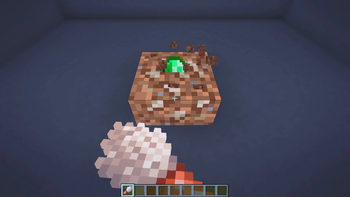
New block type — Excavation Block! Currently, there are four excavation blocks in the mod: Excavation Dirt, Gravel, Sand and Red Sand.
- They look similar to regular block (e.g., Dirt or Gravel), but have white stripes, and you can use a Copper Brush on them to start brushing layers off.
- When fully brushed off, the block drops random loot (depending on excavation site you found it, and oxidation level of the brush)
- While brushing, you should move your mouse like you are brushing to stop the block from breaking. If you don't move the mouse enough, the block will eventually break, and you won't get anything. The more oxidized your brush is, the faster the block breaks, and therefore faster you need to move the mouse.
- Actually, Mojang showed this feature other way around: if you are not careful enough, the block will break. However, I changed it so that it's more challenging and exciting (you can tweak the difficulty in the mod's config).
Ceramic Shards
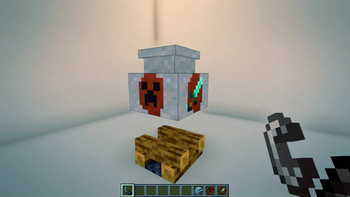
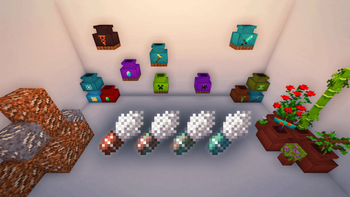
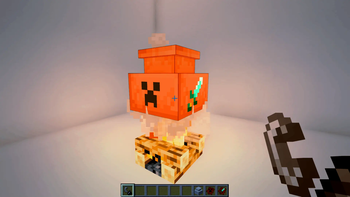
Ceramic Shards are items, that are dropped from brushing the Excavation Blocks. You can place them on the Raw Clay Pot, so that when hardened, this pot will retain placed shards and have pretty drawing on it.
- Different shards have different drawings on them, and the drawing of the shard depends on the Excavation Site you found it.
Raw Clay Pots
This is a block that used to make (Hardened) Clay Pot. It is made of 5 Clay Balls. When broken, it drops 2-4 clay balls (or block itself if mined using Silk Touch enchantment), and shards, if there were any. The fastest tool is shovel.
- You can put up to 8 shards on one raw clay pot: 4 on the sides and 4 on the corners.
- If you light up a fire or a campfire underneath it, it will harden after some time and become a Clay Pot.

Clay Pots (AKA Hardened Clay Pots)
This is a container block, that has 9 item slots (not counting shards). The player cannot insert items into it directly, but should rather use a hopper or a dropper to insert items. However, after inserting, there is no way to get these items back without breaking the pot. Think about it like a Piggy Bank.
- Shulker Boxes or other Clay Pots cannot be inserted into a Clay Pot.
- If you break the pot with Silk Touch enchantment, you will get the Clay Pot with all contents. It could be thought of like early-game Shulker Box with less space and no reusability.
- Clay Pots are Gravity-Affected Blocks, and preserve inserted items and shards after landing.
- If a Clay Pot doesn't find a place to land (like sand landed on a torch), or despawns, it will break and pop all items in it.

You can dye them by using Dye on an uncolored Clay Pot, and you can remove dye using Water Bottle on already dyed ones.
Excavation Sites
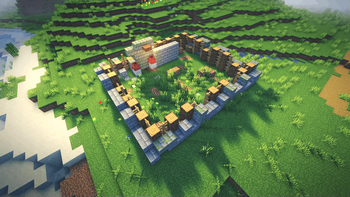
Excavation Sites are structures in where you can find Excavation Blocks. This is the only place where these blocks spawn naturally and where you can find them in Survival. You can also find a Clay Pots with loot in them here! These are all currently existing structures in the mod:
- Excavation Site Plains
- Excavation Site Snow
- Excavation Site Mangrove
- Excavation SIte Desert

When you enter any Excavation Site, you get an advancement called "Forgotten Legacy".
Unimplemented Features (yet)
- Copper Brush enchantments
- (Maybe) The Copper Golem
Available Versions
How to Install Archeology Mod on Your Server
Order Server
Order a Minecraft Java server with at least 3 GB RAM (4 GB recommended).
Set fabric Loader
In the panel under "Egg", select the fabric loader and matching Minecraft version (1.19.3).
Install Mod
Open the mod browser in the dashboard and search for "Archeology Mod". Click "Install" – done! Alternatively, upload the .jar via SFTP to the /mods folder.
Compatibility
Mod Loaders
Minecraft Versions
1.19.3, 1.19.2, 1.19.1 (+2 more)
Server-side
✓ RequiredRecommended RAM
4 GB(min. 3 GB)Frequently Asked Questions
Archeology Mod server crashes on startup – what to do?
Most common cause: wrong fabric version or insufficient RAM. Check the server log (latest.log) for "OutOfMemoryError" or "Mixin" errors. With Mado Hosting: ensure at least 3 GB RAM is allocated and the loader matches the mod version (1.19.3). You can switch loaders with one click in the panel.
Is Archeology Mod compatible with fabric?
Archeology Mod officially supports fabric for Minecraft 1.19.3, 1.19.2, 1.19.1. The Mado dashboard automatically detects incompatible loader combinations.
Server lagging with Archeology Mod – how to optimize performance?
Recommended RAM: 4 GB (per 8 players). Use /spark profiler to check if Archeology Mod consumes the most tick time. Common fixes: reduce server view-distance to 8-10, install "performant" or "starlight" as supplementary mods on Forge. With Mado Hosting, your server runs on NVMe SSDs with dedicated CPU cores for minimal latency.
Similar Mods

![[ETF] Entity Texture Features](https://cdn.modrinth.com/data/BVzZfTc1/af683d206d50b05258d865b0d6e4aa2f2cee12f2_96.webp)
![[EMF] Entity Model Features](https://cdn.modrinth.com/data/4I1XuqiY/6e5bbd0d06b1741bfdab6c0cfab6de8fdaf0064c_96.webp)



Rent Modded Server
Install Archeology Mod with just one click on your server.