
Archipelago (CI Assistant Mod)
The Cobblemon Islands Assistant Mod!
Screenshots


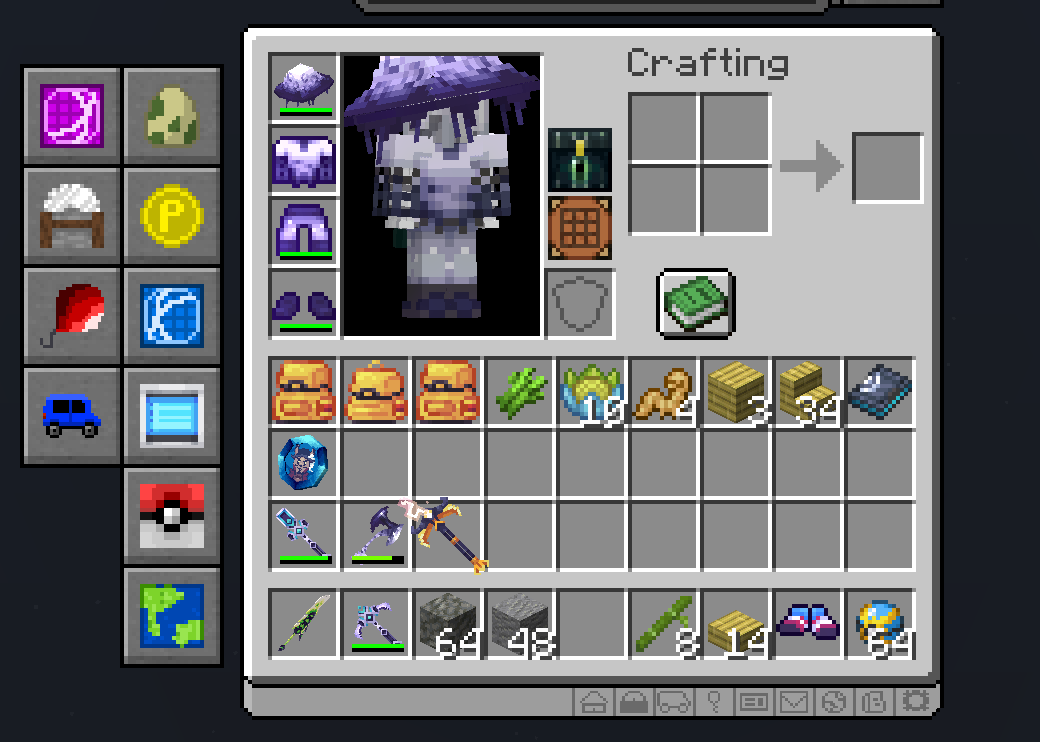

About this Mod
NOTE: Archipelago is designed to be used on the Cobblemon Islands Server!
Archipelago, the Cobblemon Islands Assistant Mod, Made by the Players, for the Players!

Archipelago adds various buttons and tweaks to make your experience on the Islands a lot easier!
Adds the following buttons to the inventory screen:
- Daycare
- Shop
- GTS
- PC
- Realms
- Pokebuilder
- Wondertrade
- Stonecutter
- Anvil
- Balloons
- Vehicles
- Kits
- RSW
- Mailbox
- Trainercard
- Battlepass
- Daily Rewards
- Workbench
- Ender chest
- 3 Home Buttons, that can be set to any home!
Buttons can be configured inside of the Mod Menu, accessible via Esc > Mods > Archipelago (Or the options button on the bottom right of the inventory)
New in 1.2.0: You can now create custom buttons that run any command!
The mod also adds a hotkey for the ./feed command (Useable by ranked players only.)
Additional hotkeys are also added for the checkegg command.
New in 1.5.0: Support for viewing skin tokens inside of the inventory!
New in 1.7.0: Item Frame Skin Token Display!
The new item frame feature allows you to display Pokémon Skin Tokens directly in the world! By placing specific blocks behind or below the note block the item frame is placed upon, you can customize the Pokémon's evolution stage, form, pose, and even its shiny status.
Placing an Iron Block, Gold block or Diamond Block below the instrument block will change the Pokémon's evolution
Instruments:
default -> Forms
- BIT -> Mega Form 1
- XYLOPHONE -> Mega Form 2 (E.g. Mega Y)
- COW_BELL -> Mega Form 3 (E.g. Mega Z)
- Changing the Note block's pitch will cycle a Pokémon's pose!
The mod only uses commands provided by the server itself. So it is not useable in single-player, and completely safe to use!
This mod is not affiliated with Cobblemon Islands officially! It's a fan-made project! Please do not direct any critique or bugs towards CI Staff!
If you have any issues or suggestions with the mod, feel free to contact me on Discord!
Available Versions
How to Install Archipelago (CI Assistant Mod) on Your Server
Order Server
Order a Minecraft Java server with at least 3 GB RAM (4 GB recommended).
Set fabric Loader
In the panel under "Egg", select the fabric loader and matching Minecraft version (1.21.1).
Install Mod
Open the mod browser in the dashboard and search for "Archipelago (CI Assistant Mod)". Click "Install" – done! Alternatively, upload the .jar via SFTP to the /mods folder.
Compatibility
Mod Loaders
Minecraft Versions
1.21.1
Server-side
✗ UnsupportedRecommended RAM
4 GB(min. 3 GB)Frequently Asked Questions
Archipelago (CI Assistant Mod) server crashes on startup – what to do?
Most common cause: wrong fabric version or insufficient RAM. Check the server log (latest.log) for "OutOfMemoryError" or "Mixin" errors. With Mado Hosting: ensure at least 3 GB RAM is allocated and the loader matches the mod version (1.21.1). You can switch loaders with one click in the panel.
Is Archipelago (CI Assistant Mod) compatible with fabric?
Archipelago (CI Assistant Mod) officially supports fabric for Minecraft 1.21.1. The Mado dashboard automatically detects incompatible loader combinations.
Server lagging with Archipelago (CI Assistant Mod) – how to optimize performance?
Recommended RAM: 4 GB (per 8 players). Use /spark profiler to check if Archipelago (CI Assistant Mod) consumes the most tick time. Common fixes: reduce server view-distance to 8-10, install "performant" or "starlight" as supplementary mods on Forge. With Mado Hosting, your server runs on NVMe SSDs with dedicated CPU cores for minimal latency.
Similar Mods




![[ETF] Entity Texture Features](https://cdn.modrinth.com/data/BVzZfTc1/af683d206d50b05258d865b0d6e4aa2f2cee12f2_96.webp)
![[EMF] Entity Model Features](https://cdn.modrinth.com/data/4I1XuqiY/6e5bbd0d06b1741bfdab6c0cfab6de8fdaf0064c_96.webp)
Rent Modded Server
Install Archipelago (CI Assistant Mod) with just one click on your server.