
Architectural Building Wand
An advanced drag-and-drop construction tool and structure builder. Effortlessly place blocks, build walls, and fill areas in survival using a balanced ghost block preview planner.
Screenshots
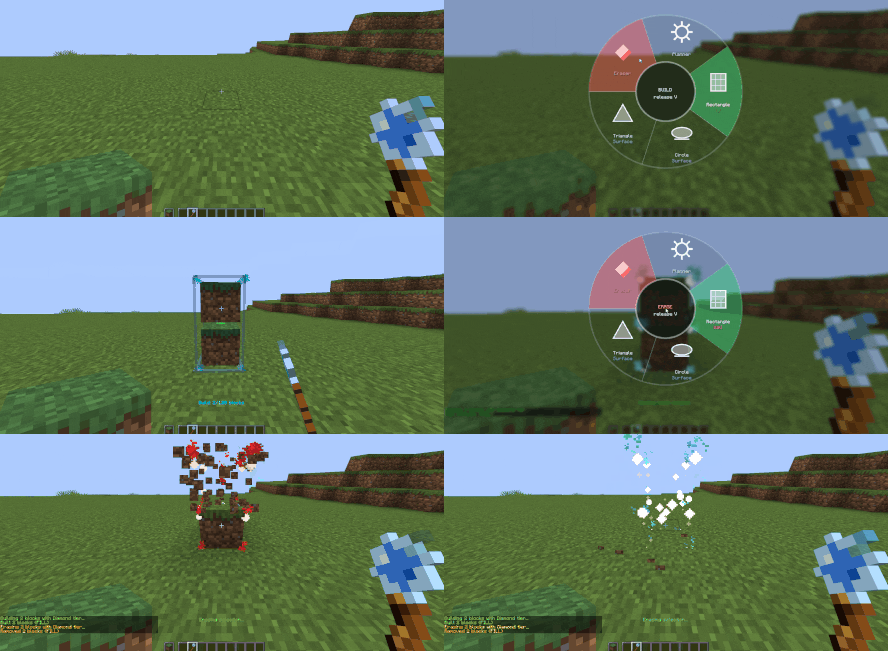
About this Mod

A sophisticated architectural tool designed for precision and speed. Using a seamless "Drag and Drop" mechanic, this mod allows you to construct complex structures with ease. Featuring a Planner Mode for full visualization before execution, it is perfectly balanced for Survival mode, ensuring a professional building experience without compromising game progression or balance.


Drag & Drop Construction: No complex point-marking required. Simply click and drag to define your structure, then release to build instantly.
Planner Mode: Preview structures as "ghost blocks" to visualize the final result and adjust dimensions before committing any resources.
Survival Balanced: Every aspect, including the Eraser tool, is tuned for Survival mode, respecting resource costs and tool durability.
Flexible Geometry: Supports Walls, Surfaces, Circles, and Triangles, with full control over orientation (Vertical/Horizontal).
Advanced Eraser: Remove blocks with the same geometric precision used for building, fully balanced for survival gameplay.
Custom Shortcuts: Access all modes instantly via a radial menu (default: V) or fully rebindable keys.

Radial Menu: Press V (default) to open the mode selection wheel.
Building: After selecting a mode, click on the ground, drag to scale your shape, and release to build.
Resources: Ensure the blocks you wish to build with are in your Offhand (Left hand).
Quick Controls (Scroll):
In Radial Menu (V): Hover over an icon and scroll to toggle between "Wall" and "Surface" modes.
During Preview: Scroll to change the build axis.
Block Orientation: Use Shift + Scroll during preview to rotate the individual block direction.

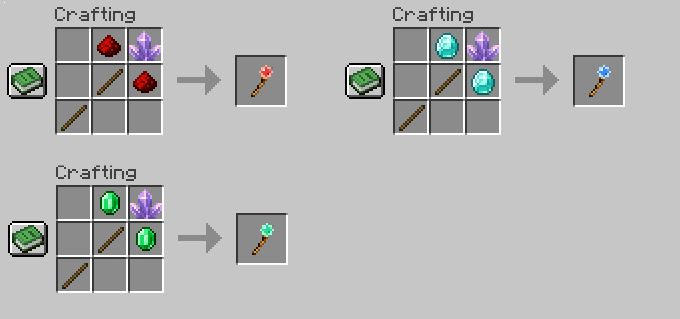
The wand is available in multiple tiers (Redstone, Emerald, Diamond). Higher tiers offer:
Increased block placement limits per operation.
Faster building and erasing speeds.
Extended reach for larger projects.

Developer: in2bubble
Project Name: Architectural Building Wand
Terms: You are free to use and share this mod as long as you adhere to the terms in the included LICENSE file.
Note: This license applies to version v1.1 and above.

The mod is fully compatible with the following loaders:
Fabric | Forge | NeoForge
Available Versions
How to Install Architectural Building Wand on Your Server
Order Server
Order a Minecraft Java server with at least 3 GB RAM (4 GB recommended).
Set fabric Loader
In the panel under "Egg", select the fabric loader and matching Minecraft version (26.1.2).
Install Mod
Open the mod browser in the dashboard and search for "Architectural Building Wand". Click "Install" – done! Alternatively, upload the .jar via SFTP to the /mods folder.
Compatibility
Mod Loaders
Minecraft Versions
26.1.2, 26.1.1, 26.1 (+6 more)
Server-side
✓ RequiredRecommended RAM
4 GB(min. 3 GB)Frequently Asked Questions
Architectural Building Wand server crashes on startup – what to do?
Most common cause: wrong fabric version or insufficient RAM. Check the server log (latest.log) for "OutOfMemoryError" or "Mixin" errors. With Mado Hosting: ensure at least 3 GB RAM is allocated and the loader matches the mod version (26.1.2). You can switch loaders with one click in the panel.
Is Architectural Building Wand compatible with fabric and forge and neoforge?
Architectural Building Wand officially supports fabric, forge, neoforge for Minecraft 26.1.2, 26.1.1, 26.1. Note: Forge and Fabric mods are NOT cross-compatible – pick one loader and stick with it. The Mado dashboard automatically detects incompatible loader combinations.
Server lagging with Architectural Building Wand – how to optimize performance?
Recommended RAM: 4 GB (per 8 players). Use /spark profiler to check if Architectural Building Wand consumes the most tick time. Common fixes: reduce server view-distance to 8-10, install "performant" or "starlight" as supplementary mods on Forge. With Mado Hosting, your server runs on NVMe SSDs with dedicated CPU cores for minimal latency.
Similar Mods

![[ETF] Entity Texture Features](https://cdn.modrinth.com/data/BVzZfTc1/af683d206d50b05258d865b0d6e4aa2f2cee12f2_96.webp)
![[EMF] Entity Model Features](https://cdn.modrinth.com/data/4I1XuqiY/6e5bbd0d06b1741bfdab6c0cfab6de8fdaf0064c_96.webp)



Rent Modded Server
Install Architectural Building Wand with just one click on your server.