
Armor Durability Warning
Warns you by ringing bells and chat messages when your armor pieces go below a adjustable threshold. GUI Key - O
Screenshots
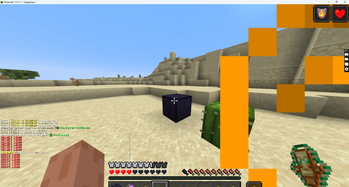
About this Mod
Armor HUD Mod
Overview
Armor HUD is a Minecraft Fabric mod that provides a simple and effective way to monitor your equipped armor durability without opening the inventory. It displays important armor information directly on the screen, allowing players to quickly check the condition of their gear while playing.
Features
Displays durability information for equipped armor pieces.
Provides a customizable HUD for better visibility.
Allows players to set durability warning thresholds.
Sends notifications when armor durability becomes low.
Works smoothly without affecting normal gameplay.
Advantages
Better Awareness: Players can always see their armor condition during gameplay.
Prevents Unexpected Breaks: Alerts help avoid losing protection because of broken armor.
Saves Time: Removes the need to repeatedly open the inventory to check durability.
Useful in Combat: Helps players prepare repairs or replacements during PvP and dangerous situations.
Customizable Experience: Players can adjust settings based on their preferences.
Use Cases
Armor HUD is useful for survival players, PvP players, explorers, and builders who depend on their equipment. It helps manage resources efficiently during long adventures, mining sessions, and battles.
Performance
The mod is lightweight and designed to run efficiently with Fabric. It does not modify Minecraft's core mechanics and focuses only on improving the player's information display.
Conclusion
Armor HUD improves the Minecraft experience by making armor durability tracking easier, faster, and more convenient. It provides essential information at a glance while keeping gameplay simple and immersive.
Available Versions
How to Install Armor Durability Warning on Your Server
Order Server
Order a Minecraft Java server with at least 3 GB RAM (4 GB recommended).
Set fabric Loader
In the panel under "Egg", select the fabric loader and matching Minecraft version (1.21.11).
Install Mod
Open the mod browser in the dashboard and search for "Armor Durability Warning". Click "Install" – done! Alternatively, upload the .jar via SFTP to the /mods folder.
Compatibility
Mod Loaders
Minecraft Versions
1.21.11
Server-side
✓ RequiredRecommended RAM
4 GB(min. 3 GB)Frequently Asked Questions
Armor Durability Warning server crashes on startup – what to do?
Most common cause: wrong fabric version or insufficient RAM. Check the server log (latest.log) for "OutOfMemoryError" or "Mixin" errors. With Mado Hosting: ensure at least 3 GB RAM is allocated and the loader matches the mod version (1.21.11). You can switch loaders with one click in the panel.
Is Armor Durability Warning compatible with fabric?
Armor Durability Warning officially supports fabric for Minecraft 1.21.11. The Mado dashboard automatically detects incompatible loader combinations.
Server lagging with Armor Durability Warning – how to optimize performance?
Recommended RAM: 4 GB (per 8 players). Use /spark profiler to check if Armor Durability Warning consumes the most tick time. Common fixes: reduce server view-distance to 8-10, install "performant" or "starlight" as supplementary mods on Forge. With Mado Hosting, your server runs on NVMe SSDs with dedicated CPU cores for minimal latency.
Similar Mods




![[ETF] Entity Texture Features](https://cdn.modrinth.com/data/BVzZfTc1/af683d206d50b05258d865b0d6e4aa2f2cee12f2_96.webp)
![[EMF] Entity Model Features](https://cdn.modrinth.com/data/4I1XuqiY/6e5bbd0d06b1741bfdab6c0cfab6de8fdaf0064c_96.webp)
Rent Modded Server
Install Armor Durability Warning with just one click on your server.