Armor Stand's Custom Poses
Change Properties and Pose of your Armor Stands. Even in survival!
Screenshots
About this Mod
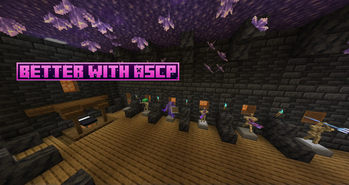
Tired of vanilla java armor stands?
Jealous of bedrock edition armor stands?
Me too, so I fixed them.
THIS MOD WORKS IN SURVIVAL AND CREATIVE MODE.
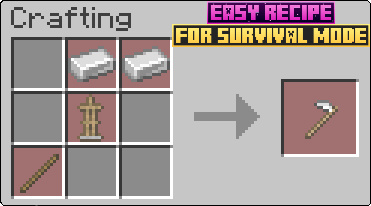
To get started with this mod, you will first need to craft the Armor Stand Modifier.

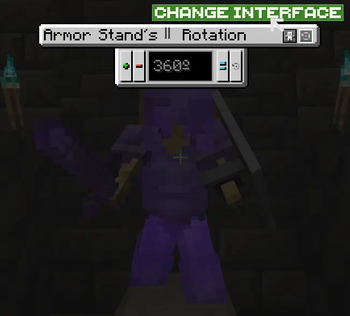
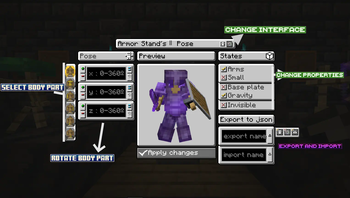
Once you have it, just right click an armor stand. This will open an interface to modify its properties and pose.

Body part Rotation Buttons:
-Plus (+) = Adds the
-Minus (-) = Rests the
-Set (=) = Sets the
-Get default (↩️) = Sets in the textfield the current rotation value of the armor stand (IMPORTANT: NOT THE PREVIEW ARMOR STAND, THE REAL ARMOR STAND IN WORLD)
IMPORT AND EXPORT BUTTONS
Exporting: 1º Put a name to file (can´t contain ".", "/", "" or strange characters). 2º Press export button.
Importing: 1º Put the name of the file you want to import. 2º Press import button. 3º Press confirm button.
The files are .json stored in ".minecraft/ASCP_Saved". They are only saved in client, so you can export/import in different servers/worlds without problems.
Extra info:
-The buttons at right of the export button are for chosing if exporting Pose and/or Armor Stand Rotation and/or States
-When importing, you will have to confirm operation with a confirm buttons that appears at right of the import button. It will also apply changes.
SECOND INTERFACE
To enter in this interface, you have to press the Change Interface Button (indicated in First Interface image).

Plus (+) button = Add
Minus (-) button = Rests
Set (=) button = Sets
Get (↩️) button = Sets in the textfield the old rotation of the real armor stand, for obtain new rotation, you have to apply changes in the First Interface.
IMPORTANT: In this Interface the changes are directly applied to the real armor stand.
VERSIONS:
This mod is currently for:
Forge: 1.14.4, 1.16.5, 1.18.2, 1.19.2, 1.19.4, 1.20.1
NeoForge: 1.20.4
Im intended to update to next´s Forge and NeoForge versions when they release. And future updates with new features like player heads and animations (Im going to take a break so it will take long).
Available Versions
How to Install Armor Stand's Custom Poses on Your Server
Order Server
Order a Minecraft Java server with at least 3 GB RAM (4 GB recommended).
Set forge Loader
In the panel under "Egg", select the forge loader and matching Minecraft version (1.20.4).
Install Mod
Open the mod browser in the dashboard and search for "Armor Stand's Custom Poses". Click "Install" – done! Alternatively, upload the .jar via SFTP to the /mods folder.
Compatibility
Mod Loaders
Minecraft Versions
1.20.4, 1.20.1, 1.19.4 (+4 more)
Server-side
✓ RequiredRecommended RAM
4 GB(min. 3 GB)Frequently Asked Questions
Armor Stand's Custom Poses server crashes on startup – what to do?
Most common cause: wrong forge version or insufficient RAM. Check the server log (latest.log) for "OutOfMemoryError" or "Mixin" errors. With Mado Hosting: ensure at least 3 GB RAM is allocated and the loader matches the mod version (1.20.4). You can switch loaders with one click in the panel.
Is Armor Stand's Custom Poses compatible with forge and neoforge?
Armor Stand's Custom Poses officially supports forge, neoforge for Minecraft 1.20.4, 1.20.1, 1.19.4. The Mado dashboard automatically detects incompatible loader combinations.
Server lagging with Armor Stand's Custom Poses – how to optimize performance?
Recommended RAM: 4 GB (per 8 players). Use /spark profiler to check if Armor Stand's Custom Poses consumes the most tick time. Common fixes: reduce server view-distance to 8-10, install "performant" or "starlight" as supplementary mods on Forge. With Mado Hosting, your server runs on NVMe SSDs with dedicated CPU cores for minimal latency.
Similar Mods

![[ETF] Entity Texture Features](https://cdn.modrinth.com/data/BVzZfTc1/af683d206d50b05258d865b0d6e4aa2f2cee12f2_96.webp)
![[EMF] Entity Model Features](https://cdn.modrinth.com/data/4I1XuqiY/6e5bbd0d06b1741bfdab6c0cfab6de8fdaf0064c_96.webp)



Rent Modded Server
Install Armor Stand's Custom Poses with just one click on your server.