
ArmorBegone
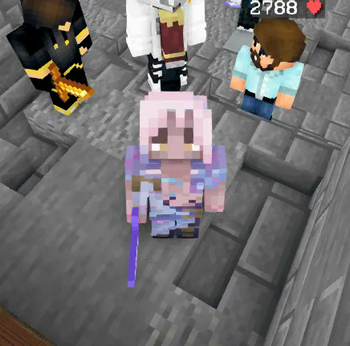
This is a project I've been waiting for for 3 years that I finally decided to create. For Hypixel Skyblock players at a top level, outside of various cosmetics to add to your armor, nothing represents you more than your very own minecraft skin Fixed
Screenshots
About this Mod
Notice: I will soon be migrating this project and it's features over to a new mod, Nod3py's Customs. When available, please consider downloading at the following page: https://modrinth.com/mod/nod3pyscustoms
Armor Begone
Armor Begone is a project I've been waiting for for 3 years that I finally decided to create. For Hypixel Skyblock players at a top level, outside of various cosmetics to add to your armor, nothing showcases your personality better than your skin.
I'm here to fix that.
What does it do?
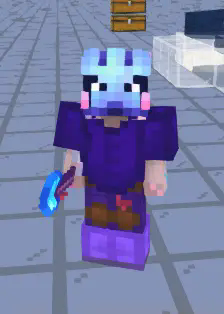
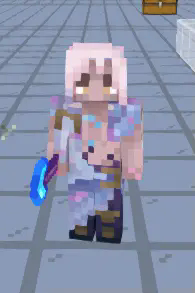
Essentially, any armor or player head (textured skull item) worn by the player will not render, allowing for a full view of other player's skins in game.
The Future
I am currently only going to be supporting fabric for 1.21.1 for the time being. From what I know of this is the best version of the game to be running mods for Hypixel Skyblock on that will be supported come the foraging update.
This is also my first mod, so realistically it's gonna take me a while to get the ball rolling :p
Issues:
- When enabled, skull items sometimes may not render in your hotbar.
Requirements
- Cloth Config
- Mod Menu
- Fabric API
Available Versions
How to Install ArmorBegone on Your Server
Order Server
Order a Minecraft Java server with at least 3 GB RAM (4 GB recommended).
Set fabric Loader
In the panel under "Egg", select the fabric loader and matching Minecraft version (1.21.1).
Install Mod
Open the mod browser in the dashboard and search for "ArmorBegone". Click "Install" – done! Alternatively, upload the .jar via SFTP to the /mods folder.
Compatibility
Mod Loaders
Minecraft Versions
1.21.1
Server-side
✗ UnsupportedRecommended RAM
4 GB(min. 3 GB)Frequently Asked Questions
ArmorBegone server crashes on startup – what to do?
Most common cause: wrong fabric version or insufficient RAM. Check the server log (latest.log) for "OutOfMemoryError" or "Mixin" errors. With Mado Hosting: ensure at least 3 GB RAM is allocated and the loader matches the mod version (1.21.1). You can switch loaders with one click in the panel.
Is ArmorBegone compatible with fabric?
ArmorBegone officially supports fabric for Minecraft 1.21.1. The Mado dashboard automatically detects incompatible loader combinations.
Server lagging with ArmorBegone – how to optimize performance?
Recommended RAM: 4 GB (per 8 players). Use /spark profiler to check if ArmorBegone consumes the most tick time. Common fixes: reduce server view-distance to 8-10, install "performant" or "starlight" as supplementary mods on Forge. With Mado Hosting, your server runs on NVMe SSDs with dedicated CPU cores for minimal latency.
Similar Mods

![[ETF] Entity Texture Features](https://cdn.modrinth.com/data/BVzZfTc1/af683d206d50b05258d865b0d6e4aa2f2cee12f2_96.webp)
![[EMF] Entity Model Features](https://cdn.modrinth.com/data/4I1XuqiY/6e5bbd0d06b1741bfdab6c0cfab6de8fdaf0064c_96.webp)



Rent Modded Server
Install ArmorBegone with just one click on your server.