
Artemis' Laboratory Blocks
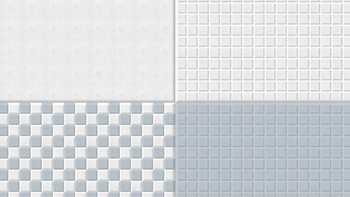
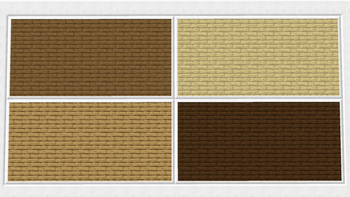
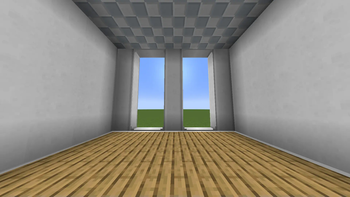
Artemis' Laboratory Blocks aims at providing new Laboratory Blocks and to expand the already known palette of these blocks with new and exciting variants and improvements.
Screenshots
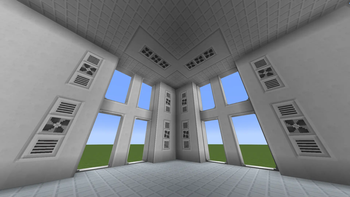
About this Mod
!
!
Artemis' Laboratory Blocks aims at providing new Laboratory Blocks and to expand the already known palette of these blocks with new and exciting variants and improvements.
For 1.18 and 1.19, you can also use the ConnectedTexturesMod (CTM). With it, all blocks will use connected textures to further enhance your builds and projects.
For 1.20 and up, Fusion will do the same.
Download CTM here! (CurseForge)
Download Fusion here! (CurseForge)
Download Fusion here! (Modrinth)
More blocks will follow with each update and already existing ones will also be improved.
!
Enlighted Laboratory Blocks
Every Laboratory Block can also be enlighted.
By rightclicking with Glowstone Dust or combining them in a Crafting Table, they will become Enlighted Laboratory Blocks
They will emit light, similar to Glowstone Blocks or Sea Lanterns.
This will be very usefull, if you want to light up your base, without placing lights all around your rooms.
By rightclicking with any Pickaxe, this Glowstone Dust can be removed and the block will stop to emit light.
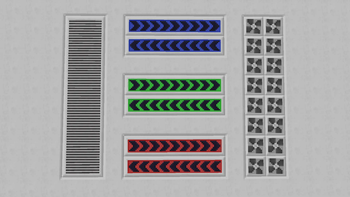
Decorative Laboratory Blocks
Some blocks are more intended to be used to decorate your base.
These include the Laboratory Fan, Laboratory Vent and the Signaling Laboratory Block.
You can use them to further enhance and add detail to your builds.
They can also be combined perfectly with any other Laboratory Block
!
There is also a community Discord.
Feel free to join and take part in the "Intelligence" community.
Projects of us include for example Advanced Peripherals.
!

Are you looking for a new and challenging adventure?
Dreaming of machines, power plants, magic or even bees?
MyFTB is the largest German modded Minecraft network.
One world is not enough! That's why every player gets their own world with us.
Play alone or in a team and get the greatest flexibility and security for maximum gaming fun.
With over 20 modpacks, you're guaranteed to find the right one for you!
Check out their Website, Discord and Launcher
In the MyFTB launcher, you always have the right modpack versions to play on our servers. In addition, the servers are directly saved!
Available Versions
How to Install Artemis' Laboratory Blocks on Your Server
Order Server
Order a Minecraft Java server with at least 3 GB RAM (4 GB recommended).
Set forge Loader
In the panel under "Egg", select the forge loader and matching Minecraft version (1.21.1).
Install Mod
Open the mod browser in the dashboard and search for "Artemis' Laboratory Blocks". Click "Install" – done! Alternatively, upload the .jar via SFTP to the /mods folder.
Compatibility
Mod Loaders
Minecraft Versions
1.21.1, 1.20.2, 1.20.1 (+2 more)
Server-side
✓ RequiredRecommended RAM
4 GB(min. 3 GB)Frequently Asked Questions
Artemis' Laboratory Blocks server crashes on startup – what to do?
Most common cause: wrong forge version or insufficient RAM. Check the server log (latest.log) for "OutOfMemoryError" or "Mixin" errors. With Mado Hosting: ensure at least 3 GB RAM is allocated and the loader matches the mod version (1.21.1). You can switch loaders with one click in the panel.
Is Artemis' Laboratory Blocks compatible with forge?
Artemis' Laboratory Blocks officially supports forge for Minecraft 1.21.1, 1.20.2, 1.20.1. The Mado dashboard automatically detects incompatible loader combinations.
Server lagging with Artemis' Laboratory Blocks – how to optimize performance?
Recommended RAM: 4 GB (per 8 players). Use /spark profiler to check if Artemis' Laboratory Blocks consumes the most tick time. Common fixes: reduce server view-distance to 8-10, install "performant" or "starlight" as supplementary mods on Forge. With Mado Hosting, your server runs on NVMe SSDs with dedicated CPU cores for minimal latency.
Similar Mods

![[ETF] Entity Texture Features](https://cdn.modrinth.com/data/BVzZfTc1/af683d206d50b05258d865b0d6e4aa2f2cee12f2_96.webp)
![[EMF] Entity Model Features](https://cdn.modrinth.com/data/4I1XuqiY/6e5bbd0d06b1741bfdab6c0cfab6de8fdaf0064c_96.webp)



Rent Modded Server
Install Artemis' Laboratory Blocks with just one click on your server.