
Arth Machines
Adds unique electrical devices such as the Time Accelerator or Random Item Generator.
Screenshots


About this Mod

📥 Installation
⚠️ Important: MixinBooter is required for this mod to work.
- Download Arth Machines.
- Download MixinBooter.
- Place both files in your mods folder.
- Note: Ensure the MixinBooter filename starts with a special character (like !mixinbooter.jar) to load correctly.
Craft unique devices you won't find in ordinary mods!
Currently, the mod implements the following mechanisms:
- Temporal Accelerator: A multiblock structure that allows you to accelerate time. This works globally across the entire server and affects all mechanics.
- Unstable Materializer: This device accepts absolutely any item and, in exchange for a certain quantity, generates a random in-game item. It can produce anything, in any quantity, with any enchantments or durability.
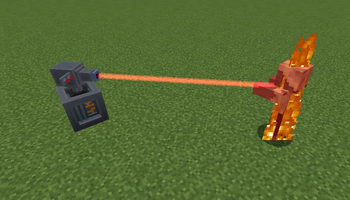
- Laser Turret: A smart block that attacks targeted units. You can set whitelists and blacklists for players. The turret can be upgraded, including the ability to break blocks. This makes it a very powerful defense for your base.
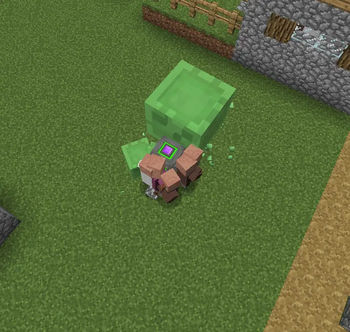
- Gravity Manipulator: A block that attracts or repel mobs, items, and anything else that can move. You can combine multiple of these to combine their power. Use Shift+RMB to toggle between modes.

This is a technical mod, so the machines accept standard RF energy.
Warning: Be careful with the Temporal Accelerator. The maximum acceleration is 5x; please ensure your computer or server can handle this load. A configuration file to adjust the maximum and minimum TPS limits will be added in the future.
If you are only interested in full control over game time, you can check out my other mod - TickRate.
Available Versions
How to Install Arth Machines on Your Server
Order Server
Order a Minecraft Java server with at least 3 GB RAM (4 GB recommended).
Set forge Loader
In the panel under "Egg", select the forge loader and matching Minecraft version (1.12.2).
Install Mod
Open the mod browser in the dashboard and search for "Arth Machines". Click "Install" – done! Alternatively, upload the .jar via SFTP to the /mods folder.
Compatibility
Mod Loaders
Minecraft Versions
1.12.2
Server-side
✓ RequiredRecommended RAM
4 GB(min. 3 GB)Frequently Asked Questions
Arth Machines server crashes on startup – what to do?
Most common cause: wrong forge version or insufficient RAM. Check the server log (latest.log) for "OutOfMemoryError" or "Mixin" errors. With Mado Hosting: ensure at least 3 GB RAM is allocated and the loader matches the mod version (1.12.2). You can switch loaders with one click in the panel.
Is Arth Machines compatible with forge?
Arth Machines officially supports forge for Minecraft 1.12.2. The Mado dashboard automatically detects incompatible loader combinations.
Server lagging with Arth Machines – how to optimize performance?
Recommended RAM: 4 GB (per 8 players). Use /spark profiler to check if Arth Machines consumes the most tick time. Common fixes: reduce server view-distance to 8-10, install "performant" or "starlight" as supplementary mods on Forge. With Mado Hosting, your server runs on NVMe SSDs with dedicated CPU cores for minimal latency.
Similar Mods




Rent Modded Server
Install Arth Machines with just one click on your server.