
AST-Tweaks
A lightweight Fabric 1.19.4 client tweaks mod with 13+ toggleable QoL features: auto eat, auto totem, auto repair, mass grindstone, inventory sort, entity culling, lava highlight, custom scoreboard, notepad and more. Sodium-compatible.
Screenshots
About this Mod
AST-Tweaks
A collection of small client-side quality-of-life tweaks for Minecraft 1.19.4 (Fabric).
Originally built for the ASTRAL SMP community, but works on any vanilla or modded server.
AST-Tweaks bundles 13+ independent QoL features into a single lightweight
client mod. Every feature can be toggled and configured individually, so you
can use only what you need. The mod is fully client-side — no server
installation required, safe for vanilla and most modded servers.
✨ Features
Automation
- Auto Eat — Automatically eats food when your hunger drops below a
configurable threshold. Per-food blacklist included. - Auto Totem — Automatically moves a Totem of Undying back to your
off-hand after one is consumed. - Auto Repair — Fast-repairs Mending items by using Experience Bottles
from a target hotbar slot, with adjustable clicks-per-tick (Tweakeroo style). - Auto Move — Hold-free auto-walk in any of the four directions, with
a dedicated keybind per direction.
Inventory & Items
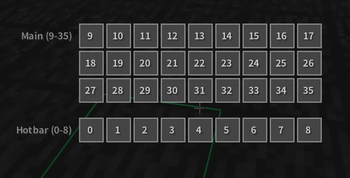
- Inventory Sort — Sort your inventory or any open container with a
keybind (IPN style). Multiple sort modes (Item ID / Name / Category /
Stack count / Total count), per-slot exclusions, and optional in-GUI
sort buttons. - Mass Grindstone — Bulk-remove enchantments using the grindstone
(ItemScroller / MassCraft style). Whitelist/blacklist mode, configurable
operations-per-tick, and an option to drop results for maximum speed. - Bone Meal Filter — Restrict bone meal usage to a whitelist of blocks
to prevent wasting it on the wrong crops. - Silk Touch Switch — Automatically switches to a Silk Touch tool when
you start mining a target block. Integrates with Tweakeroo'stoolSwitchfor the actual swap.
Rendering & Performance
- Entity Culling — Fine-grained control over entity rendering: hide
armor stands, falling blocks, dead mobs, or all non-player entities;
set per-frame render limits for item entities and XP orbs; per-entity
visibility list. - Lava Highlight — Highlights lava source blocks and flowing lava with
configurable colors, so you can spot them at a glance. Compatible with
Sodium via a dedicated mixin.
HUD & UI
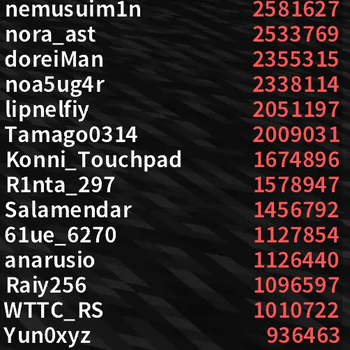
- Custom Scoreboard — Replaces the vanilla sidebar scoreboard with a
customizable renderer: drag-and-drop position editor, scale, header /
body / text colors, paging support for long boards, max line limit, and
optional rank numbers. - Notepad — A simple in-game notepad screen for jotting down
coordinates, recipes, or reminders. Notes are persisted between sessions. - Mouse Sensitivity Toggle — Switch between your normal sensitivity
and a target value (e.g. for sniping with bows) with a single keybind.
Quality of Life
- Update Checker — Optionally checks Modrinth for new versions of the
mod on startup / daily / weekly and shows a toast notification when one
is available.
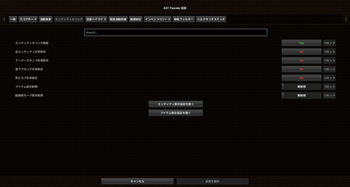
All features are configured from the in-game settings screen
(Mod Menu → AST-Tweaks → Settings). Every toggle, list, and keybind is
saved per-profile.
📦 Requirements
| Minecraft | 1.19.4 |
| Mod loader | Fabric Loader 0.14.21 or newer |
| Java | 17 or newer |
| Required | Fabric API |
| Recommended | Mod Menu 6.0+ · Cloth Config 10.0+ |
| Optional | Sodium (Lava Highlight is Sodium-compatible) · Tweakeroo (used by Silk Touch Switch) |
🖥️ Side
Client only. AST-Tweaks does not need to be installed on the server.
You can use it on vanilla servers, SMPs, and most modded servers without
issues.
📥 Installation
- Install Fabric Loader for Minecraft 1.19.4.
- Download the required dependencies:
- Fabric API (required)
- Mod Menu (recommended)
- Cloth Config (recommended)
- Drop
ast-tweaks-x.x.x.jarinto yourmodsfolder.
🌐 Languages
- English (
en_us) - 日本語 (
ja_jp)
🐛 Issues & Source
- Source code: https://github.com/ASTRAL-SMP/AST-Tweaks
- Bug reports: https://github.com/ASTRAL-SMP/AST-Tweaks/issues
📜 License
Licensed under the Apache-2.0 License.
日本語
AST-Tweaks は、Minecraft 1.19.4 (Fabric) 向けの軽量な
クライアントサイド QoL Mod です。
元々は ASTRAL SMP コミュニティのために作られましたが、
バニラサーバー・SMP・ほとんどの Modded サーバーでそのまま使えます。
13個以上の独立した機能を1つのMod内にまとめてあり、
すべての機能を個別にオン/オフ・設定できます。必要なものだけ使えます。
完全にクライアントサイドで動作するため、サーバー側へのインストールは不要です。
✨ 機能一覧
自動化
- Auto Eat(自動食事) — 空腹度が設定したしきい値以下になると自動で食事します。食べ物ごとのブラックリスト対応。
- Auto Totem(自動トーテム) — 不死のトーテムを使った後、オフハンドに自動補充します。
- Auto Repair(自動修理) — Mending 付きアイテムを、ホットバーの指定スロットから経験値の瓶を使って高速修理します(Tweakeroo 互換挙動)。
- Auto Move(自動移動) — 前後左右それぞれにキーバインドを割り当てた、押しっぱなし不要のオート歩行機能。
インベントリ・アイテム
- Inventory Sort(インベントリソート) — キー1つでインベントリやコンテナをソート(IPN 風)。アイテム ID / 名前 / カテゴリ / スタック数 / 合計数の5モード、スロット除外設定、GUI 内ソートボタン対応。
- Mass Grindstone(一括グラインドストーン) — 砥石でエンチャントを一括削除します(ItemScroller / MassCraft 風)。ホワイトリスト/ブラックリストモード、Tickあたりの処理回数調整、結果を地面にドロップする高速モードあり。
- Bone Meal Filter(骨粉フィルタ) — 骨粉の使用先をホワイトリストのブロックに限定。間違って成長させたくない作物への誤使用を防げます。
- Silk Touch Switch(シルクタッチ自動切替) — 指定ブロックを掘り始めたとき、自動でシルクタッチ付きのツールに切り替えます。実際の切り替えには Tweakeroo の
toolSwitchを使います。
描画・パフォーマンス
- Entity Culling(エンティティカリング) — エンティティ描画を細かく制御。防具立て / 落下ブロック / 死亡 mob / プレイヤー以外の全エンティティの非表示、アイテム・経験値オーブのフレームあたり描画上限、エンティティごとの個別表示設定。
- Lava Highlight(溶岩ハイライト) — 溶岩のソースブロックとフローを任意の色でハイライト表示。Sodium に対応(専用 mixin 同梱)。
HUD・UI
- Custom Scoreboard(カスタムスコアボード) — バニラのサイドバースコアボードを置き換えます。ドラッグ&ドロップでの位置編集、スケール調整、ヘッダー / 本体 / 文字色のカスタマイズ、長いボードのページング、最大行数、ランク番号表示などに対応。
- Notepad(メモ帳) — ゲーム内で開けるシンプルなメモ帳画面。座標やレシピ、TODO などを書き残せます。セッションをまたいで保存されます。
- Mouse Sensitivity Toggle(マウス感度切替) — キー1つで通常の感度と任意の感度(例: 弓のスナイプ用)を切り替えます。
その他
- Update Checker(アップデート確認) — 起動時 / 毎日 / 毎週のいずれかで Modrinth API からアップデートを確認し、新バージョンがあればトースト通知します。
すべての機能はゲーム内設定画面(Mod Menu → AST-Tweaks → Settings)から
設定でき、トグル・リスト・キーバインドはすべてプロファイルに保存されます。
📦 動作環境
| Minecraft | 1.19.4 |
| Mod loader | Fabric Loader 0.14.21 以降 |
| Java | 17 以降 |
| 必須 | Fabric API |
| 推奨 | Mod Menu 6.0+ ・ Cloth Config 10.0+ |
| 任意 | Sodium(Lava Highlight が Sodium 対応)・Tweakeroo(Silk Touch Switch から利用) |
🖥️ サイド
クライアント専用です。サーバー側へのインストールは不要なので、
バニラサーバー、SMP、ほとんどの Modded サーバーで安心して使えます。
📥 インストール
- Minecraft 1.19.4 用の Fabric Loader を導入する
- 依存 Mod をダウンロードする
- Fabric API(必須)
- Mod Menu(推奨)
- Cloth Config(推奨)
ast-tweaks-x.x.x.jarをmodsフォルダに入れる
🌐 対応言語
- English (
en_us) - 日本語 (
ja_jp)
🐛 不具合報告 / ソース
- ソースコード: https://github.com/ASTRAL-SMP/AST-Tweaks
- 不具合報告: https://github.com/ASTRAL-SMP/AST-Tweaks/issues
📜 ライセンス
Apache-2.0 License で公開されています。
Available Versions
How to Install AST-Tweaks on Your Server
Order Server
Order a Minecraft Java server with at least 3 GB RAM (4 GB recommended).
Set fabric Loader
In the panel under "Egg", select the fabric loader and matching Minecraft version (1.19.4).
Install Mod
Open the mod browser in the dashboard and search for "AST-Tweaks". Click "Install" – done! Alternatively, upload the .jar via SFTP to the /mods folder.
Compatibility
Mod Loaders
Minecraft Versions
1.19.4
Server-side
✗ UnsupportedRecommended RAM
4 GB(min. 3 GB)Frequently Asked Questions
AST-Tweaks server crashes on startup – what to do?
Most common cause: wrong fabric version or insufficient RAM. Check the server log (latest.log) for "OutOfMemoryError" or "Mixin" errors. With Mado Hosting: ensure at least 3 GB RAM is allocated and the loader matches the mod version (1.19.4). You can switch loaders with one click in the panel.
Is AST-Tweaks compatible with fabric?
AST-Tweaks officially supports fabric for Minecraft 1.19.4. The Mado dashboard automatically detects incompatible loader combinations.
Server lagging with AST-Tweaks – how to optimize performance?
Recommended RAM: 4 GB (per 8 players). Use /spark profiler to check if AST-Tweaks consumes the most tick time. Common fixes: reduce server view-distance to 8-10, install "performant" or "starlight" as supplementary mods on Forge. With Mado Hosting, your server runs on NVMe SSDs with dedicated CPU cores for minimal latency.
Similar Mods




![[ETF] Entity Texture Features](https://cdn.modrinth.com/data/BVzZfTc1/af683d206d50b05258d865b0d6e4aa2f2cee12f2_96.webp)
![[EMF] Entity Model Features](https://cdn.modrinth.com/data/4I1XuqiY/6e5bbd0d06b1741bfdab6c0cfab6de8fdaf0064c_96.webp)
Rent Modded Server
Install AST-Tweaks with just one click on your server.