
ASTRIXVISUALS
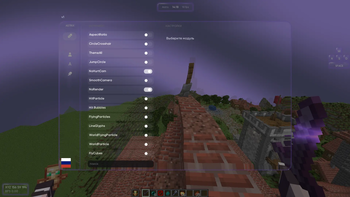
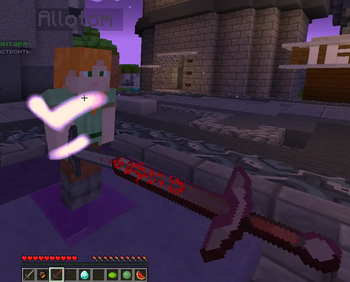
AstrixVisuals blends aesthetics with performance. Soft colors, smooth animations, and a polished interface create a visually pleasing and comfortable PvP experience.
Screenshots
About this Mod
AstrixVisuals is a client-side visual mod for Minecraft focused on improving the PvP experience through better interface design, optimized effects, and enhanced visual clarity. It does not provide any gameplay advantages in terms of mechanics, but significantly increases comfort and performance during combat.
The main goal of AstrixVisuals is to reduce visual clutter and make gameplay as clear and responsive as possible. The interface is redesigned in a clean, minimalistic style — only essential information is displayed, with no unnecessary distractions. All GUI elements are carefully balanced to support focus during fights.
The mod features optimized particles, improved hit effects, and refined visual elements that make it easier to track hits, player movement, and overall combat flow. The color palette is designed to enhance contrast and visibility in all situations.
AstrixVisuals is fully suitable for various PvP modes such as duels, BedWars, SkyWars, and more, providing stable performance and smooth visuals even in intense scenarios.
It’s an ideal choice for players who want to improve focus, reduce eye strain, and enjoy a cleaner, more efficient PvP experience without altering game balance.
Available Versions
How to Install ASTRIXVISUALS on Your Server
Order Server
Order a Minecraft Java server with at least 3 GB RAM (4 GB recommended).
Set fabric Loader
In the panel under "Egg", select the fabric loader and matching Minecraft version (1.21.4).
Install Mod
Open the mod browser in the dashboard and search for "ASTRIXVISUALS". Click "Install" – done! Alternatively, upload the .jar via SFTP to the /mods folder.
Compatibility
Mod Loaders
Minecraft Versions
1.21.4
Server-side
✗ UnsupportedRecommended RAM
4 GB(min. 3 GB)Frequently Asked Questions
ASTRIXVISUALS server crashes on startup – what to do?
Most common cause: wrong fabric version or insufficient RAM. Check the server log (latest.log) for "OutOfMemoryError" or "Mixin" errors. With Mado Hosting: ensure at least 3 GB RAM is allocated and the loader matches the mod version (1.21.4). You can switch loaders with one click in the panel.
Is ASTRIXVISUALS compatible with fabric?
ASTRIXVISUALS officially supports fabric for Minecraft 1.21.4. The Mado dashboard automatically detects incompatible loader combinations.
Server lagging with ASTRIXVISUALS – how to optimize performance?
Recommended RAM: 4 GB (per 8 players). Use /spark profiler to check if ASTRIXVISUALS consumes the most tick time. Common fixes: reduce server view-distance to 8-10, install "performant" or "starlight" as supplementary mods on Forge. With Mado Hosting, your server runs on NVMe SSDs with dedicated CPU cores for minimal latency.
Similar Mods





Rent Modded Server
Install ASTRIXVISUALS with just one click on your server.