
Astroflow
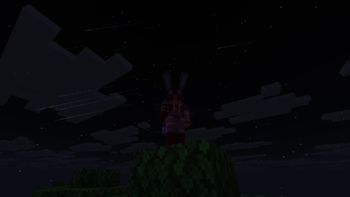
A client-side cinematic meteor stream that transforms the night sky into a flowing astral spectacle.
Screenshots


About this Mod
🌌 Astroflow — Cinematic Meteor Showers
Transform your night sky into a breathtaking astral spectacle.
Astroflow is a lightweight client-side mod that introduces smooth, cinematic meteor streams flowing across the sky — designed for immersion, atmosphere, and pure visual beauty.
Unlike chaotic meteor effects, Astroflow creates a coherent celestial flow, where meteors travel in unified directions, forming elegant streaks that feel natural and mesmerizing.
✨ Features
☄️ Cinematic meteor streams — not random, but flowing as a unified system
🌠 Long glowing trails with smooth fading
🌌 Depth and perspective — distant and close meteors feel different
🎬 Perfect for screenshots and videos
⚡ Lightweight & performance-friendly
🧩 Client-side only — works on any server
🎨 Visual Design
Astroflow focuses on visual harmony and motion:
Meteors move in parallel, forming a natural sky flow
Subtle variation keeps the effect dynamic without breaking immersion
Carefully tuned brightness and speed create a cinematic feel
🖥️ Compatibility
✔ Latest Fabric
✔ Client-side only
✔ No impact on gameplay
Available Versions
How to Install Astroflow on Your Server
Order Server
Order a Minecraft Java server with at least 3 GB RAM (4 GB recommended).
Set fabric Loader
In the panel under "Egg", select the fabric loader and matching Minecraft version (1.21.10).
Install Mod
Open the mod browser in the dashboard and search for "Astroflow". Click "Install" – done! Alternatively, upload the .jar via SFTP to the /mods folder.
Compatibility
Mod Loaders
Minecraft Versions
1.21.10
Server-side
✗ UnsupportedRecommended RAM
4 GB(min. 3 GB)Frequently Asked Questions
Astroflow server crashes on startup – what to do?
Most common cause: wrong fabric version or insufficient RAM. Check the server log (latest.log) for "OutOfMemoryError" or "Mixin" errors. With Mado Hosting: ensure at least 3 GB RAM is allocated and the loader matches the mod version (1.21.10). You can switch loaders with one click in the panel.
Is Astroflow compatible with fabric?
Astroflow officially supports fabric for Minecraft 1.21.10. The Mado dashboard automatically detects incompatible loader combinations.
Server lagging with Astroflow – how to optimize performance?
Recommended RAM: 4 GB (per 8 players). Use /spark profiler to check if Astroflow consumes the most tick time. Common fixes: reduce server view-distance to 8-10, install "performant" or "starlight" as supplementary mods on Forge. With Mado Hosting, your server runs on NVMe SSDs with dedicated CPU cores for minimal latency.
Similar Mods

![[ETF] Entity Texture Features](https://cdn.modrinth.com/data/BVzZfTc1/af683d206d50b05258d865b0d6e4aa2f2cee12f2_96.webp)
![[EMF] Entity Model Features](https://cdn.modrinth.com/data/4I1XuqiY/6e5bbd0d06b1741bfdab6c0cfab6de8fdaf0064c_96.webp)



Rent Modded Server
Install Astroflow with just one click on your server.