
ATiers Tagger
Tiertagger for atiers.net Minecraft CIS Tierlist
Screenshots

About this Mod
TierTagger
Зависимости
Этот мод требует owo-lib для работы!
Убедитесь, что он установлен перед запуском.
Что такое TierTagger?
TierTagger отображает PvP-тир игрока прямо в его никнейме — над головой и в списке игроков (Tab).
Мод получает данные рангов в реальном времени с нашего сайта atiers.net и показывает их в виде тега с иконкой соответствующего игрового режима.
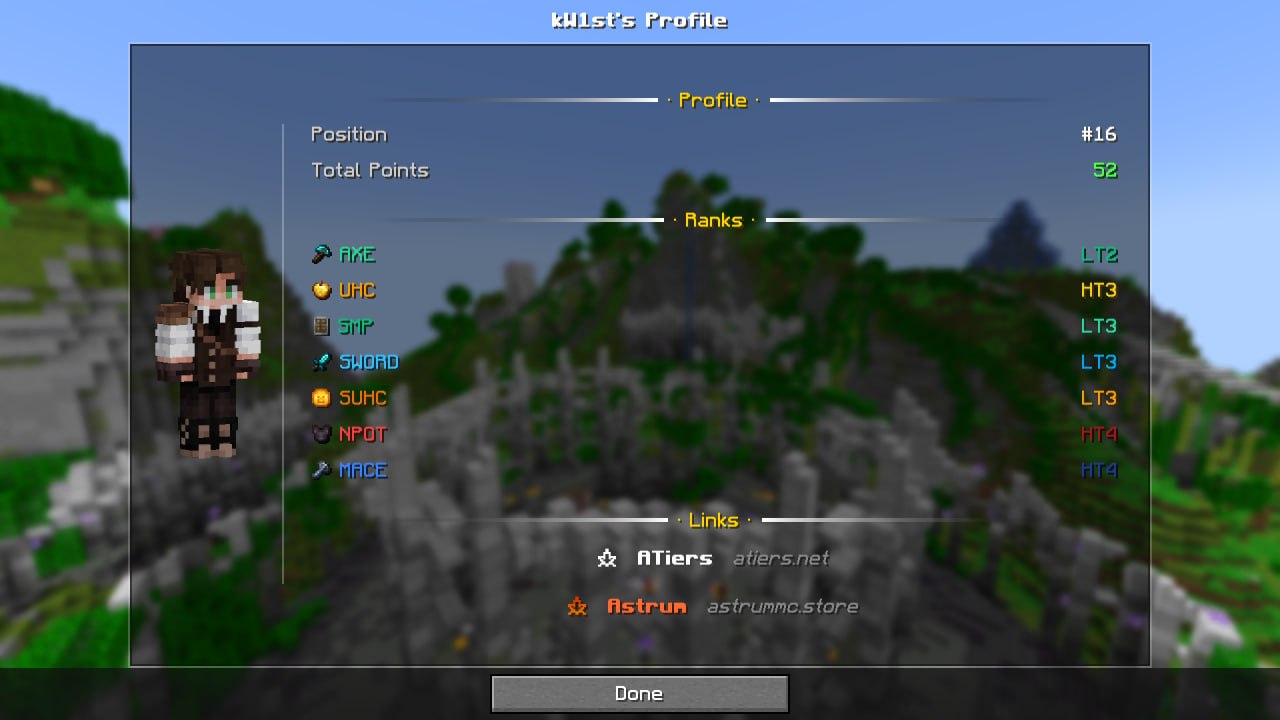
Экран профиля игрока
В TierTagger встроен просмотр профиля игрока.
Открыть его можно:
- Shift + ПКМ по игроку
- или командой:
/atiers profile <nickname>
Экран профиля показывает:
- полный рендер скина игрока;
- ранги по всем игровым режимам;
- общую позицию и количество очков;
- две темы оформления:
- Default — тёмная тема;
- Astrum — цвета в стиле аструма.
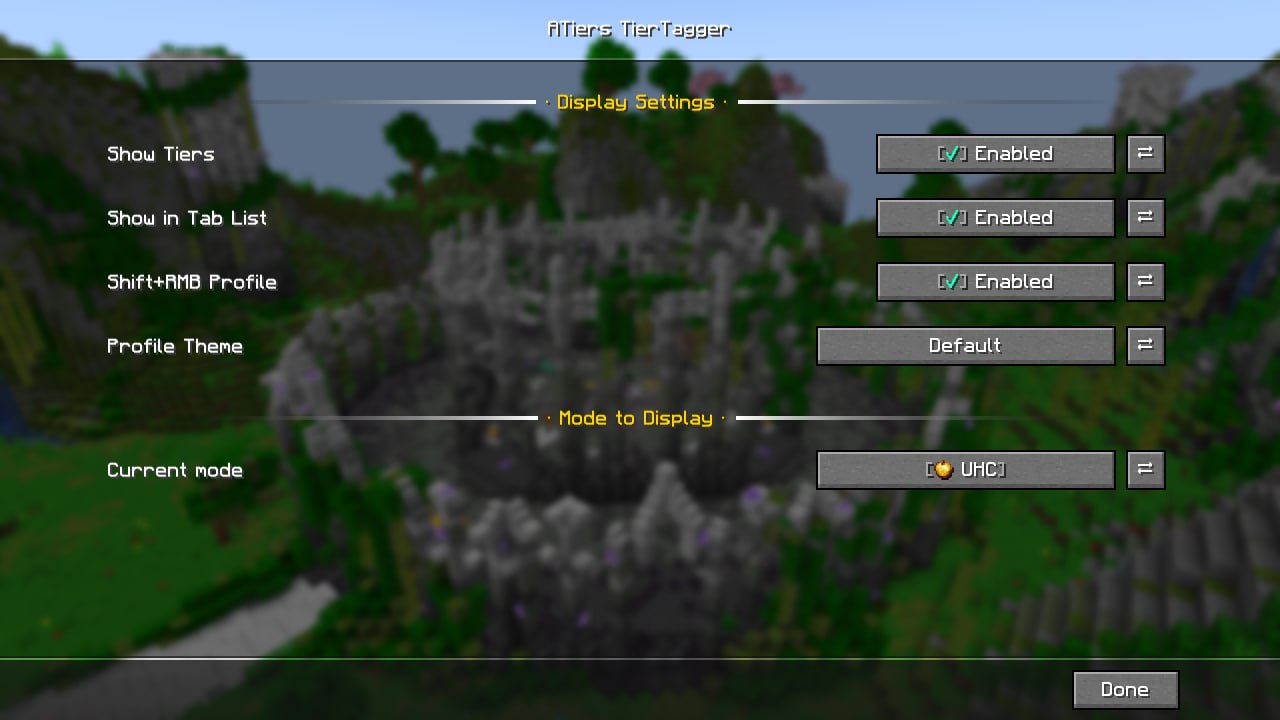
Настройки
Все параметры можно настроить прямо в игре через Mod Menu или вызвать командой /atiers config.
| Параметр | Описание |
|---|---|
| Enabled | Включает или отключает отображение тиров |
| Show in Tab List | Показывает тиры в списке игроков |
| Shift+Click Profile | Включает или отключает открытие профиля через Shift + ПКМ |
| Selected Mode | Позволяет выбрать игровой режим для отображаемого тира |
| Profile Theme | Переключает тему профиля |
Dependencies
This mod requires owo-lib to work!
Make sure it is installed before launching.
What is TierTagger?
TierTagger displays a player's PvP Tier directly in their nametag — above their head and in the Tab player list.
The mod fetches ranking data in real time from ATiers and displays it as a clean, color-coded tag with a matching game mode icon.
Player Profile Screen
TierTagger includes a built-in player profile viewer.
You can open it by:
- Shift + Right-Clicking a player
- or by using the command:
/atiers profile <nickname>
The profile screen shows:
- a full player skin render;
- rankings across all game modes;
- overall position and total points;
- two available themes:
- Default — dark theme;
- Astrum — animated fiery theme.
Configuration
All settings can be configured in-game through Mod Menu.
| Option | Description |
|---|---|
| Enabled | Enables or disables tier tags |
| Show in Tab List | Displays tiers in the Tab player list |
| Shift+Click Profile | Enables or disables opening the profile with Shift + RMB |
| Selected Mode | Chooses which game mode tier is displayed |
| Profile Theme | Switches the profile theme |
Available Versions
How to Install ATiers Tagger on Your Server
Order Server
Order a Minecraft Java server with at least 3 GB RAM (4 GB recommended).
Set fabric Loader
In the panel under "Egg", select the fabric loader and matching Minecraft version (1.21.11).
Install Mod
Open the mod browser in the dashboard and search for "ATiers Tagger". Click "Install" – done! Alternatively, upload the .jar via SFTP to the /mods folder.
Compatibility
Mod Loaders
Minecraft Versions
1.21.11, 1.21.10, 1.21.9 (+9 more)
Server-side
✗ UnsupportedRecommended RAM
4 GB(min. 3 GB)Frequently Asked Questions
ATiers Tagger server crashes on startup – what to do?
Most common cause: wrong fabric version or insufficient RAM. Check the server log (latest.log) for "OutOfMemoryError" or "Mixin" errors. With Mado Hosting: ensure at least 3 GB RAM is allocated and the loader matches the mod version (1.21.11). You can switch loaders with one click in the panel.
Is ATiers Tagger compatible with fabric?
ATiers Tagger officially supports fabric for Minecraft 1.21.11, 1.21.10, 1.21.9. The Mado dashboard automatically detects incompatible loader combinations.
Server lagging with ATiers Tagger – how to optimize performance?
Recommended RAM: 4 GB (per 8 players). Use /spark profiler to check if ATiers Tagger consumes the most tick time. Common fixes: reduce server view-distance to 8-10, install "performant" or "starlight" as supplementary mods on Forge. With Mado Hosting, your server runs on NVMe SSDs with dedicated CPU cores for minimal latency.
Similar Mods




![[ETF] Entity Texture Features](https://cdn.modrinth.com/data/BVzZfTc1/af683d206d50b05258d865b0d6e4aa2f2cee12f2_96.webp)
![[EMF] Entity Model Features](https://cdn.modrinth.com/data/4I1XuqiY/6e5bbd0d06b1741bfdab6c0cfab6de8fdaf0064c_96.webp)
Rent Modded Server
Install ATiers Tagger with just one click on your server.