
Atmos
A cinematic atmospheric fog overhaul for Minecraft Fabric.
Screenshots
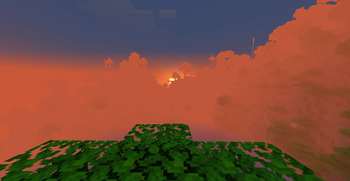
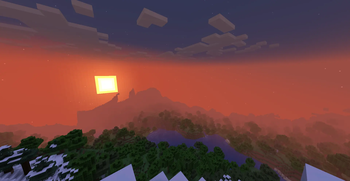
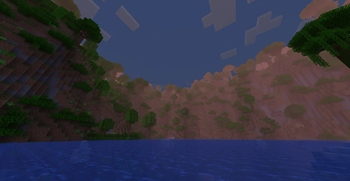
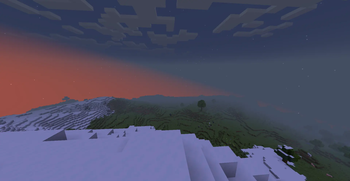
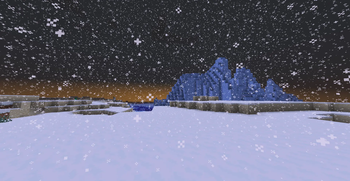
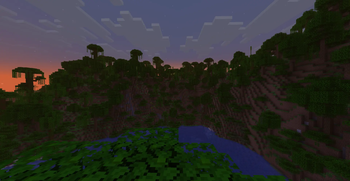
About this Mod
Atmos — Cinematic Atmospheric Fog for Minecraft
Atmos is a cinematic atmospheric rendering mod for Minecraft Fabric 1.21.1 focused on soft biome-aware fog, immersive environmental blending, and dreamy exploration-focused visuals.
Atmos enhances Minecraft with:
- Soft cinematic fog
- Dynamic biome atmosphere
- Smooth environmental transitions
- Height-based atmospheric depth
- Immersive weather mood
- Vanilla-friendly visuals
- Lightweight performance
The goal of Atmos is to make Minecraft feel more alive, immersive, and atmospheric without sacrificing gameplay readability or performance.
Features
Dynamic Biome Fog
Each biome has its own atmospheric profile:
- Jungle mist
- Desert haze
- Snow storms
- Swamp fog
- Ocean atmosphere
- Forest depth fog
- Cave ambience
Smooth Atmospheric Blending
Atmos smoothly transitions between environments to avoid harsh visual popping while exploring.
Cinematic Exploration
Designed for:
- Exploration immersion
- Soft distance haze
- Dreamy environmental mood
- Atmospheric survival gameplay
Lightweight Rendering
Atmos focuses on performance-friendly rendering instead of expensive volumetric systems.
Current Version
Current Release
0.02-alpha
This is an early alpha build.
Some weather conditions, caves, and shader combinations may still produce visual issues while the rendering pipeline continues evolving.
Supported Platforms
- Minecraft 1.21.1
- Fabric Loader
- Fabric API
Experimental Support
- Sodium
- Iris
- Shader Packs
Shader compatibility is still experimental and may vary depending on the shader pack.
Recommended Settings
Best experience:
- Render Distance: 12–16
- Vanilla renderer or light shaders
Development Goals
Future Atmos versions may include:
- Adaptive weather scaling
- Advanced height fog
- Better night atmosphere
- Dynamic valley mist
- Improved storm rendering
- Configurable settings
- Better shader compatibility
Feedback
Feedback and screenshots are highly appreciated.
Please report:
- Visual bugs
- Compatibility issues
- Performance problems
- Atmospheric suggestions
Atmos is actively evolving, and community feedback helps shape future versions.
Atmos Vision
A cinematic Minecraft atmosphere that feels:
- Soft
- Dreamy
- Immersive
- Moody
- Playable
- Vanilla-friendly
without turning the game into an unreadable fog simulator.
Available Versions
How to Install Atmos on Your Server
Order Server
Order a Minecraft Java server with at least 3 GB RAM (4 GB recommended).
Set fabric Loader
In the panel under "Egg", select the fabric loader and matching Minecraft version (1.21.1).
Install Mod
Open the mod browser in the dashboard and search for "Atmos". Click "Install" – done! Alternatively, upload the .jar via SFTP to the /mods folder.
Compatibility
Mod Loaders
Minecraft Versions
1.21.1
Server-side
✗ UnsupportedRecommended RAM
4 GB(min. 3 GB)Frequently Asked Questions
Atmos server crashes on startup – what to do?
Most common cause: wrong fabric version or insufficient RAM. Check the server log (latest.log) for "OutOfMemoryError" or "Mixin" errors. With Mado Hosting: ensure at least 3 GB RAM is allocated and the loader matches the mod version (1.21.1). You can switch loaders with one click in the panel.
Is Atmos compatible with fabric?
Atmos officially supports fabric for Minecraft 1.21.1. The Mado dashboard automatically detects incompatible loader combinations.
Server lagging with Atmos – how to optimize performance?
Recommended RAM: 4 GB (per 8 players). Use /spark profiler to check if Atmos consumes the most tick time. Common fixes: reduce server view-distance to 8-10, install "performant" or "starlight" as supplementary mods on Forge. With Mado Hosting, your server runs on NVMe SSDs with dedicated CPU cores for minimal latency.
Similar Mods

![[ETF] Entity Texture Features](https://cdn.modrinth.com/data/BVzZfTc1/af683d206d50b05258d865b0d6e4aa2f2cee12f2_96.webp)
![[EMF] Entity Model Features](https://cdn.modrinth.com/data/4I1XuqiY/6e5bbd0d06b1741bfdab6c0cfab6de8fdaf0064c_96.webp)



Rent Modded Server
Install Atmos with just one click on your server.