
ATMOSPHERICS
Change fog, sky, clouds, and stars per biome in real time
Screenshots

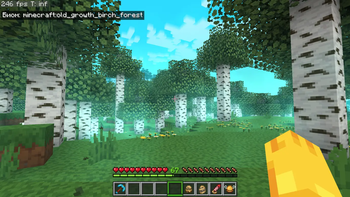


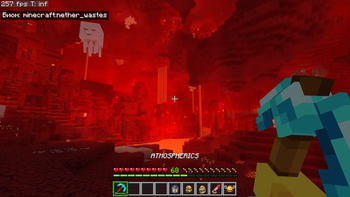

About this Mod


📋Features
Disable Improved Transparency in the Sodium settings
📁All presets are saved in a folder -minecraft/config/ambientfog
compatible with "ModMenu" (but not recommended for use, as there is a hotkey "B" for convenience)

Features in text form
- ✨Real-time per-biome customization for fog, sky, clouds, and haze
- 🔄Smooth transitions between biomes
- ☄️Falling comets customization
- 🌙Separate day and night atmosphere settings
- ⭐Star customization
- ☁️Story Mode Clouds
- ⚙️Dedicated settings menu for Story Mode Clouds
- ☁️Solid clouds without shading
- 🧭User-friendly menu with real-time viewing
- 📊Live info panel
- 📚Preset library
- ✏️Settings copy editor
- 🌌Biome teleport menu for easier setup
- 🎨Create your own resource pack with a preset
- 📁Preset import and export


⚙️(The current hotkey is "B", but you can change it in the game settings)
✨OWN CUSTOM ATMOSPHERICS PRESET
Also, you can create your own resource pack with a custom Atmospherics preset!
📁 How to create a preset:
assets\atmospherics\preset\your_preset.json
🖼️ How to add a preview:
assets\atmospherics\preset\your_preset.png
(.jpg and .jpeg formats are also supported)
⚠️ Important: the preview file name must exactly match the preset name!
⚠️ The name of preset should be without a space! (🚫
Vibrant fog.json- ✅Vibrantfog.json)📚 Your preset will automatically show up in the Preset Library within the menu.
📢 You can also publish your RP-preset on Modrinth or CurseForge!
(Don’t forget to add this mod as a required dependency when uploading your RP-preset)


ㅤㅤㅤㅤ ㅤ




Available Versions
How to Install ATMOSPHERICS on Your Server
Order Server
Order a Minecraft Java server with at least 3 GB RAM (4 GB recommended).
Set fabric Loader
In the panel under "Egg", select the fabric loader and matching Minecraft version (26.1.2).
Install Mod
Open the mod browser in the dashboard and search for "ATMOSPHERICS". Click "Install" – done! Alternatively, upload the .jar via SFTP to the /mods folder.
Compatibility
Mod Loaders
Minecraft Versions
26.1.2, 26.1.1, 26.1 (+2 more)
Server-side
✗ UnsupportedRecommended RAM
4 GB(min. 3 GB)Frequently Asked Questions
ATMOSPHERICS server crashes on startup – what to do?
Most common cause: wrong fabric version or insufficient RAM. Check the server log (latest.log) for "OutOfMemoryError" or "Mixin" errors. With Mado Hosting: ensure at least 3 GB RAM is allocated and the loader matches the mod version (26.1.2). You can switch loaders with one click in the panel.
Is ATMOSPHERICS compatible with fabric and neoforge?
ATMOSPHERICS officially supports fabric, neoforge for Minecraft 26.1.2, 26.1.1, 26.1. The Mado dashboard automatically detects incompatible loader combinations.
Server lagging with ATMOSPHERICS – how to optimize performance?
Recommended RAM: 4 GB (per 8 players). Use /spark profiler to check if ATMOSPHERICS consumes the most tick time. Common fixes: reduce server view-distance to 8-10, install "performant" or "starlight" as supplementary mods on Forge. With Mado Hosting, your server runs on NVMe SSDs with dedicated CPU cores for minimal latency.
Similar Mods

![[ETF] Entity Texture Features](https://cdn.modrinth.com/data/BVzZfTc1/af683d206d50b05258d865b0d6e4aa2f2cee12f2_96.webp)
![[EMF] Entity Model Features](https://cdn.modrinth.com/data/4I1XuqiY/6e5bbd0d06b1741bfdab6c0cfab6de8fdaf0064c_96.webp)



Rent Modded Server
Install ATMOSPHERICS with just one click on your server.