
Attribute Modify
This mod allows the modification of item attributes, both vanilla and curios. Do you want to buff or nerf a weapon or curios? With this mod, you only need a datapack to do so.
Screenshots
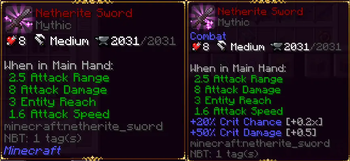
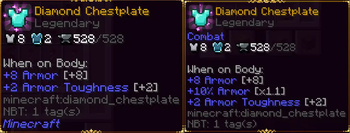
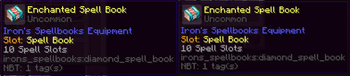
About this Mod
AttributeModify / NeoAttributeModify
Customize item attributes, mining behavior, durability, and item progression with JSON datapacks. No Java required.
AttributeModify is the Forge edition for Minecraft 1.20.1.NeoAttributeModify is the NeoForge edition for Minecraft 1.21.1.
Both projects use the same datapack folder layout and the same general JSON style. The main difference is how item data is read internally:
- 1.20.1 evaluates NBT-style data
- 1.21.1 evaluates data components
- For cross-version packs, component-like paths such as
component:apotheosis:raritycan be used to keep configs easier to maintain
What You Can Do
- Add, modify, or remove attributes on vanilla and modded items
- Target standard equipment slots,
body, and optional Curios slots - Use shorthand syntax with automatic slot detection
- Apply rules to single items or whole item tags
- Make rules conditional with NBT or component matching
- Override mining speed and mining tier
- Override durability and optional durability triggers
- Roll randomized quality tiers on item creation
- Mark items as decorative
- Split configs across multiple files and hot-reload them with
/reload - Sync everything automatically in multiplayer
Datapack Location
Place your files in:
data/<namespace>/item_attributes/<file>.json
Entries from multiple files are merged, so you can organize your datapack however you want.
Examples
1. Single shorthand attribute with automatic slot detection
{
  "minecraft:diamond_chestplate": {
    "attribute": "minecraft:generic.luck",
    "action": "add",
    "amount": 1.0,
    "operation": "add_value"
  }
}
Useful for quick changes. Armor and common tools can infer the correct slot automatically.
2. Multiple shorthand attributes on the same item
{
  "minecraft:diamond_boots": {
    "attributes": [
      {
        "attribute": "minecraft:generic.armor",
        "action": "add",
        "amount": 1.0,
        "operation": "add_value"
      },
      {
        "attribute": "minecraft:generic.movement_speed",
        "action": "add",
        "amount": 0.03,
        "operation": "add_multiplied_total"
      }
    ]
  }
}
3. Explicit equipment slots with add, modify, and remove
{
  "minecraft:diamond_sword": {
    "equipment_slots": {
      "mainhand": [
        {
          "attribute": "minecraft:generic.attack_damage",
          "action": "modify",
          "amount": 10.0,
          "operation": "add_value"
        },
        {
          "attribute": "minecraft:generic.attack_speed",
          "action": "remove"
        }
      ]
    }
  }
}
4. Curios slot example
Requires Curios to be installed.
{
  "mymod:magic_ring": {
    "curios_slots": {
      "ring": [
        {
          "attribute": "minecraft:generic.max_health",
          "action": "add",
          "amount": 4.0,
          "operation": "add_value"
        }
      ]
    }
  }
}
5. Apply one rule to a whole item tag
{
  "#minecraft:swords": {
    "equipment_slots": {
      "mainhand": [
        {
          "attribute": "minecraft:generic.attack_knockback",
          "action": "add",
          "amount": 0.5,
          "operation": "add_value"
        }
      ]
    }
  }
}
6. Conditional attributes with NBT or component matching
{
  "minecraft:diamond_sword": {
    "equipment_slots": {
      "mainhand": [
        {
          "attribute": "minecraft:generic.attack_damage",
          "action": "add",
          "amount": 5.0,
          "operation": "add_value",
          "nbt": {
            "path": "component:apotheosis:rarity",
            "operator": "equals",
            "value": "apotheosis:mythic"
          }
        }
      ]
    }
  }
}
You can use path or key inside the nbt block.
7. Quality system
{
  "minecraft:iron_sword": {
    "quality_system": {
      "tag_path": "quality",
      "triggers": ["craft", "loot", "villager_trade", "apotheosis_sync"],
      "levels": [
        { "value": "common", "weight": 60 },
        { "value": "rare", "weight": 30 },
        { "value": "mythic", "weight": 10 }
      ]
    }
  }
}
8. Mining speed and tier overrides
{
  "minecraft:iron_pickaxe": {
    "mining": [
      {
        "speed": 12.0,
        "tier": "diamond",
        "nbt": {
          "path": "quality",
          "operator": "equals",
          "value": "mythic"
        }
      },
      {
        "speed": 8.0,
        "tier": "iron"
      }
    ]
  }
}
9. Durability override and custom durability triggers
{
  "minecraft:diamond_pickaxe": {
    "durability": 3000,
    "durability_triggers": ["block_break", "right_click"]
  }
}
Supported custom durability triggers:
melee_hitblock_breakright_click
10. Decorative items
{
  "minecraft:carved_pumpkin": {
    "decorative": true
  }
}
Quick Reference
Top-level blocks
attribute: single shorthand attribute entryattributes: shorthand array of attribute entriesequipment_slots: explicit vanilla equipment slotscurios_slots: explicit Curios slotsquality_system: weighted quality roll rulesmining: mining speed and tier overridesdurability: max durability overridedurability_triggers: optional triggers for custom durabilitydecorative: marks an item as decorative
Standard equipment slots
mainhand, offhand, head, chest, legs, feet, body
Actions
add: add modifiers on top of existing statsmodify: replace the base modifiers for that attributeremove: remove that attribute from the item for the target slot
Operations
add_valueadd_multiplied_baseadd_multiplied_total
Accepted aliases:
additionmultiply_basemultiply_total
NBT or component operators
equalsnot_equalsgreatergreater_or_equallessless_or_equalexistsnot_existscontainsstarts_withends_withmatches_regex
Quality triggers
craftlootvillager_tradeapotheosis_sync
Multiplayer and Reloading
/reloadre-reads datapack files without restarting the game- Servers sync attribute, mining, durability, and decorative data to clients
- The logic is designed for multiplayer use
Compatibility Notes
- Works with vanilla items and modded items
- Curios support is optional
- Apotheosis-style data checks are supported through conditional matching
- Use
modifier_idif you want a fixed custom modifier identity for compatibility with other mods
Links
- Discord: https://discord.gg/NXVEtWqsnw
Author: Etema
Available Versions
How to Install Attribute Modify on Your Server
Order Server
Order a Minecraft Java server with at least 3 GB RAM (4 GB recommended).
Set forge Loader
In the panel under "Egg", select the forge loader and matching Minecraft version (1.21.11).
Install Mod
Open the mod browser in the dashboard and search for "Attribute Modify". Click "Install" – done! Alternatively, upload the .jar via SFTP to the /mods folder.
Compatibility
Mod Loaders
Minecraft Versions
1.21.11, 1.21.10, 1.21.9 (+14 more)
Server-side
✓ RequiredRecommended RAM
4 GB(min. 3 GB)Frequently Asked Questions
Attribute Modify server crashes on startup – what to do?
Most common cause: wrong forge version or insufficient RAM. Check the server log (latest.log) for "OutOfMemoryError" or "Mixin" errors. With Mado Hosting: ensure at least 3 GB RAM is allocated and the loader matches the mod version (1.21.11). You can switch loaders with one click in the panel.
Is Attribute Modify compatible with forge and neoforge?
Attribute Modify officially supports forge, neoforge for Minecraft 1.21.11, 1.21.10, 1.21.9. The Mado dashboard automatically detects incompatible loader combinations.
Server lagging with Attribute Modify – how to optimize performance?
Recommended RAM: 4 GB (per 8 players). Use /spark profiler to check if Attribute Modify consumes the most tick time. Common fixes: reduce server view-distance to 8-10, install "performant" or "starlight" as supplementary mods on Forge. With Mado Hosting, your server runs on NVMe SSDs with dedicated CPU cores for minimal latency.
Similar Mods




Rent Modded Server
Install Attribute Modify with just one click on your server.