
Audio Navigation
A mod that adds audio navigation features for the blind, inspired by Soundscape
Screenshots
About this Mod
Audio Navigation
This is a Minecraft mod to add audio navigation features, mostly to make it easier for blind players to play the game. It is intended to complement, not replace, the Minecraft Access mod. Some features in this mod are inspired by Microsoft Soundscape.
It runs on both Fabric and NeoForge (on both servers and clients), and the server-side component runs on Paper and Purpur as well.
Dependencies
This mod runs on either Fabric, NeoForge, or Paper/Purpur, and depends on the following mods:
- Fabric API (Fabric only)
- Fabric Language Kotlin (Fabric only)
- Kotlin for Forge (NeoForge only)
- Architectury API (Fabric and NeoForge only)
- Fzzy Config (Fabric and NeoForge only)
- Eclipse (Paper and Purpur only)
Also, it uses a native library for speech synthesis, which is downloaded automatically on first launch. The library is compiled for Windows, MacOS, and Linux, for both x86_64 and aarch64. Create an issue if you use an unsupported operating system or architecture and I will try to add it. The mod verifies the hash of the downloaded file to make sure it downloads correctly. The native library is not downloaded or used on dedicated servers.
You can also download the library yourself from the release page. Download the correct file for your operating system and architecture, place it in your .minecraft folder, and extract the espeak-ng-data folder from espeak-ng-data.zip and copy it into your .minecraft folder.
Things to Know
This mod must be installed on both the client and server side, so if you are playing on a server, you must install it there as well as on your client. Also, points of interest for trees and other features will not be created unless you generate the world with this mod installed. If you travel into ungenerated chunks, it will save points of interest there, but once a chunk is generated it is too late to generate these POIs. Points of interest are stored in poi.db inside your .minecraft folder, or in the Minecraft server root if you are playing on a dedicated server. Deleting this file will delete all POIs.
Current Features
- Points of interest will be announced as you pass, according to the configured radius, vertical distance limit, and maximum number of announcements. You will hear the announcement from the direction of the point of interest, and a sound will be played before speaking the announcement based on the type of the POI.
- When a point of interest is announced, its name is always spoken, and optionally its distance from you and its direction. The direction can also include the vertical component, and the horizontal component can be spoken using clock hands, direction and angle, just direction, just angle, or compass direction. The vertical component can be spoken as direction and angle, just direction, or just angle, either relative to the direction you are facing or the absolute direction.
- When a world is generated, or when you travel into ungenerated chunks or trigger chunk generation in some other way, points of interest are created for features such as trees, ice spikes, end islands, ore vanes, etc. Structures like villages are coming soon.
- You can announce all nearby points of interest by pressing F7. This has a larger radius, vertical limit, and maximum number of POIs than automatic announcements by default.
- You can stop speech at any time by pressing F9.
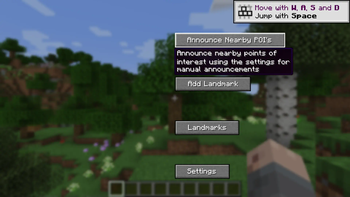
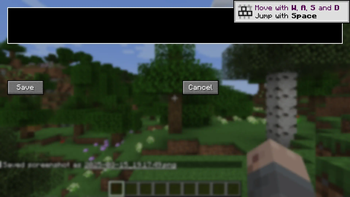
- You can create landmarks by pressing F6 to open the menu and pressing the "Add landmark" button. They are saved as points of interest and announced as you pass. You can choose whether the new landmark is visible to other players or not.
- To delete a landmark, open the menu with F6, press "Landmarks", find the landmark you want to delete, and press the "Delete" button.
- You can start an audio beacon on a landmark by opening the list of landmarks, finding the landmark you want, and pressing "Start beacon". This will start a continuous sound coming from the direction of the landmark that you can follow to find it. The sound will change depending on if you're facing it, facing away from it, or facing in the opposite direction.
- By default, the distance and direction to a beacon will be announced every 30 seconds. You can change the amount of time, disable either distance or direction, or disable this entirely in settings.
- To stop an audio beacon, open the menu with F6 and press "Stop beacon".
- To announce the distance and/or direction to the current beacon, press F8.
- The landmark list is filtered by radius. To increase the radius in which landmarks are shown, press enter on the current radius.
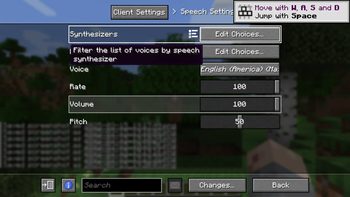
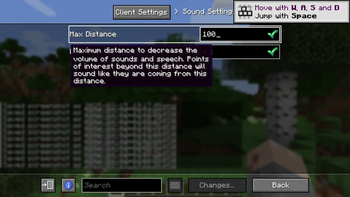
- This mod is extremely configurable. To open the settings, press F6 to open the menu, and choose "Settings". From there, the configuration screen should be pretty intuitive to use.
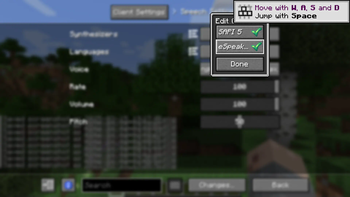
- This mod can use multiple speech synthesizers. eSpeak NG is always included. On Windows, SAPI 5 is also supported, and on MacOS the mod can use AVSpeechSynthesizer to use all Apple TTS voices as well as third-party voices exposed to the system TTS.
- Since the list of voices is extremely long if all voices are included, it is filtered by synthesizer and language. When you open the synthesizers or languages list in speech settings, you can select one or multiple options, which will change how the voice list is filtered. By default all speech synthesizers are selected, but the current Minecraft language is the only selected language.
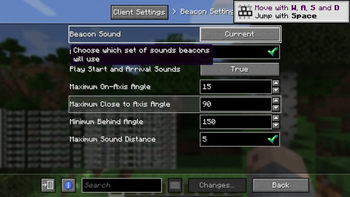
- The beacon sounds in this mod are taken from Soundscape, so if you are familiar with Soundscape's beacon names, they are the same sounds. If not, you can start a beacon and change the sound while the beacon is running, and the sound will change when you change the setting.
Server Configuration
On a dedicated server, you can set a maximum radius at which POIs will be sent to clients. You can also prevent certain features, such as ore veins, from being sent to clients, whether or not players enable them in client settings. On Fabric and NeoForge servers, these can be changed in config/audio_navigation/server_config.toml. On Paper and Purpur, change them in plugins/AudioNavigation/config.yml. You can also use the settings UI to change server settings on Fabric and NeoForge servers, by joining the world, pressing F6, pressing "Settings", then pressing "Server Settings".
Available Versions
How to Install Audio Navigation on Your Server
Order Server
Order a Minecraft Java server with at least 4 GB RAM (6 GB recommended).
Set fabric Loader
In the panel under "Egg", select the fabric loader and matching Minecraft version (1.21.10).
Install Mod
Open the mod browser in the dashboard and search for "Audio Navigation". Click "Install" – done! Alternatively, upload the .jar via SFTP to the /mods folder.
Compatibility
Mod Loaders
Minecraft Versions
1.21.10, 1.21.8, 1.21.7 (+2 more)
Server-side
✓ RequiredRecommended RAM
6 GB(min. 4 GB)Frequently Asked Questions
Audio Navigation server crashes on startup – what to do?
Most common cause: wrong fabric version or insufficient RAM. Check the server log (latest.log) for "OutOfMemoryError" or "Mixin" errors. With Mado Hosting: ensure at least 4 GB RAM is allocated and the loader matches the mod version (1.21.10). You can switch loaders with one click in the panel.
Is Audio Navigation compatible with fabric and neoforge and paper and purpur?
Audio Navigation officially supports fabric, neoforge, paper, purpur for Minecraft 1.21.10, 1.21.8, 1.21.7. The Mado dashboard automatically detects incompatible loader combinations.
Server lagging with Audio Navigation – how to optimize performance?
Recommended RAM: 6 GB (per 5 players). Use /spark profiler to check if Audio Navigation consumes the most tick time. Common fixes: reduce server view-distance to 8-10, install "performant" or "starlight" as supplementary mods on Forge. With Mado Hosting, your server runs on NVMe SSDs with dedicated CPU cores for minimal latency.
Similar Mods




Rent Modded Server
Install Audio Navigation with just one click on your server.