
AudioBridge
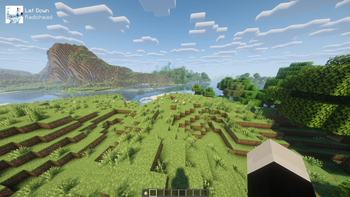
AudioBridge is a Fabric mod that displays your currently playing Spotify (or any media) song and artist on your Minecraft HUD, complete with album art fetched automatically, no account linking required.
Screenshots

About this Mod
AudioBridge
AudioBridge bridges your music and your Minecraft session by displaying a live "Now Playing" overlay directly on your HUD. Whatever you're listening to in Spotify, or any app that exposes Windows media controls, AudioBridge picks it up automatically and shows the song title, artist, and album art in a clean, unobtrusive widget.
Features
- Live song and artist display pulled from Windows SMTC (no account linking or API keys required)
- Album art fetched automatically via the iTunes Search API as a fallback when the media session doesn't provide it
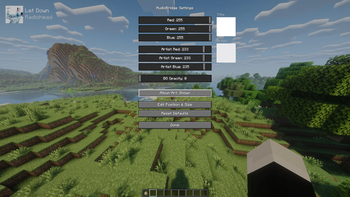
- Fully customizable title and artist text colors, background opacity, scale, and HUD position
- Drag to reposition and scroll to resize interface for easy placement
- Album art toggle
- Automatically hides when music is paused
- Smooth fade in/out transitions on track change
Notes
AudioBridge is purely client side and works on any server. It has no impact on gameplay and requires no configuration out of the box.
Available Versions
How to Install AudioBridge on Your Server
Order Server
Order a Minecraft Java server with at least 3 GB RAM (4 GB recommended).
Set fabric Loader
In the panel under "Egg", select the fabric loader and matching Minecraft version (26.1.2).
Install Mod
Open the mod browser in the dashboard and search for "AudioBridge". Click "Install" – done! Alternatively, upload the .jar via SFTP to the /mods folder.
Compatibility
Mod Loaders
Minecraft Versions
26.1.2, 26.1.1, 26.1
Server-side
✗ UnsupportedRecommended RAM
4 GB(min. 3 GB)Frequently Asked Questions
AudioBridge server crashes on startup – what to do?
Most common cause: wrong fabric version or insufficient RAM. Check the server log (latest.log) for "OutOfMemoryError" or "Mixin" errors. With Mado Hosting: ensure at least 3 GB RAM is allocated and the loader matches the mod version (26.1.2). You can switch loaders with one click in the panel.
Is AudioBridge compatible with fabric?
AudioBridge officially supports fabric for Minecraft 26.1.2, 26.1.1, 26.1. The Mado dashboard automatically detects incompatible loader combinations.
Server lagging with AudioBridge – how to optimize performance?
Recommended RAM: 4 GB (per 8 players). Use /spark profiler to check if AudioBridge consumes the most tick time. Common fixes: reduce server view-distance to 8-10, install "performant" or "starlight" as supplementary mods on Forge. With Mado Hosting, your server runs on NVMe SSDs with dedicated CPU cores for minimal latency.
Similar Mods




![[ETF] Entity Texture Features](https://cdn.modrinth.com/data/BVzZfTc1/af683d206d50b05258d865b0d6e4aa2f2cee12f2_96.webp)
![[EMF] Entity Model Features](https://cdn.modrinth.com/data/4I1XuqiY/6e5bbd0d06b1741bfdab6c0cfab6de8fdaf0064c_96.webp)
Rent Modded Server
Install AudioBridge with just one click on your server.