
AuthCore
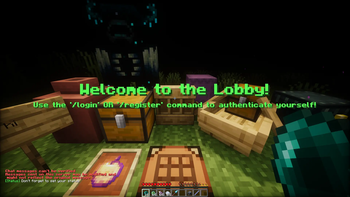
AuthCore is a high-performance, server-side login framework designed for large-scale Fabric 1.21+ environments. While other mods just check a password, AuthCore manages the entire lifecycle of a player's session, securing the server against bot attacks.
Screenshots
About this Mod
🔐 AuthCore
The Fortress Framework for Fabric Servers.




AuthCore is a high-performance, server-side login framework designed for large-scale Fabric 1.21+ environments.
While other mods just check a password, AuthCore manages the entire lifecycle of a player's session, securing the server
against bot attacks, griefing attempts during login, and session hijacking.
Ideal for: Massive SMPs, Public Community Servers, and Hybrid Networks demanding 20 TPS.
🏢 Enterprise-Grade Features
Designed for server owners who need absolute control. Here is how AuthCore’s configuration translates to real-world
server benefits.
| ⚙️ Configuration / Features | 🚀 Benefits for Minecraft Server |
|---|---|
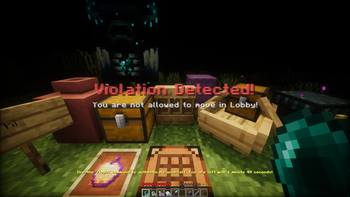
| Hermetic Limbo State (Blocks: Breaking, Placing, Item Use, Drops, Movement, Chat, Commands) |
Zero-Grief Lobby. Unauthenticated players are effectively ghosts. They cannot spam chat, ruin spawn, steal items, or generate chunk updates that lag the server. |
| Granular Entity Protection (Separately blocks attacks on: Players, Hostiles, Animals, Pets, Villagers) |
Spawn Integrity. Prevents malicious users from logging in just to kill the community pet or trade-lock villagers before they even authenticate. |
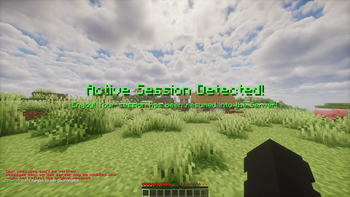
| Smart Session Management (IP Locking, Session Timeouts, Re-login Windows) |
Anti-Hijacking. If a player disconnects, their session is saved briefly for quick rejoins. However, if a different IP tries to join, the gate slams shut. Prevents session stealing. |
| Hybrid Authentication (Online-Mode Auto-Login & Offline-Mode Support) |
Frictionless UX. Paid Minecraft users ( online-mode) skip the password prompt entirely. Offline-Mode users are securely sandboxed. Best of both worlds. |
| Brute-Force Mitigation (Max Login Attempts, Kick Cooldowns, Proxy Blocking) |
DDoS/Bot Resilience. Automatically purges bad actors guessing passwords. Built-in Proxy/VPN checks reduce bot traffic without needing external firewalls. |
| UX-First Feedback (Titles, Subtitles, Action Bars, Chat - All Configurable) |
Professional Polish. Don't spam the chat box. Use clean Title Screens and Action Bars to guide users, keeping the chat clean for actual players. |
| Password Complexity Logic (Regex: Min Length, Upper/Lower, Digits) |
Security Compliance. Force your admins and VIPs to use real passwords, not "12345", reducing the risk of social engineering hacks. |
🚀 Getting Started
- Install Prerequisites: Grab Fabric Loader
and Fabric API. - Download: Get the latest
authcore-x.x.x.jarfrom Modrinth
or GitHub Releases. - Install: Drop the
.jarinto your server'smods/folder. - Run: Start the server. The configuration file will generate at
config/authcore/settings.conf.
🛠️ Command Reference
👤 Player Commands
Basic commands available to everyone.
| Command | Usage | Description |
|---|---|---|
| Register | /register <password> [<confirm-password>] |
Create an identity. Confirmation required if enabled in config. |
| Login | /login <password> |
Authenticate credentials and release the Limbo state. |
| Logout | /account logout |
Manually end session (force password on next join). |
| Change Pass | /account set-password <new-password> |
Update credentials securely. |
| Unregister | /account unregister |
Self-service account deletion (GDPR compliance). |
👮 Admin Commands
Requires OP or Permission Level 3+.
| Command | Usage | Description |
|---|---|---|
| Reload | /authcore reload |
Hot-swaps settings.conf and messages without a restart. |
| List Players | /authcore list players |
Lists all registered player usernames. |
| List Online | /authcore list online-players |
Lists all online-mode players. |
| List Offline | /authcore list offline-players |
Lists all offline-mode players. |
| Delete Player | /authcore delete player <player> |
Wipes player data from the DB. The "Nuclear Option". |
| Destroy Sess | /authcore destroy-session <player> |
Destroys a session and disconnects the user immediately. |
| WhoIs | /authcore whois <username> <uuid> <player> |
Displays UUID, IP, Reg Date, Last Login, and Auth Mode. |
| Set Password | /authcore set-password <player> <new-password> |
Administrative password reset. |
| Set Mode Online | /authcore set-mode online <player> |
Toggles specific users to Online-Mode validation. |
| Set Mode Offline | /authcore set-mode offline <player> <new-password> |
Toggles specific users to Offline-Mode validation. |
| Set Spawn | /authcore set-spawn limbo <x> <y> <z> |
Sets the precise X/Y/Z for the Limbo spawn. |
📝 Roadmap (Todo)
- Velocity / BungeeCord Plugin: A dedicated upstream plugin for network-wide auth handling.
- 2FA / MFA Support: Integration with TOTP apps (Google Auth) for Staff accounts. 📱
- Visual Captcha: Map-based or inventory-based CAPTCHA to stop advanced bots. 🤖
- Database SQL Support: MySQL/MariaDB/PostgreSQL support for syncing data across multiple backend servers. 🗄️
- Web Panel: A lightweight HTML interface for admins to manage users externally.
- Progressive Punishment: Exponential cooldowns (
5s->30s->5m) for failed password attempts.
🛠️ Dev Corner
Building from source (if you're brave):
- Requirements: Java 21+ & Gradle 8+
# Clone the repo
git clone [https://github.com/DawnOfDedSec/AuthCore.git](https://github.com/DawnOfDedSec/AuthCore.git)
cd AuthCore

# Build the jar
./gradlew build
🤝 Contributing
Contributions are welcome!
To contribute:
- Fork the repository
- Create a new branch:
git checkout -b feature/your-feature-name - Make your changes and commit:
git commit -m 'Add new feature' - Push to your fork:
git push origin feature/your-feature-name - Open a pull request: https://github.com/DawnOfDedSec/AuthCore/pulls
Please follow the existing code style and include clear commit messages. For major changes, open an issue first to
discuss what you’d like to change.
📄 License
This project is licensed under the CC0 1.0 Universal (Public Domain). You are free to use, modify, and
distribute this mod without any restrictions.
📬 Support & Feedback
Found a bug or have a feature request?
Open an issue: https://github.com/DawnOfDedSec/AuthCore/issues
Start a discussion: https://github.com/DawnOfDedSec/AuthCore/discussions
Available Versions
How to Install AuthCore on Your Server
Order Server
Order a Minecraft Java server with at least 3 GB RAM (4 GB recommended).
Set fabric Loader
In the panel under "Egg", select the fabric loader and matching Minecraft version (26.1.2).
Install Mod
Open the mod browser in the dashboard and search for "AuthCore". Click "Install" – done! Alternatively, upload the .jar via SFTP to the /mods folder.
Compatibility
Mod Loaders
Minecraft Versions
26.1.2, 1.21.11
Server-side
✓ RequiredRecommended RAM
4 GB(min. 3 GB)Frequently Asked Questions
AuthCore server crashes on startup – what to do?
Most common cause: wrong fabric version or insufficient RAM. Check the server log (latest.log) for "OutOfMemoryError" or "Mixin" errors. With Mado Hosting: ensure at least 3 GB RAM is allocated and the loader matches the mod version (26.1.2). You can switch loaders with one click in the panel.
Is AuthCore compatible with fabric?
AuthCore officially supports fabric for Minecraft 26.1.2, 1.21.11. The Mado dashboard automatically detects incompatible loader combinations.
Server lagging with AuthCore – how to optimize performance?
Recommended RAM: 4 GB (per 8 players). Use /spark profiler to check if AuthCore consumes the most tick time. Common fixes: reduce server view-distance to 8-10, install "performant" or "starlight" as supplementary mods on Forge. With Mado Hosting, your server runs on NVMe SSDs with dedicated CPU cores for minimal latency.
Similar Mods




Rent Modded Server
Install AuthCore with just one click on your server.