
Auto Clicker Ultra
This mod is an innovative and new auto-clicker that brings a whole new set of features to the table in an easy-to-use and understand GUI.
Screenshots
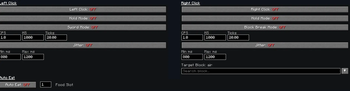
About this Mod
AutoClicker Ultra
Why an autoclicker is useful.
Open GUI : K
This mod is a simple, reliable autoclicker made for Minecraft players who just want things to work without a bunch of hassle. If you’ve ever spent way too long holding down your mouse for farms or grinding, this is meant to take that pressure off. It fits right into normal gameplay and helps you get things done without feeling like you’re fighting with the mod itself.
Why use this over others?
What really makes this stand out is how easy it is to use while still being flexible. A lot of autoclicker mods either throw a ton of confusing options at you or don’t give you enough control. This one tries to sit right in the middle—you get useful features without needing to dig through complicated menus. You can set it up quickly and get back to playing, whether you’re new to mods or have been using them for a while.
How its different than others?
It also includes a few features you won’t usually find in other autoclickers, while still keeping everything lightweight and smooth. It’s built to handle different situations without slowing your game down, and it stays consistent even during long AFK sessions. Overall, it’s designed to be something you can rely on without having to think about it too much.
Available Versions
How to Install Auto Clicker Ultra on Your Server
Order Server
Order a Minecraft Java server with at least 3 GB RAM (4 GB recommended).
Set fabric Loader
In the panel under "Egg", select the fabric loader and matching Minecraft version (1.21.11).
Install Mod
Open the mod browser in the dashboard and search for "Auto Clicker Ultra". Click "Install" – done! Alternatively, upload the .jar via SFTP to the /mods folder.
Compatibility
Mod Loaders
Minecraft Versions
1.21.11
Server-side
✗ UnsupportedRecommended RAM
4 GB(min. 3 GB)Frequently Asked Questions
Auto Clicker Ultra server crashes on startup – what to do?
Most common cause: wrong fabric version or insufficient RAM. Check the server log (latest.log) for "OutOfMemoryError" or "Mixin" errors. With Mado Hosting: ensure at least 3 GB RAM is allocated and the loader matches the mod version (1.21.11). You can switch loaders with one click in the panel.
Is Auto Clicker Ultra compatible with fabric?
Auto Clicker Ultra officially supports fabric for Minecraft 1.21.11. The Mado dashboard automatically detects incompatible loader combinations.
Server lagging with Auto Clicker Ultra – how to optimize performance?
Recommended RAM: 4 GB (per 8 players). Use /spark profiler to check if Auto Clicker Ultra consumes the most tick time. Common fixes: reduce server view-distance to 8-10, install "performant" or "starlight" as supplementary mods on Forge. With Mado Hosting, your server runs on NVMe SSDs with dedicated CPU cores for minimal latency.
Similar Mods


Rent Modded Server
Install Auto Clicker Ultra with just one click on your server.