
Auto Greeter
A simple mod that greets a user when they join the server.
Screenshots
About this Mod
This is a simple mod that greets users when they join the server. Whenever player joins the server it will automatically say a welcome message from the configured list. You do not need to be tabbed into game for it to do this.
Do note this can become really spammy and annoying in chat!
I am not responsible for how you use this mod, but try to not be annoying with it <3
Config Screen
You can acess the config screen via Mods -> Auto Greeter, the Mods button is provided by Mod Menu.
General Config
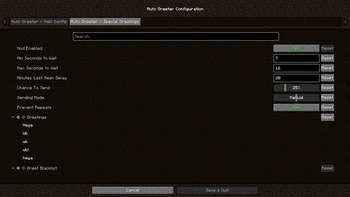
- Mod Enabled – Enable or disable the mod
- Min Seconds to Wait – Minimum time before sending a greeting
- The mod will wait at least this many seconds after the player joins before greeting
- Max Seconds to Wait – Maximum time before sending a greeting
- The mod will randomly choose a time between min and max to wait before greeting
- Minutes Last Seen Delay – Delay before greeting the same player again
- The player must have joined this many minutes ago before they can be greeted again
- Chance To Send – The chance that a greeting will be sent
- 0% means never send a greeting
- 100% means always send a greeting
- Any value in between is used as a random chance
- Sending Mode – Select how greetings are triggered
- Auto – Greeting is sent automatically after a delay
- Manual – Greeting is only sent when manually triggered
- Combined – Both auto and manual modes are used
- Prevent Repeats – Avoid sending the same greeting twice in a row
- Greetings – List of general greeting messages
- One will be randomly selected when greeting
- Use PLAYER_NAME to insert the player's name
- Greet Blacklist – List of player names who should not be greeted
Special Greetings
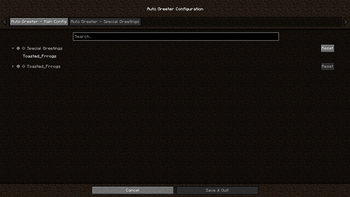
- Special People to Greet – List of specific player names to greet with unique messages
- Each name will get its own custom greeting list
- [Player Name] – Greeting messages specifically for this player
- One will be randomly selected when greeting that specific player
- Use PLAYER_NAME to insert the player's name
Available Versions
How to Install Auto Greeter on Your Server
Order Server
Order a Minecraft Java server with at least 3 GB RAM (4 GB recommended).
Set fabric Loader
In the panel under "Egg", select the fabric loader and matching Minecraft version (26.1.2).
Install Mod
Open the mod browser in the dashboard and search for "Auto Greeter". Click "Install" – done! Alternatively, upload the .jar via SFTP to the /mods folder.
Compatibility
Mod Loaders
Minecraft Versions
26.1.2, 26.1.1, 26.1 (+23 more)
Server-side
✗ UnsupportedRecommended RAM
4 GB(min. 3 GB)Frequently Asked Questions
Auto Greeter server crashes on startup – what to do?
Most common cause: wrong fabric version or insufficient RAM. Check the server log (latest.log) for "OutOfMemoryError" or "Mixin" errors. With Mado Hosting: ensure at least 3 GB RAM is allocated and the loader matches the mod version (26.1.2). You can switch loaders with one click in the panel.
Is Auto Greeter compatible with fabric?
Auto Greeter officially supports fabric for Minecraft 26.1.2, 26.1.1, 26.1. The Mado dashboard automatically detects incompatible loader combinations.
Server lagging with Auto Greeter – how to optimize performance?
Recommended RAM: 4 GB (per 8 players). Use /spark profiler to check if Auto Greeter consumes the most tick time. Common fixes: reduce server view-distance to 8-10, install "performant" or "starlight" as supplementary mods on Forge. With Mado Hosting, your server runs on NVMe SSDs with dedicated CPU cores for minimal latency.
Similar Mods




![[ETF] Entity Texture Features](https://cdn.modrinth.com/data/BVzZfTc1/af683d206d50b05258d865b0d6e4aa2f2cee12f2_96.webp)
![[EMF] Entity Model Features](https://cdn.modrinth.com/data/4I1XuqiY/6e5bbd0d06b1741bfdab6c0cfab6de8fdaf0064c_96.webp)
Rent Modded Server
Install Auto Greeter with just one click on your server.